
Project UMMu Hovercrafts

I had to make 1 change to the code. but it still bounces. but it seems the bouncing distance gets smaller over time.
VECTOR3 vWeight;
double gravity;

GetWeightVector(vWeight);
gravity = length(vWeight);

SetThrusterMax0 (th_hover ,1.5 * gravity * pow(2,-.058*GetAltitude()));
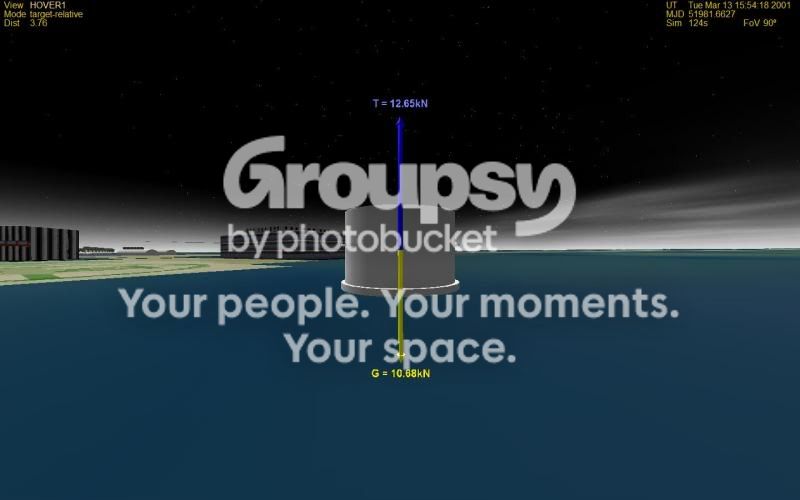
hover4.jpg
 
Well it should bounce a little until air resistance slows it down.

If you up the air resistance enough it should settle pretty quickly.

Remember that if you want to change the max thrust or hover height the 1.5 is how many g's max thrust you have, the -.058 is -(log2(max_thrust)/Hover_Height)
 
Here is the resistance factor from the sdk:

so if altitude>10 then SetCW(999,999,999,999,999) and if under 10 then back to normal CW


SetCW
Sets the vessel’s wind resistance coefficients along the local reference axes

Synopsis:
void SetCW (

double cw_z_pos,
double cw_z_neg,
double cw_x,
double cw_y) const
Parameters:
cw_z_pos resistance in positive z direction (forward)
cw_z_neg resistance in negative z direction (back)
cw_x resistance in lateral direction
cw_y resistance in vertical direction
Notes:
· The first value (cw_z_pos) is the coefficient used if the vessel’s airspeed zcomponent
is positive (vessel moving forward). The second value is used if
the z-component is negative (vessel moving backward).
· Lateral and vertical components are assumed symmetric.
· The cw coefficients are only used if no airfoils are defined (see CreateAirfoil),
in which case the flight model reverts to legacy parasite drag calculation.
 
Well try it and see if you like it, however if you're moving at a good clip and go h>10 then you're gonna hit the breaks real fast. So, your call.
 
I did this:
Code:
if (GetAltitude() < 10) 
    {
        SetCW (0.3, 0.3, 0.67, 0.92);
}
if (GetAltitude() >10)
    {
        SetCW (.3, .3, .67, 500);
}
just reduced the y resistance.

still abounce but only 1 meter difference
 
Worse case scenario you can make some piloting adjustments to slow your ascent as you reach 10m so you don't overshoot so high. Just as a small note, you're not hovering at exactly 10m it should hover at like 10.1m or so.

Keep at it if you want, I would just setCW (10,10,10,10); when you init the craft and call it a day maybe try setCW (.3,.3,.67,500); constant as well. At some point you're gonna have to settle for something, your choice is when.
 
Very fun. I have a few notes.


  • The animated controls moving when I thrust is awesome!
  • Restructure the file paths in your .zip so it can be extracted into the Orbiter directory directly.
  • The hovercraft doesn't seem to have any thrusters that allow it to maneuver by tilting forward/back or to the sides. (My favorite way to maneuver while in hover)
  • I had Orbiter Damage enabled so the scenario started with the pilot as a charcoal briquette. Also the ship broke up when I gunned the thrusters to go over the 10m mark (could safely do that when moving slower).
  • Consider adding more lateral drag when below the 10m mark. The only way to reasonably slow down when side slipping is to turn and thrust along the movement axis.
 
Thanks. I noticed the ummu burned up also when I start the scenario. Not sure what that is from. I can add some tilt. I will add drag above 10m. On the install what do you suggest. Because I have done it tahta way and I get don't install to c:\orbiter.
Very fun. I have a few notes.


  • The animated controls moving when I thrust is awesome!
  • Restructure the file paths in your .zip so it can be extracted into the Orbiter directory directly.
  • The hovercraft doesn't seem to have any thrusters that allow it to maneuver by tilting forward/back or to the sides. (My favorite way to maneuver while in hover)
  • I had Orbiter Damage enabled so the scenario started with the pilot as a charcoal briquette. Also the ship broke up when I gunned the thrusters to go over the 10m mark (could safely do that when moving slower).
  • Consider adding more lateral drag when below the 10m mark. The only way to reasonably slow down when side slipping is to turn and thrust along the movement axis.
 
More lateral drag below 10m.

I think the uMMU dies because he's making a jump to the attachment. That is, create the uMMU in scenario; move him to the same location as the hovercraft; unpause; attach; pause; save scenario. Honestly I wouldn't worry about it.

I assume you created the .zip file by having a nice little HOVERCRAFT folder with a file tree and the files inside, then just zipped that folder.

So just take the existing folder structure you used to make the last .zip but create an empty .zip file inside your HOVERCRAFT folder and then drag the subfolders inside. If you view the contents of the file their path should just say scenarios/ insead of HOVERCRAFT/scenarios/.
 
ok. Then is retro which should slow the craft down. But I can add more drag below 10m.
On the rcs I may use the same joystick animation. Or should I add another joystick?

UPDATE: new file with scenario with Ummu attached.http://www.4shared.com/file/130988387/cb2120a4/newhovercraft10.html
on the drag. here is what I have:if (GetAltitude() < 10)
{
SetCW (0.3, 0.3, 0.67, 0.92);
}
if (GetAltitude() >10)
{
SetCW (.3, .3, .67, 700);
}

on the tilt. Not sure if that is advisable. One could flip the craft over.
 
Last edited:
here is a image of the 2nd model.
newhovercraft.jpg
It will have attachment points for crew. I suppose you could carry cargo also.
 
Looks good gattispilot :) Have a question though on the first release. I downloaded the first release and it's update...the update didn't have a new hovercraft.dll. Is this correct? Also appears 2 texture files are missing. Anyways....nice work.... :)
 
Last edited:
Back
Top