Request UMMU Compatible Helicopter?

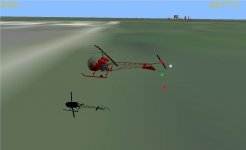
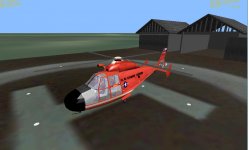
Here is a new Dolphin_A. If this is good I will make a version B with no Payload Manager.

She can carry 1 UCGO crate. You can't see it because the crate is too big.

I added Beacons.

What about different camera positions. Like below the body or below the hook?

The scenario has the base included with the original dolphin.

The one thing I haven't gotten coded in is the save/load of the airlock state. Not sure what the code for that would look like.
 

Attachments

  • DOLPHIN4.zip
    DOLPHIN4.zip
    777.9 KB · Views: 11
  • DOLPHINBASE.jpg
    DOLPHINBASE.jpg
    85.5 KB · Views: 21
Down the hook might be useful, usually you have a cargo handlers station on most cargo helicopters to have a better view.
 
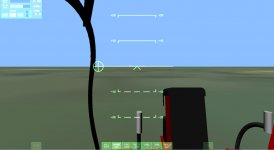
Thanks. I ran into a problem with the camera. I put a internal camera facing down. then one on the hook looking down and sideways. But when on the hook looking down you don't see the crate but if you look sideways you do.

I fix the image where the crate is seen thru the copter by changing this to
MESHVIS_ALWAYS | MESHVIS_EXTPASS); from just ALWAYS. but then it messes the internal image.
side at attachment
SKYCRANEBOX1.jpg

below the copter
SKYCRANEBOX2.jpg

See the copter first then the box
SKYCRANEBOX3.jpg

external view shows it correct
SKYCRANEBOX4.jpg


clipped internal view
SKYCRANEBOX5.jpg


good view of cargo
SKYCRANEBOX6.jpg


Code:
void SKYC::SelectCockpitView (int CAM)
{

     switch (CAM) {
 case 0:  //PILOT
          SetCameraDefaultDirection (_V(0,0,1));
          SetCameraOffset (_V(1.18,-0.55,11.4));
		  oapiCameraSetCockpitDir (0,0);
          break;
 case 1:  //BELOW
          SetCameraDefaultDirection (_V(0,-1,0));
          SetCameraOffset (_V(0 ,-4.5181,  2.244843));
		  oapiCameraSetCockpitDir (0,0);
          break;
case 2:  //ATTACHMENT BELOW
          SetCameraDefaultDirection (_V(0,-1,0));
          SetCameraOffset (_V(0, -4.5181,  2.244843));
		  oapiCameraSetCockpitDir (0,0);
          break;
case 3:  //ATTACHMENT SIDE
          SetCameraDefaultDirection (_V(-1,0,0));
          SetCameraOffset (_V(11, -4.5181 , 2.244843));
		  oapiCameraSetCockpitDir (0,0);
          break;

 }}
...

SetCameraOffset (_V(1.18,-0.55,11.4));
		SetClipRadius(0.1);
...

CAM_pos.x=(0.119247) ;
CAM_pos.z=(3);
CAM_pos.y=(P1_pos.y) ;
CAM1_pos.x=(11) ;
CAM1_pos.z=(4.32316 );
CAM1_pos.y=(P1_pos.y) ;

if (CAM==2){
	SetCameraDefaultDirection (_V(0,-1,0));
          SetCameraOffset ((CAM_pos));
		  oapiCameraSetCockpitDir (0,0);
}


if (CAM==3){
	SetCameraDefaultDirection (_V(-1,0,0));
          SetCameraOffset ((CAM1_pos));
		  oapiCameraSetCockpitDir (0,0);
}


I don't think you can move the external camera. I know there is a Module that does it. But then It would follow the hook.
 
Hello gattispilot,

I am embarrassed of not to be able actually to test fully these helicopters, therefore all their functionalities, beyond what I did with the Dolphin for what concerns the visibility of the mesh. I will have more time this weekend.

I do not know if you have knowledge of this (HH65):
[ame="http://www.orbithangar.com/searchid.php?ID=847"]Kev33 Source Code[/ame]

and.......................................................(AH1):

[ame="http://www.orbithangar.com/searchid.php?ID=247"]AH-1 Kev33 new panel[/ame]

I have a remember of a vehicle (but which one ? Can be done by Kev i think) with wich one it was possible with a key on the keyboard ( or with F3 ? ) to have the point of view of the pilot in front of the board or the one behind him. I will look for that.
 
Last edited:
Thanks. What I don't get is why you see the cargo from the side but not from above. The camera is set just above the hook. Both are cockpit camera.
 
Thanks. What I don't get is why you see the cargo from the side but not from above. The camera is set just above the hook. Both are cockpit camera.

Clipping distance maybe? You camera is to close to the object.
 
I will check that for the hook. When retracted it my not show the crate as it will clip. But on the cockpit I can't move the camera so it doesn't clip the windows or the pilot. I might try a VC?


Should I add the ground effects/ dust/smoke Over water it wouldn't be right
 
I will check that for the hook. When retracted it my not show the crate as it will clip. But on the cockpit I can't move the camera so it doesn't clip the windows or the pilot. I might try a VC?

I think a VC would be great, I can maybe deliver some components there, if you need things. Would be one great reason to finish a small Java tool to produce dial textures.

Should I add the ground effects/ dust/smoke Over water it wouldn't be right

Better leave them away, unless you can get a DLL module to test if the helicopter is over water. Otherwise you might be reinventing the wheel for minimal improvements.
 
On the VC I was just going to use the same mesh. That is about all I have done like that.


I agree about the dust


Here is the latest Skycrane. Use V to switch cameras. Cockpit. below, hook below and hook side. You still get clipping near the top of the hook. but below the copter wheels you see the cargo

You still get the clipping in the cockpit view. I put this in but still clipping.

Code:
SetMeshVisibilityMode (AddMesh (oapiLoadMeshGlobal ("K-S-64A")), MESHVIS_ALWAYS | MESHVIS_EXTPASS); //Main ship mesh
SetMeshVisibilityMode (AddMesh (oapiLoadMeshGlobal ("K-S-64A")),  MESHVIS_VC ); //Main ship mesh


Code:
SetCameraOffset (_V(1.18,-0.55,11.4));
		SetClipRadius(0.001);
 

Attachments

Last edited:
Any ideas around the cockpit clipping. I might just put the cockpit in front of copter.

I found this Bell47 copter. I might add stretchers to the side. Then when you pick up a Ummu he appears in the stretcher.

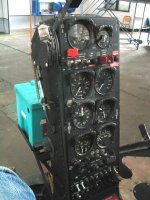
I need to find the instrument panel for a texture.

Also I need to go back and change the sound on the copters.
 

Attachments

  • BELL471.jpg
    BELL471.jpg
    50.8 KB · Views: 19
  • BELL472.jpg
    BELL472.jpg
    50.2 KB · Views: 15
or that one ? ( seeing your picture, i think that it's the first )
 

Attachments

  • bell2.jpg
    bell2.jpg
    209.8 KB · Views: 11
Thanks. It is the long rectangle one. It is a secret or techinque to get it so the straight other wise the gauges are crooked. I turned the mesh that angle applied it and then straighten the mesh and get this:


Also updated the Dolphin with the camera V switches. Looking into Kev33 source. Trying to get the sound to work. No issues in the sound log but no gear noise and no change by thrust level. I could find in the sound doc the different setting for sounds, external, cockpit,....

Code:
{


DOLPHINID=ConnectToOrbiterSoundDLL3(GetHandle());

RequestLoadVesselWave3(DOLPHINID,	HH65Engines	,"Sound\\Vessel\\HH65\\HH65Engines.wav",EXTERNAL_ONLY_FADED_CLOSE);
RequestLoadVesselWave3(DOLPHINID,	HH65Gear,"Sound\\Vessel\\HH65\\HH65Gear.wav",EXTERNAL_ONLY_FADED_CLOSE);
//RequestLoadVesselWave(HH65Start,		"Sound\\Vessel\\HH65\\HH65Start.wav");

//	RequestLoadVesselWave3(MyID,MY500METERSOUND,"Sound\\OrbiterSound_SDK\\sound\\my500meter.wav",RADIO_SOUND);


//ReplaceStockSound3(DOLPHINID,"Sound\\Vessel\\MOONBASEALPHA\\ambient.wav",	REPLACE_COCKPIT_AMBIENCE_1);
SoundOptionOnOff3(DOLPHINID,PLAYMAINTHRUST,FALSE);
//ReplaceStockSound3(DOLPHINID,"Sound\\Vessel\\DOLPHIN\\DOLPHIN.wav",	REPLACE_HOVER_THRUST);

SoundOptionOnOff3(DOLPHINID,PLAYHOVERTHRUST,TRUE);
ReplaceStockSound3(DOLPHINID,"Sound\\Vessel\\roll.wav",	REPLACE_RCS_THRUST_ATTACK);

SoundOptionOnOff3(DOLPHINID,PLAYATTITUDETHRUST,TRUE);

SoundOptionOnOff3(DOLPHINID,PLAYCOUNTDOWNWHENTAKEOFF,FALSE);

SoundOptionOnOff3(DOLPHINID,PLAYCABINAIRCONDITIONING,TRUE);

SoundOptionOnOff3(DOLPHINID,PLAYCABINRANDOMAMBIANCE,TRUE);

SoundOptionOnOff3(DOLPHINID,PLAYRADIOATC,FALSE);

SoundOptionOnOff3(DOLPHINID,DISPLAYTIMER,FALSE);

}

if(key==OAPI_KEY_G)
{
	PlayVesselWave3(HH65Gear,NOLOOP,255);  
}

if (GetThrusterLevel(th_hover[0]) ==0){
PlayVesselWave3(HH65Engines,NOLOOP,0);
	}

    if (GetThrusterLevel(th_hover[0]) >0.1){
PlayVesselWave3(HH65Engines,LOOP,255);
	}

    if (GetThrusterLevel(th_hover[0]) ==0.1){
PlayVesselWave3(HH65Engines,LOOP,128);
	}
 

Attachments

  • bell473.jpg
    bell473.jpg
    28.4 KB · Views: 16
  • dolphin5.zip
    dolphin5.zip
    39.9 KB · Views: 8
Last edited:
I wanted to be sure that it was the first one.

I found some links with pictures or video of the panel. I'll try this week to make a good picture of it. I do not know if I could have the complete low party (the last quarter) but it will have the radio ( if necessary ) on top.

Do you intend to make à 2D or 3D panel ?
 
Last edited:
Thanks.

I was going to just just the regular Orbiter HUD. Not done any panels. If someone wants to do one that would be great.

Kev33's dolphin had a start up procedure. I think it was just a time delay. I can add that. Right now all the copter use the same thrust/rcs setting. So I think I need to go back and back them different as they would be in real life. Adjust the weight also. On the Dolphin I added to save and load the thrust level and ignition state. So if you quit and restart you don't have to start the engine and apply thrust.

Might look at Kev'33 copter base and add animation to the door. So an UMMU could open the door. Should have sort of fuel tank?
 
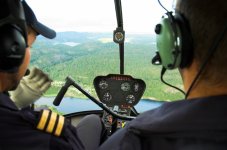
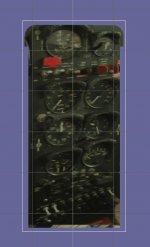
This is an example of capture of a video that presents, during a flight, a panel. This is the central part. While doing a mounting with the high part and the low part, the picture of the panel can have a rather good level of details. I eventually can complete it with some others instruments, in copy past, taken in others capture or photograph.

This picture has a size of 480x360.

I do that this week end.
 

Attachments

  • 9.png
    9.png
    363.1 KB · Views: 16
Now I just need a RAH-66 Comanche. :lol:
 
Ok updated dophin now ceiling is around 5300. I copied Kev33 sound but don't like it. Still no gear sound.

Code:
void DOLPHIN::clbkPostCreation (void)

{


DOLPHINID=ConnectToOrbiterSoundDLL3(GetHandle());

RequestLoadVesselWave3(DOLPHINID,	HH65Engines	,"Sound\\Vessel\\HH65\\HH65Engines.wav",EXTERNAL_ONLY_FADED_CLOSE);
RequestLoadVesselWave3(DOLPHINID,	HH65Gear,"Sound\\Vessel\\HH65\\HH65Gear.wav",EXTERNAL_ONLY_FADED_CLOSE);
//RequestLoadVesselWave(HH65Start,		"Sound\\Vessel\\HH65\\HH65Start.wav");

//	RequestLoadVesselWave3(MyID,MY500METERSOUND,"Sound\\OrbiterSound_SDK\\sound\\my500meter.wav",RADIO_SOUND);


//ReplaceStockSound3(DOLPHINID,"Sound\\Vessel\\MOONBASEALPHA\\ambient.wav",	REPLACE_COCKPIT_AMBIENCE_1);
SoundOptionOnOff3(DOLPHINID,PLAYMAINTHRUST,FALSE);
//ReplaceStockSound3(DOLPHINID,"Sound\\Vessel\\DOLPHIN\\DOLPHIN.wav",	REPLACE_HOVER_THRUST);

SoundOptionOnOff3(DOLPHINID,PLAYHOVERTHRUST,TRUE);
ReplaceStockSound3(DOLPHINID,"Sound\\Vessel\\roll.wav",	REPLACE_RCS_THRUST_ATTACK);

SoundOptionOnOff3(DOLPHINID,PLAYATTITUDETHRUST,TRUE);

SoundOptionOnOff3(DOLPHINID,PLAYCOUNTDOWNWHENTAKEOFF,FALSE);

SoundOptionOnOff3(DOLPHINID,PLAYCABINAIRCONDITIONING,TRUE);

SoundOptionOnOff3(DOLPHINID,PLAYCABINRANDOMAMBIANCE,TRUE);

SoundOptionOnOff3(DOLPHINID,PLAYRADIOATC,FALSE);

SoundOptionOnOff3(DOLPHINID,DISPLAYTIMER,FALSE);

}


Code:
if (GetThrusterLevel(th_hover[0]) ==0){
PlayVesselWave3(HH65Engines,NOLOOP,0);
	}

    if (GetThrusterLevel(th_hover[0]) >0.1){
PlayVesselWave3(HH65Engines,LOOP,255);
	}

    if (GetThrusterLevel(th_hover[0]) ==0.1){
PlayVesselWave3(HH65Engines,LOOP,128);
	}
...

if(key==OAPI_KEY_G)
{
	PlayVesselWave3(HH65Gear,NOLOOP,255);  
	RevertGEARCOVER();

RevertGEAR();
}


kev33 code:
if (GetThrusterLevel(th_first[0]) ==0){
PlayVesselWave(HH65Engines,NOLOOP,0);
}

if (GetThrusterLevel(th_first[0]) >0.1){
PlayVesselWave(HH65Engines,LOOP,255);
}

if (GetThrusterLevel(th_first[0]) ==0.1){
PlayVesselWave(HH65Engines,LOOP,128);
}


On the Commache just need a mesh


http://en.wikipedia.org/wiki/Eurocopter_HH-65_Dolphin
 

Attachments

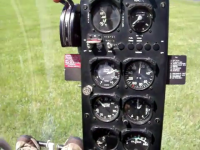
So: the picture of the Bell panel. I'll see tomorrow if i can ad some complements.

Edit

Sorry: i see that i forgot the foot of the panel i think. Depending of the model, there can be there one or two features.
 

Attachments

Last edited:
On the Commache just need a mesh

Damn, I have no eye for making helicopter meshes. :lol:

But joke aside, if I can get you a NH-90 mesh, you could make it quickly a helicopter?
 
Back
Top