TransX TranX lowering orbit instead of raising it

awdrgyjil

New member
Joined
May 1, 2023
Messages
15
Reaction score
5
Points
3
Location
Canada
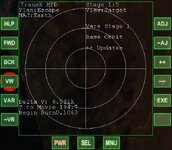
I'm new to Orbiter, and is trying to fly a Deepstar to Mars using TranX. When I plan out the mission following the manual, prepare to escape Earth's gravity and send the information to BurnTimeMFD, it always puts my orbit to a lower one, rather than a Hohmann transfer to Mars, my destination. Here are my two MFD's:1686335106571.png
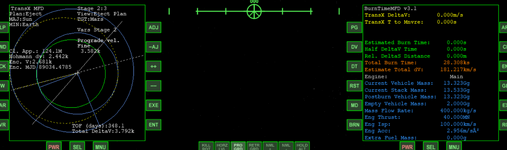
As I'm still learning Orbiter, I get good results on Stage 1 if I just point prograde the whole burn. Do I turn off the prograde autopilot at any time during the burn?
 
Here are the two scenarios, one before the burn, with my TransX setup, and the one after the burn, with my current trajectory.
The throttle is controlled by BurnTimeMFD, and I keep the prograde autopilot enabled at all times. Is it a problem with my piloting?
 

Attachments

You need to use the minor view for the eject function and the maneuver has to minimize R.Inc and DeltaV:
It may or may not be the prograde burn relative to Earth. Depends on your parking orbit and your current position on the orbit.
 
On second thought, should I even be using TransX for my first Mars flight, or is IMFD good enough?
 
Last edited:
0142.jpg
I think, usually you would not need another MFD to support TransX.
TransX has a pretty good burn view by itself. It is activated after clicking the [VW] View MFD button several times.

Burn Attitude:
There is a really tiny green X, which has to be centered in the crosshair by turning the spacecraft. This gives the direction of the burn. The burn vector is averaged on the estimated burn time, so at the begin it is actually pointing inward from the prograde direction.

Burn Start and Burn Time:
In the lower right corner the Delta V, and time to begin the burn are given.
After starting the burn, the Delta V indicated will decrease. Keep on burning until it is zero, and keep the green X centered in the crosshairs.

To learn TransX (in addition to RTFM ;) ) a set of training scenarios can be found in "Navigation" -> "TransX".
 
I'm afraid that no matter how many times I mash the "VW" button in Stage 1(eject), no burn view appears.
 
From the TransX Quickstart guide:
A bullseye view will only be available once the maneuvering data have been entered.
That is, when the ejection date and dV vector have been defined.
 
Back
Top