Project Trajectory "Pork-Chop Plot" Generator

I do believe the status bar is not needed if it involves strange dll files.

They are not strange dll files. They are so common that your system even has them already but they are just not registered properly.
 
A wonderful, long needed tool. Really well done.
I have a problem with it displaying the actual image. The output.bmp is created quite viewable, but the program is displaying the default icon from my assigned bmp viewer (irfanview) instead. Screenshot attached.
Also, when exiting the program with the windows forms (X button), the process persists and has to be killed via Task Manager. Process kills itself fine when using the exit button.
This is on a fully updated Windows 7 for x64.

The program was written and tested on a computer using Windows XP. Unfortunately I don't have access to a computer that uses Windows 7, or Vista for that matter, so I don't really have any good ways of solving this particular problem as it currently works. With that said, I'll look at other ways of displaying the image that doesn't involve opening a file at all (which is what Windows 7 and Vista doesn't seem to like programs doing, I think).

The missing font by the way is Wingding 3. I thought that this was a standard font, apparently that's only true for Microsoft Office. I'll look at other ways of displaying arrows.
The "x" at the right-hand corner not working is because I forgot to write in a single line of code saying "End". I'll add it in.

As for the status bar, people said they wanted it, so I added it.
 
It currently works fine for me in Windows 7. One thing that others running Vista or 7 can do is move the program out of the Program Files folder to avoid UAC.
 
Another font to try

The missing font by the way is Wingding 3. I thought that this was a standard font, apparently that's only true for Microsoft Office. I'll look at other ways of displaying arrows.
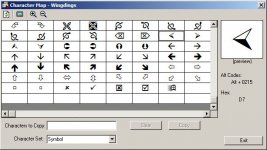
There are a number of arrow characters in the "standard" WingDings that are probably suitable...

WinDings.jpg
 
They are not strange dll files. They are so common that your system even has them already but they are just not registered properly.

Actually, the .ocx stuff is purely Visual Basic/Office, the files wrap the Common Control dynamic link library which you really use.

http://en.wikipedia.org/wiki/Object_Linking_and_Embedding

If you don't have it registered, for example because you don't have MS Office installed already, it will fail. But the alternative would be switching the programming language.
 
It currently works fine for me in Windows 7. One thing that others running Vista or 7 can do is move the program out of the Program Files folder to avoid UAC.

Can other people with Vista or Windows 7 confirm this as a fix?
 
I have Vista and version 1.0.5 is working fine.


comp.gif
 
Can other people with Vista or Windows 7 confirm this as a fix?

This does not fix my problem. I never had it in one of the program files directories and disabling UAC yielded no results.
The image file is properly written to disk, which is what the directories and UAC would be preventing.
Again, I am on a 64 bit Windows 7. I can only suspect that everyone else who reports it working is using the 32bit version. Or does not have an alternate default program assigned to BMP files.

May the :probe: be with us
 
Just tested on Vista 64 bit. It wouldn't even allow me to extract to 'Program Files (x86)' I put it in C:\Games\TrajectoryPlanner and ran it. I got that ocx error when I clicked a button, but I can't find that file anywhere on my computer to register it. So it seems the file will need to be added to the program (as mentioned in a link a few posts ago).
 
I've completely changed how the imaged is loaded and displayed, so hopefully this fixes the problem for Windows 7 64-bit users. I've also changed the arrows to standard Wingdings, so hopefully everybody has that font and they will show. Lastly, I've also added an "End" command to the termination sequence for the main form, so it should probably end the program now.

Trajectory Planner (1.94 Mb)
 
I've completely changed how the imaged is loaded and displayed, so hopefully this fixes the problem for Windows 7 64-bit users. I've also changed the arrows to standard Wingdings, so hopefully everybody has that font and they will show. Lastly, I've also added an "End" command to the termination sequence for the main form, so it should probably end the program now.

Trajectory Planner (1.94 Mb)

"Runtime Error 339"

MSCOMCTL.OSX again...

Sorry Piper I still am unable to run the program. Still unable to register this file.
 
Image displaying is working very fine now and the arrows are there too. :thumbup:
However, the process is not terminating. No change in the behavior at all. :(
 
Image displaying is working very fine now and the arrows are there too. :thumbup:
However, the process is not terminating. No change in the behavior at all. :(

Well, at least the big part is working, however I'm completely stumped about the process not terminating. If I don't hear of any other major issues in the next day or so, I'll upload the new one to Orbit Hangar.

Now wait till you see my next program ;)
 
BUG: You can drag selection cross out of the frame, which causes either in elements displayed as 0, if you moved it right or above of the frame, or "Run-time error '9': Subscript out of range", if selection cross is moved left or below of the bitmap frame.

And process remains in computer's memory after quitting the application on Windows XP too. Like there is no ExitProcess or ExitThread call after closing main app window. EDIT: Not always though. This might be connected to extensive tests with dozens of calculations before quitting, or causing few runtime errors in a row, before making the process remain in a memory. Single tests terminate the process after closing the window.
 
Last edited:
Ok a few more fixes:

-Corrected typo (I wrote "synoptic" when it should be "synodic").
-Corrected problem with clicking near edges, or draging the cross outside of the frame.
-After what orb said about the "process continuing" problem, I'm pretty sure I've now corrected it.

Trajectory Planner (1.94 Mb)
 
Everything is working properly now for me. Thank you very much!

:cheers:
 
Ok, I've uploaded the new version (v1.1.1) to Orbit Hangar, it's the same as the most recent one I've put up on my site, so if you've already downloaded that one, you don't need to download the one from Orbit Hangar.

I also just realized that I'm releasing this on my birthday :P.
 
Back
Top