Project Space Shuttle Vessel

A few notes:
  • in SPEC 34 you don't need to input T1 for each burn, only Ti and some other I forgot... take a look at a rendezvous checklist, they have step by step burn setup instructions;
  • the MC burns should be done using the RCS, and try to minimize attitude changes (you can make a RCS burn in any attitude, so you don't even need to change it), so that the trajectory isn't disturbed, which will mean larger future burns (a 2-second dual-OMS burn is really trying to kill a fly with a bazooka);
  • call SPEC 33 in another CRT, and you can see a display of range and range rate, so you don't need the Docking MFD;
  • I mentioned this before, but the Ku-band antenna radar tracking only works in "Auto Track"... believe me because I wrote that code. Eventually the GPCs will also play with that, but for now it is what it is;
  • the docking ring should be in the "initial position" prior to docking, and not the "forward position". After docking, if the the automatic sequence is allowed, it will extend the ring before retracting in for hard docking.
 
For docking, forget the CRT, select DAP B, LVLH and Translation PULSE, for fine control, and zoom in on the centerline camera for alignment far away.
 
the docking ring should be in the "initial position" prior to docking, and not the "forward position". After docking, if the the automatic sequence is allowed, it will extend the ring before retracting in for hard docking.
It was in the correct position on this flight, but I think it wasn't on STS-71.

BTW: take some screenshots of the docked configuration, that was a neat one.
 
A few notes:
  • in SPEC 34 you don't need to input T1 for each burn, only Ti and some other I forgot... take a look at a rendezvous checklist, they have step by step burn setup instructions;
  • the MC burns should be done using the RCS, and try to minimize attitude changes (you can make a RCS burn in any attitude, so you don't even need to change it), so that the trajectory isn't disturbed, which will mean larger future burns (a 2-second dual-OMS burn is really trying to kill a fly with a bazooka);
  • call SPEC 33 in another CRT, and you can see a display of range and range rate, so you don't need the Docking MFD;
  • I mentioned this before, but the Ku-band antenna radar tracking only works in "Auto Track"... believe me because I wrote that code. Eventually the GPCs will also play with that, but for now it is what it is;
  • the docking ring should be in the "initial position" prior to docking, and not the "forward position". After docking, if the the automatic sequence is allowed, it will extend the ring before retracting in for hard docking.
looks like I really should make that guide for FDO MFD haha. Mostly just waiting for the ascent yaw to be in a release version, and maybe the UNIV PTG updates but idk if that will be added till later.
 
The OME is pretty accurate in its thrust delivery (Including today on Orion), but I think the smallest amount of velocity change it can produce was something like 6 feet per second per engine. For most burns beyond 25 fps, using a single OME is perfect, only for longer or mission-critical burns (like deorbit), you would use two at the same time.
 
maybe the UNIV PTG updates but idk if that will be added till later.
Not on the next release.

The OME is pretty accurate in its thrust delivery (Including today on Orion), but I think the smallest amount of velocity change it can produce was something like 6 feet per second per engine. For most burns beyond 25 fps, using a single OME is perfect, only for longer or mission-critical burns (like deorbit), you would use two at the same time.
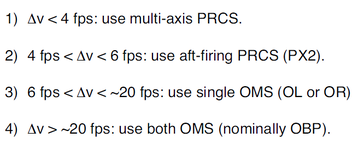
There was a table somewhere (couldn't find it) with what engines to use for each dV.
Only found this in SCOM (doesn't have to 1/2 OMS engine boundary): If delta V total >6 fps, an OMS burn will be required. If delta V total is >4 and <6 fps, a +X RCS burn is used (thereby limiting the amount of forward RCS burned). If the delta V total <4 fps, the burn is multi-axis (RCS) with no maneuver to burn attitude.
 
Not on the next release.


There was a table somewhere (couldn't find it) with what engines to use for each dV.
Only found this in SCOM (doesn't have to 1/2 OMS engine boundary): If delta V total >6 fps, an OMS burn will be required. If delta V total is >4 and <6 fps, a +X RCS burn is used (thereby limiting the amount of forward RCS burned). If the delta V total <4 fps, the burn is multi-axis (RCS) with no maneuver to burn attitude.

Then the RCS was weaker than I remembered, but at least I got the 6 fps right. :cheers:
 
  • the MC burns should be done using the RCS, and try to minimize attitude changes (you can make a RCS burn in any attitude, so you don't even need to change it), so that the trajectory isn't disturbed, which will mean larger future burns (a 2-second dual-OMS burn is really trying to kill a fly with a bazooka);
The problem is that despite numerous attempts I have never managed to get the RCS to work for the maneuvers. No matter how much I select the RCS for the maneuver, it never activates when it should fire
 

The problem is that despite numerous attempts I have never managed to get the RCS to work for the maneuvers. No matter how much I select the RCS for the maneuver, it never activates when it should fire
RCS burns are manual, you null the axis one by one at TIG.
 
New mission to the ISS
For the RCS burns don't put in ITEM 27, just keep the current attitude, especially during the MC burns, as that will help with the trajectory. Also, try getting each dV to something like < 0.1fps, as accuracy matters more in these small burns.
 
@Geoair2 try the RMS in ORB LD/UNL mode, in which the PLB is the reference (instead of the EE), so to take a module out of the PLB you just need to command an up translation.
 
@Geoair2 try the RMS in ORB LD/UNL mode, in which the PLB is the reference (instead of the EE), so to take a module out of the PLB you just need to command an up translation.
In this case, it will also be useful to maneuver Destiny around and attach it to Unity.
 
A few notes:
  • in SPEC 34 you don't need to input T1 for each burn, only Ti and some other I forgot... take a look at a rendezvous checklist, they have step by step burn setup instructions;
  • the MC burns should be done using the RCS, and try to minimize attitude changes (you can make a RCS burn in any attitude, so you don't even need to change it), so that the trajectory isn't disturbed, which will mean larger future burns (a 2-second dual-OMS burn is really trying to kill a fly with a bazooka);
  • call SPEC 33 in another CRT, and you can see a display of range and range rate, so you don't need the Docking MFD;
  • I mentioned this before, but the Ku-band antenna radar tracking only works in "Auto Track"... believe me because I wrote that code. Eventually the GPCs will also play with that, but for now it is what it is;
  • the docking ring should be in the "initial position" prior to docking, and not the "forward position". After docking, if the the automatic sequence is allowed, it will extend the ring before retracting in for hard docking.
I need to go back to the 2024 release page in this thread, and start saving these kinds of tips in a document. o7
 
New mission to the ISS
I'm enjoying your videos immensely. I have one question. When you're at the aft work stations for PLB open, radiator deploy, and antenna deploy, all of the actions (keypad, CB's, etc....), are you following the checklists to guide you, or is this stuff you've learned/become familiar with over the course of using SSV? Also, it looks like you use just one instance of FDOMFD and don't save as you go along. I never quite understood the reason for using two instances of the MFD and saving.
 
Last edited:
I'm enjoying your videos immensely. I have one question. When you're at the aft work stations for PLB open, radiator deploy, and antenna deploy, all of the actions (keypad, CB's, etc....), are you following the checklists to guide you, or is this stuff you've learned/become familiar with over the course of using SSV? Also, it looks like you use just one instance of FDOMFD and don't save as you go along. I never quite understood the reason for using two instances of the MFD and saving.
Someone has made SSV-specific checklists, but as I have flown more missions, I've come to realize that the real shuttle checklists are better. No disrespect to the ones made for SSV, but once you get a feel for what is and isnt in SSV, you can use real ones no issue. and the flow of some of those can be hard or confusing. For example, the Post Insertion checklist has steps for KU Deploy, Activation, and Stow all back to back. Ive seen a few instances of people just going through each step and at the end of PI, the rads and KU are stowed since those procedures are all in there.

As for the MFD, there are multiple pages for the OMP that are good to have up at the same time for calculating and checking maneuvers. And the saving is to not overwrite the base plan so you can fly the mission again, since as the flight goes you will edit maneuvers and delete old ones and such.

 
Someone has made SSV-specific checklists, but as I have flown more missions, I've come to realize that the real shuttle checklists are better. No disrespect to the ones made for SSV, but once you get a feel for what is and isnt in SSV, you can use real ones no issue. and the flow of some of those can be hard or confusing. For example, the Post Insertion checklist has steps for KU Deploy, Activation, and Stow all back to back. Ive seen a few instances of people just going through each step and at the end of PI, the rads and KU are stowed since those procedures are all in there.

As for the MFD, there are multiple pages for the OMP that are good to have up at the same time for calculating and checking maneuvers. And the saving is to not overwrite the base plan so you can fly the mission again, since as the flight goes you will edit maneuvers and delete old ones and such.
Oh, so at the very least, save once so as not to overwrite the original mission.

I was poking around for the actual checklists, and they are a bit much for me. Very interesting, but kind of like drinking from a firehose. I did find what looks to be a good compromise. For the Flightgear shuttle, there is a set of "nominal" checklists on their website. I was able to download the ascent checklist, which was basically all the "if everything goes right" stuff, without all of the "if then" branches. I like that style of checklist as a good compromise, but unfortunately that's the only one I could download. For some reason, permission is needed to dl the other lists, which is kind of odd since FG I thiiiiink is open source, and generally open source stuff isn't locked down.

The SSV checklists here are good too, but you're right, if someone just blindly follows them, they can lead you down the wrong path.
 
Back
Top