Project Space Shuttle Vessel

Thanks for the link, I will definitely give it a read! I am familiar with rendezvous in general, im mainly just confused about the (many) burns needed and how to set them up.
In that case, the manual in the Shuttle FDO MFD might be a lighter reading, as it is more oriented to the "practical" side of things.
 
Pardon my ignorance, but I was playing with some of the other mission scenarios offered in the SSV package and it seems there are missing payloads in the payload bay. Am I supposed to use other addons in conjunction with SSV to use those payloads? For example, STS-120 launched with Harmony, but there's no payload for her.

Are these missions developed with the use of Thornton's ISS in mind?

Again, I apologize for any ignorance. I'm returning to Orbiter after a long hiatus and trying to re-familiarize with how things work nowadays.

Cheers!
 
Pardon my ignorance, but I was playing with some of the other mission scenarios offered in the SSV package and it seems there are missing payloads in the payload bay. Am I supposed to use other addons in conjunction with SSV to use those payloads? For example, STS-120 launched with Harmony, but there's no payload for her.
Well, I've also wondered why I have some missions... :rolleyes: They don't have payloads and don't showcase any particular feature of the project (missions STS-114 and STS-120 come to mind, but there are probably others). STS-107 is (mostly) complete, but it is more of a demo on how to fill the PLB, while also showing the EDO pallet.
Except for maybe some NASA payloads (DFI pallet, PFTA), the project it not about making payloads, but instead allowing others to launch their payloads. Not everything is natively supported right now, but I'm working on adding more features.


Are these missions developed with the use of Thornton's ISS in mind?
Those missions can be modified to be used with any ISS out there, as long as the modules are of the correct size and the trunnions in the right place, SSV provides the attachment latches, and it should all fit and be in the correct place in the PLB. Mission configuration is +/- explained in the SSV manual (actually I'm currently trying to improve that section).


Again, I apologize for any ignorance. I'm returning to Orbiter after a long hiatus and trying to re-familiarize with how things work nowadays.
Welcome back!
 
Finishing what was a mostly internal upgrade to the Mission Editor, which also ended up improving the user interface sooner than expected.
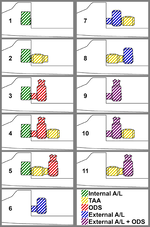
I'm also trying to have a better explanation of the Mission Editor in the manual, and just wanted to show a pretty image I made for that, showing all the Airlock, TAA and ODS options available:
AL_TAA_ODS_options.png
 
So, about the RMS grappling payloads already attached to other vessels (other than SSV).
Quick recap of the problem: Orbiter does not allow more than one parent attachment to be used at a time, i.e., a vessel cannot be attached to 2 parent vessels simultaneously. This creates an issue when, e.g., taking a payload out of the PLB with the RMS, or handing over a module from the RMS to the SSRMS.

I've been doing some thinking on a generic solution for this (it is solved inside SSV), and I think having "notifications" exchanged between parents of a payload vessel, when an attach or detach occurs, might solve this. This notification would allow a parent vessel to know that another parent has grappled the payload vessel, and thus change its own behavior (e.g., the RMS would have its movement be constrained), or when one of the parents lets go of the payload, the other is informed of this and takes the actual attachment.

The notification would make use of the clbkGeneric() callback, present in VESSEL3 and later, and would contain the operation being performed, plus maybe some extra info. This means that, while payload vessels can still be as dumb as possible, any carrier vessel or external RMS that "wants to play this game" would need to have logic inside (code or lua) to send and receive these notifications, and then act accordingly.

Any better ideas?

 
Nice landing! (y) I guess you use a joystick, because the flare is never that smooth with the keyboard... 😒
You rushed a bit into MM304... you should wait until about EI-5 and get at about alpha 40º, while you still have 3-axis control, because making a big attitude change with the AerojetDAP might not work out well, and it wastes lot of RCS. Eventually the correct EI attitude will be shown post-deorbit, but for now if you just pitch up to theta -45º or so, and then hold inertial attitude, you should be +/- at alpha 40º by the time you reach EI-5.
 
Yes indeed I use a joystick :cheers: Thank you for the information it will be useful for my next flight (y)
 
Stream STS-71
That post-OMS-2 perigee seems way too low. IRL the orbit was 190.4 x 187.3 NM.
Also, try putting the FDO MFD in an ExternalMFD window (or 2), instead of going in and out of the vc view.
Also, during the PLBD opening and closing, try putting the PLB display in the AFD MDU, so you see the latch indications and the view out the window at the ame time.
 
Due to the external MFD I had a bad ignition solution I don't understand why I carried out this mission several times and I had never had this problem but I didn't use external MFD so I think the problem comes from external MFD

I will try again tomorrow
 
That rendezvous profile is not correct... retrograde OMS-2, massive dVz at the TI burn (the massive dVy at the NPC burn is pretty much expected, as SSV doesn't target an orbital plane, just the inclination). The Mir is probably not in the right place and/or the constraints are not what they should be for that rendezvous.

Due to the external MFD I had a bad ignition solution I don't understand why I carried out this mission several times and I had never had this problem but I didn't use external MFD so I think the problem comes from external MFD
I've used it several times and I don't think it matters..., right @indy91 ?
BTW: You can minimize the ExternalMFD dialog (or other Orbiter dialogs) by double clicking in the top bar, and it will minimize to there, so you don't have to open it again and again.
 
@Geoair2 That's too bad. So if you are much more comfortable with not using any external MFD it's totally fine :) - don't fix it if it ain't broken.
So that's why the stream stopped, right?
 
Those 50fps in the NC-2 burn are a placeholder, and should be eventualy be tweaked as the burns are carried out (and the old ones removed from the list).
 
Back
Top