
You are using an out of date browser. It may not display this or other websites correctly.
You should upgrade or use an alternative browser.
You should upgrade or use an alternative browser.
Discussion Space: 1999 updates ?
- Thread starter 4throck
- Start date

Ok this is what I have planned for the UltraProbe.
Both the rear section and Cm will be vessels. Attached together. To separate you will open the arms and detach.
On the CM It could be used as a lander so I will need to add 2 struts that extend out of the hull.
The other option is that the arms that latch to the rear section are also landing gear.


It has been also suggested to separate the eagle head. and add parachutes. It has RCS jets.
That part is not hard. It would be coded chutes.....
Bottom of the page.
http://space1999.net/catacombs/main/models/eagle/w2mebits.html
Eagle head with landing gear.
Both the rear section and Cm will be vessels. Attached together. To separate you will open the arms and detach.
On the CM It could be used as a lander so I will need to add 2 struts that extend out of the hull.
The other option is that the arms that latch to the rear section are also landing gear.
It has been also suggested to separate the eagle head. and add parachutes. It has RCS jets.
That part is not hard. It would be coded chutes.....
Bottom of the page.
http://space1999.net/catacombs/main/models/eagle/w2mebits.html
Eagle head with landing gear.
Last edited:
Here is the CM lifeboat landed. The 4 docking arms also act as landing gear.

I am working on the CM right now. It is close I'm having some camera issues. Maybe someone can help here.
I have the CM mesh so that the roof is +Z and it front is +Y so it can land on it's bottom.

So here comes the issues.
1 here is the camera. it is facing to the roof which is the Z direction. But I have it set to look in the Y.

Now switch the camera to look out the windows. the locations are correct but the mesh appears to be upside down.

but here a view on the rear of the vessel swich faces the bottom. Notice the mesh is facing the right direction.

I have the CM mesh so that the roof is +Z and it front is +Y so it can land on it's bottom.
So here comes the issues.
1 here is the camera. it is facing to the roof which is the Z direction. But I have it set to look in the Y.
Code:
SetCameraOffset (_V(-.6,1.5,0));
	SetCameraDefaultDirection (_V(0,1,0));
Now switch the camera to look out the windows. the locations are correct but the mesh appears to be upside down.
Code:
 case 0:  //ext
          SetCameraDefaultDirection (_V(0,1,0));
          SetCameraOffset (_V(-.6,1.5,0));
		  oapiCameraSetCockpitDir (0,0);
but here a view on the rear of the vessel swich faces the bottom. Notice the mesh is facing the right direction.
Code:
case 3:  //rear
	      SetCameraDefaultDirection (_V(0,-1,0));
          SetCameraOffset (_V(0,.8,0));
		  oapiCameraSetCockpitDir (0,0);
          break;
4throck
Enthusiast !
- Joined
- Jun 19, 2008
- Messages
- 3,489
- Reaction score
- 1,012
- Points
- 153
- Location
- Lisbon
- Website
- orbiterspaceport.blogspot.com
Perhaps you can simply rotate the internal mesh  ?
?
?
Right now I have the internal mesh in the external mesh. So when You open the rear doors you see inside the vessel. In the Cockpit view the rear doors match the external.
But what's odd is the rear view the mesh is facing the right direction.


What's odd is the top hatch is much bigger than the rear hatch.
Also one issue the cockpit view will not match the exterior. The interior is not as long as the exterior.


Got the mesh adjusted. But haven't fixed the camera issue. The big top hatch opens and will have a ramp.
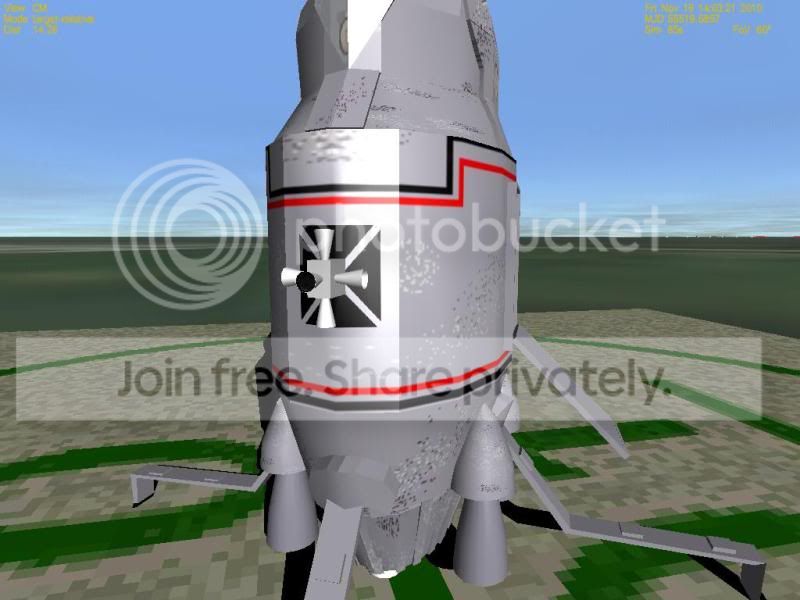
Can you have the mesh run for and back along the Z and land with the rear down?
But what's odd is the rear view the mesh is facing the right direction.
What's odd is the top hatch is much bigger than the rear hatch.
Also one issue the cockpit view will not match the exterior. The interior is not as long as the exterior.
Got the mesh adjusted. But haven't fixed the camera issue. The big top hatch opens and will have a ramp.
Can you have the mesh run for and back along the Z and land with the rear down?
Last edited:

Ok added a ramp so Ummu can enter while landed.
Still have that camera issue.
not sure how to fix it.
You can see from the Meshwizard how the interior mesh is orientated.
So it case 1and 2 which are looking toward the front the top is at the bottom. and in case 3 the mesh is okay.
Does the vessel have to lined up this way or can the front be +Z and the touchdown points be changed for a vertical landing?
This is weird. I have the meshes so only the cockpit mesh is seen in cockpit mode. and the main body only in external.
But Then I entered Cockpit mode F1 and from the cockpit windows you see the nose of the external mesh. So I moved the camera outside the cockpit mesh and you can see the external mesh.

Here is what my cockpit mesh looks like
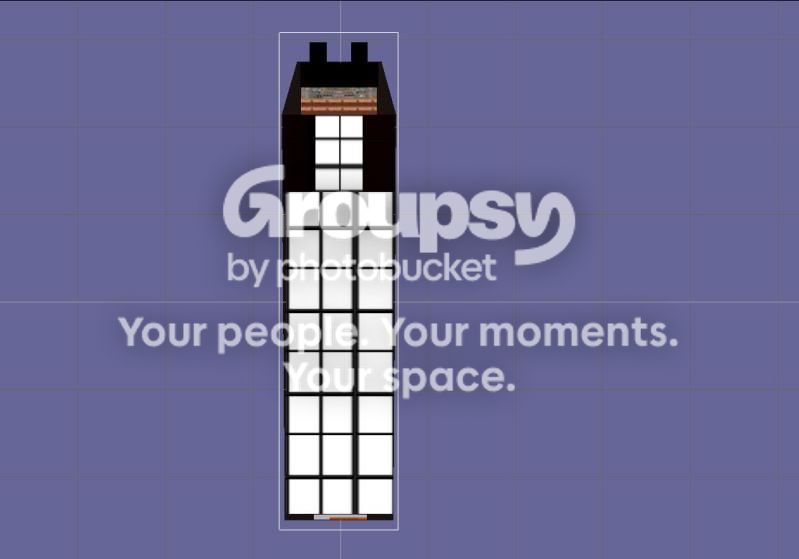
Still have that camera issue.
not sure how to fix it.
You can see from the Meshwizard how the interior mesh is orientated.
Code:
 case 0:  //ext
          SetCameraDefaultDirection (_V(0,1,0));
          SetCameraOffset (_V(-.6,5,0));
		  oapiCameraSetCockpitDir (0,0);
          break;
 case 1:  //PAD1
          SetCameraDefaultDirection (_V(0,1,0));
          SetCameraOffset (_V(.6,5,0));
		  oapiCameraSetCockpitDir (0,0);
          break;

  case 2:  //PAD1
	      SetCameraDefaultDirection (_V(1,.98,-.15));
          SetCameraOffset (_V(.5,4.3,.061));
		  oapiCameraSetCockpitDir (0,0);
          break;
  case 3:  //PAD1
	      SetCameraDefaultDirection (_V(0,-1,0));
          SetCameraOffset (_V(0,.8,0));
		  oapiCameraSetCockpitDir (0,0);
          break;
So it case 1and 2 which are looking toward the front the top is at the bottom. and in case 3 the mesh is okay.
Does the vessel have to lined up this way or can the front be +Z and the touchdown points be changed for a vertical landing?
This is weird. I have the meshes so only the cockpit mesh is seen in cockpit mode. and the main body only in external.
Code:
SetMeshVisibilityMode (AddMesh (oapiLoadMeshGlobal ("ultraprobecm3")), MESHVIS_EXTERNAL); //Main ship mesh
SetMeshVisibilityMode (AddMesh (oapiLoadMeshGlobal ("ultraprobecm3interior")), MESHVIS_COCKPIT); //Main ship mesh
But Then I entered Cockpit mode F1 and from the cockpit windows you see the nose of the external mesh. So I moved the camera outside the cockpit mesh and you can see the external mesh.
Here is what my cockpit mesh looks like
Last edited:
Ok. we figured it needs a VC. So you don't see the nose from the cockpit. But I am trying to code on. Right now just a simple one.
Followed the example in the API guide pages 29,30.
in my h.
but I get this error.
c:\orbiter2010p1\orbitersdk\samples\uprobefront\uprobefront.cpp(262) : error C4716: 'UPROBEFRONT::clbkLoadVC' : must return a value
To make the VC mode available in your mesh class, you must overload the clbkLoadVC method of the VESSEL2 class: bool MyVessel::clbkLoadVC (int id) { ... } This will allow the user to switch to VC mode with the F8 key. The id parameter is currently always 0. Eventually it will allow to select different cockpit positions.
Followed the example in the API guide pages 29,30.
Code:
bool UPROBEFRONT::clbkLoadVC (int id)
{
SetCameraOffset (_V(0,1.5,6.0));
SetCameraDefaultDirection (_V(0,0,1));
SetCameraRotationRange (RAD*120, RAD*120, RAD*70, RAD*70);
SetCameraShiftRange (_V(0,0,0.1), _V(-0.2,0,0), _V(0.2,0,0));
}
in my h.
Code:
bool UPROBEFRONT::clbkLoadVC (int id);but I get this error.
c:\orbiter2010p1\orbitersdk\samples\uprobefront\uprobefront.cpp(262) : error C4716: 'UPROBEFRONT::clbkLoadVC' : must return a value
To make the VC mode available in your mesh class, you must overload the clbkLoadVC method of the VESSEL2 class: bool MyVessel::clbkLoadVC (int id) { ... } This will allow the user to switch to VC mode with the F8 key. The id parameter is currently always 0. Eventually it will allow to select different cockpit positions.
Last edited:
Thanks. Hope someone can help on the VC. I am working on the rear section.

- Joined
- Oct 30, 2009
- Messages
- 14,018
- Reaction score
- 4
- Points
- 0
but I get this error.
c:\orbiter2010p1\orbitersdk\samples\uprobefront\uprobefront.cpp(262) : error C4716: 'UPROBEFRONT::clbkLoadVC' : must return a value
And didn't you try to return a bool value? - like:
Code:
bool UPROBEFRONT::clbkLoadVC (int id)
{
SetCameraOffset (_V(0,1.5,6.0));
SetCameraDefaultDirection (_V(0,0,1));
SetCameraRotationRange (RAD*120, RAD*120, RAD*70, RAD*70);
SetCameraShiftRange (_V(0,0,0.1), _V(-0.2,0,0), _V(0.2,0,0));
[highlight]return true;[/highlight]
}
Page 497 of API reference:
API_reference.pdf said:virtual bool VESSEL2::clbkLoadVC (int id) [virtual]
3-D virtual cockpit view mode request notification
Called when Orbiter tries to switch the cockpit view to a 3-D virtual cockpit mode (for example in response to the user switching cockpit modes with F8).
Parameters:id virtual cockpit identifier (>= 0)
Returns:true if the vessel supports the requested virtual cockpit, false otherwise.
Default action:None, returning false (i.e. virtual cockpit mode not supported).
Thanks. That fixed it. But still issues. the mesh is upside down and the nose cone is still visible.
not sure how to change the camera position in the VC.
Code:
SetMeshVisibilityMode (AddMesh (oapiLoadMeshGlobal ("ultraprobecm3")), MESHVIS_EXTERNAL); //Main ship mesh
//SetMeshVisibilityMode (AddMesh (oapiLoadMeshGlobal ("ultraprobecm3interior")), MESHVIS_COCKPIT); //Main ship mesh
SetMeshVisibilityMode (AddMesh (oapiLoadMeshGlobal ("ultraprobecm3interior")), MESHVIS_VC); //Main ship mesh


}
bool UPROBEFRONT::clbkLoadVC (int id)
{
SetCameraOffset (_V(-.6,5,0));
	SetCameraDefaultDirection (_V(0,1,0));
SetCameraRotationRange (RAD*120, RAD*120, RAD*70, RAD*70);
SetCameraShiftRange (_V(0,0,0.1), _V(-0.2,0,0), _V(0.2,0,0));
return true;

}
not sure how to change the camera position in the VC.
Attachments
I am stumped. The CM is supposed to land Nose up. So Y is up. for the cockpit and such I think the vessel needs to travel along the Z axis. But can it land with the stern down?
How do you know if in the VC?
How do you know if in the VC?
Thanks. This doesn't make sense.
This is the axis of the CM I think it is similar to the Apollo CM.

but here is a shot from the VC notice the nose cone thru the window. And it is upside down.

But If I flip the cockpit mesh now the front is right. You still see the nose cone. Not sure how to get rid of that. I think it is seeing the backside so back to anim8or

but the rear is upside down. I need to shorten it.

This is the axis of the CM I think it is similar to the Apollo CM.
but here is a shot from the VC notice the nose cone thru the window. And it is upside down.
But If I flip the cockpit mesh now the front is right. You still see the nose cone. Not sure how to get rid of that. I think it is seeing the backside so back to anim8or
but the rear is upside down. I need to shorten it.
Last edited:
Similar threads


- Replies
- 156
- Views
- 45K
- Replies
- 1
- Views
- 1K


- Replies
- 3
- Views
- 3K
