Discussion Space: 1999 updates ?

Ok. I saw this and noticed it says cockpit view

:CARGO
;-------------------------------------------------------
CargoSlotPos = 0.0 2.246 -14.474 ; Front left pos of first cargo slot X Y Z (see doc)
CargoRowColumnNbr = 3 6 ; Number of Slot row & colunm (max 20 slots, see doc)
CargoSlotInterval = 0.05 ; Interval between each slot in meters.
CargoReleasePos = 11.962 -14.474 ; X Z pos at which cargo will be placed when released (see doc)
CargoShowInCockpit= 0 ; Force cargo to appear also in cockpit view (only external by default)
CargoGrappleDist = 60 ; Grapple radius from center of cars. By default 15 meters.

When the can tops are aboard (stored) I don't want to see them. I guess that is not possible.

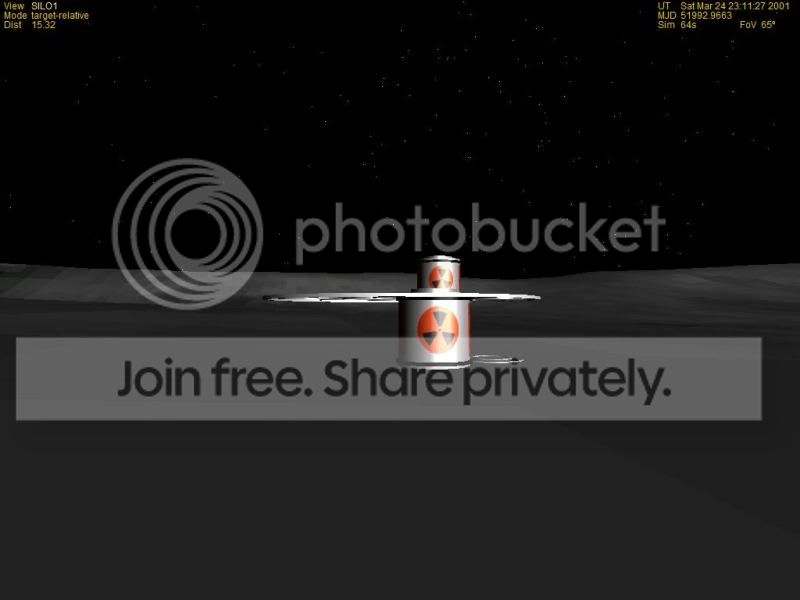
The reason is because the cans go below the surface. They are just a top that rest on the surface of a black mesh. So when they are released they are vessels

The mesh for this UCgo are 3 cans that are attached to the platform.
wp6.jpg
 
When the can tops are aboard (stored) I don't want to see them. I guess that is not possible.

ah... No, as far as I know that's not possible.

The reason is because the cans go below the surface. They are just a top that rest on the surface of a black mesh.

After looking at the screenshots above I think I get the hang of it... The silos are on ground level, and you put the cans below ground. No Idea how you managed to do that, but it should be possible to reproduce something like that with UCGO. If you make the Silos UCGO compatible, you should be able to make it show the cargo below ground level.
 
Last edited:
I'm not sure I understand... When the transporter drives over the terrain, the platform and the cans on it disapear beneath the meshes surface, is that what you want to say? In that case, it may be best to design the whole platform in a way that it can be raised a bit.

In the series the cans are stored underground. So what we did is just create the top which sit on the surface. But the inside of the silos are a black mesh. The silos are a ring and black mesh just above the surface.
Yes, of course. But if you're getting too much of them overall when you store them in the silos, why not make the silos UCGO compatible? that would take care of that problem. It's possible that I don't really understand what you want to do, though.
We have thought about that. But the placement of cargo is an issue. Cargo is placed in rows and columns. Which doesn't work in a cylinder.
Also we thought about making them vessels so that press a key or action from A Ummu. and then a mesh appears full/partial/empty.
 
We have thought about that. But the placement of cargo is an issue. Cargo is placed in rows and columns. Which doesn't work in a cylinder.

I see... But as far as I know, you can define the positions of cargo slots completely freely (admitted, I never tried to make an overlapping slot, but I doubt there's a safety built in against it). So as long as you store only these cans in there, you should still be able to align them circular. At least I think it's worth to try (if you haven't already).
 
Code:
:CARGO
;-------------------------------------------------------
[COLOR="Red"]CargoSlotPos = 0.0 2.246 -14.474 ; Front left pos of first cargo slot X Y Z (see doc)
CargoRowColumnNbr = 3 6 ; Number of Slot row & colunm (max 20 slots, see doc)
CargoSlotInterval = 0.05 ; Interval between each slot in meters.[/COLOR]
CargoReleasePos = 11.962 -14.474 ; X Z pos at which cargo will be placed when released (see doc)
CargoShowInCockpit= 0 ; Force cargo to appear also in cockpit view (only external by default)
CargoGrappleDist = 60 ; Grapple radius from center of cars. By default 15 meters.

The best we could do with a partial is 1 column and 3 rows.
 
Yes, if you want to make it a config file based "car". But if you wip up a small dll of your own, you can define the positions of the slots like this:

hUcgo.DeclareCargoSlot(0,_V(0,2.0,3.0),_V(0,0,0)); // slot 0
hUcgo.DeclareCargoSlot(1,_V(0,2.0,4.4),_V(0,0,0)); // slot 1

where the first vector is position relative to the vessels mesh, i.e. you can customize the position and are not bound to rows and columns.
 
Yes, if you want to make it a config file based "car". But if you wip up a small dll of your own, you can define the positions of the slots like this:


where the first vector is position relative to the vessels mesh, i.e. you can customize the position and are not bound to rows and columns.

Wow did not think about that. Not sure how that would be coded in a dll
 
Last edited:
If you know a bit of C++, just read the UCGO documentation, it's very well explained there. If you don't, you'll probably have to find someone who does, or learn a bit of it (although learning to program only to do this would be a bit overkill).
 
I will have to look at the ucgo doc. I can do some C++.

---------- Post added at 04:10 PM ---------- Previous post was at 12:48 PM ----------

Found it. Now to try it out and to see if I can switch cargo if so that would be great

---------- Post added 09-01-10 at 04:57 AM ---------- Previous post was 08-31-10 at 04:10 PM ----------

Thanks
That works great. The silos will be the vessel here there are 4 can tops.
silo4.jpg


and now a full 12
silo12.jpg


One thing not sure why it is doing this.

I have the camera set to look down but it looks at the z direction.
Code:
SetCameraOffset (_V(0,5,0));
	SetCameraDefaultDirection (_V(0,-1,0));
 
That works great. The silos will be the vessel here there are 4 can tops.

:thumbup: good to hear!

I have the camera set to look down but it looks at the z direction.

Not quite sure I understand what you mean. The Z direction IS down...? (Unless you modeled the Silo lying on the barrel) If I get it right, looking at your code, you're trying to align it along the y axis, which isn't down (usually) in this situation. Remember: Z-axis (usually) is the axis running parallel to the symmetry axis, allthough it depends on how you modeled the mesh.
 
Then you'll probably have to enter the parameters you entered above in the Z-axis, like this:

SetCameraDefaultDirection (_V(0,0,-1));
I'm not sure though, since I don't know the alignement of your mesh, but a try won't hurt.
 
I'll try.

One thing. I hope some one has ideas.

We can load the cans on the eagleskid.
But to get them into the WP.
we have to release cargo to the ground.
load on to the conveyor( to match the show only)
release to the ground
and then load into the WP.

If you didn't want to use the conveyor you could just release from the skid and pick up from the WP

---------- Post added 09-02-10 at 05:16 AM ---------- Previous post was 09-01-10 at 10:34 AM ----------

I doesn't mater what I set the camera it is z along the horizon.

Ok now if I set the stored location below the surface you get:

silo7.jpg

But if I add a mesh floor then this.
silo7a.jpg


not sure if I want to add a floor then Orulex (which I am not running ) might not work.

Options?


I can get the fulls size cans in the WP and stored out of site. Since we are not releasing the full cans they are hidden. But it would be great to see the can go away as the can top released.
 
Here is proof of concept:
empty wp
EMPTYWP.jpg

Wp has some cans
WP11.jpg


silo filled with 1.
SILOFILL.jpg
 
Thanks. We also have the large receiving pit.

I never really thought about all the waste. There was a lot of it. It is sad that they fill one are and go to another one and make it a waste area.

An to think that they were going to remove the waste 1 can at a time from nda2.7 to where? What about nda 1? Who knows.

Also may add freq to each silos so you will be able to drive to the correct open one.

Right now each silo and pit are ucgo vessels. So you drive up to silo#1 in the WP get close. then drop the cans off. Switch to silo#1 vessel and load the cans. Using ACT1 to place a silo top/cone on it.
 
Last edited:
You might not have to put transponders on the empty silos. I've made a map with a legend for the empty silos in the manual. They're numbered clockwise starting at the arm to the aft of the WP. The user just has to read the manual. Its your call.

Ben
 
You might not have to put transponders on the empty silos. I've made a map with a legend for the empty silos in the manual. They're numbered clockwise starting at the arm to the aft of the WP. The user just has to read the manual. Its your call.

Ben


Not sure. Your map is great. But it's in the manual I think you would have to switch back and forth. I thought about putting the map in the wp but then you couldn't get it from the ACT1.

I think adding 12 transponders is easiest.


Here is the latest. The way to get the cans off the Eagle and to the WP. In the show in used a conveyor.

Eagle landed with cans
waste1.jpg


1 can offloaded
waste2.jpg

picked up by conveyor and moved to the end

waste3.jpg


dropped off ready for pick up by the wp

waste4.jpg

Receiving Well with 2 layers of cans. It can hold up to 40 cans
waste5.jpg


Thanks. I think one could recreate Pre- Breakaway.
 
Back
Top