Question Screen annotations for one vessel showing in other vessels, how to control?

Thunder Chicken

Resident Lua Script Rabble-Rouser
Donator
Joined
Mar 22, 2008
Messages
5,847
Reaction score
5,509
Points
188
Location
Massachusetts
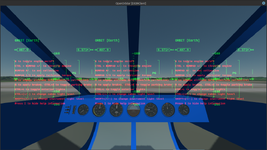
I just made a scenario where two different vessels of different classes (R-4Script helicopter and Skiff boat) are loaded. Both vessels have different screen annotations to display prompts and vessel information to the user.

Right now when I load the scenario and start with the focus in the R-4, I get the annotations for that vessel, but also the ones for the Skiff. I presume that this is due to the fact that the annotation calls are oapi functions not associated with a vessel, so they get presented no matter which vessel is focus.

I assume that there must be some way using the vessel functions to basically do a check where if the current vessel interface is the interface of the script, then it can show the annotations. I get parts of it, but I'm still missing the big picture and specific procedure.

Right now, I establish the vessel interface in both the R-4 and Skiff with get_focusinterface at the top of the main Lua script like this:

Code:
vi = vessel.get_interface('R-4Script')

I then try to restrict the annotations of both vessels to only show when the focus is on that vessel by using this in the annotation function:

Code:
if vessel.get_focusinterface() == vi then

...show annotations for this vessel

end

This kinda sorta works. When I start the scenario in the R-4, it initially only shows the R-4 annotations. But when I switch to the skiff, I get the skiff annotations, but they persist when I return the focus back to the R-4.

I'm clearly doing something wrong, and I'm not sure if what I am doing is only affecting the annotations or that there is some additional potential for inadvertent cross-confusion between the vessels. What is the proper way to isolate what happens in a particular vessel in a scenario to that vessel and no others?
 
If what you want is per vessel indications, you may consider using the HUD callbacks.
 
If what you want is per vessel indications, you may consider using the HUD callbacks.
Yes, I am seeing that annotations are the wrong tool for this job. I never picked up on this as I was usually only loading one vessel. I'll have to revise all my add-ons that use annotations.

But there are some problems with the documentation of HUD usage.

In the Orbiter Developer Manual this is what is offered:
8.13.6 Defining the HUD in the virtual cockpit
(to be completed)
clbkHUDmode, clbkRenderHUD, and clbkDrawHUD are only shown in the program flow chart on page 3, but not described anywhere else.

Unless it is hiding someplace I am not expecting it, there is nothing at all on HUDs in the orbiter_lua.chm file. I'll have to start digging in GitHub.

From the API Reference, it seems that clbkDrawHUD would permit indications for VC displays as well as 2D and glass displays, and they must be drawn in SketchPad. I've never used that, but the sketchpad class is documented in orbiter_lua.chm.
 
So I am looking at this snippet of code for some guidance:

Code:
function clbk_drawHUD(mode, hps, skp)
    local cx = hps.CX
    local cy = hps.CY

    -- show OMS thrust marker
    if status >= 3 then
        local omsy = cy + math.floor(15.0 * hps.Scale)
        local dx = math.floor(1.0 * hps.Scale)
        skp:line(cx - 2 * dx, omsy, cx + 2 * dx, omsy)
        skp:line(cx, omsy - dx, cx, omsy + dx)
    end

    -- show RCS mode
    if status >= 3 and oapi.cockpit_mode() == COCKPIT.VIRTUAL then
        local rcsmode = vi:get_rcsmode()
        if rcsmode == RCSMODE.ROT then
            skp:text(0, hps.H - 13, "RCS ROT", 7)
        elseif rcsmode == RCSMODE.LIN then
            skp:text(0, hps.H - 13, "RCS LIN", 7)
        end
    end
    return true
end

I am making my own "Hello World" version of this to sort things out:

Code:
function clbk_drawHUD(mode, hps, skp)

    if show_help == false then

        skp:text (100, 100, "HUD in VC!")

    end

    return true

end

So far, so good. It shows the desired text, but only in the 2D and glass cockpits. I tried the following to get it to show in the VC, but no luck, and I have no idea why as it seems to be the same usage as in the Atlantis.lua example above:

Code:
function clbk_drawHUD(mode, hps, skp)

    if show_help == false and oapi.cockpit_mode() == COCKPIT.VIRTUAL then

        skp:text (100, 100, "HUD in VC!")

    end

    return true

end

It now doesn't show the text in any cockpit, 2D, glass, or VC.
 
OK, so it seems that one needs to make a simple square mesh to project the HUD. So I made a separate mesh file with three HUD displays, 0.1 m on a side, located 0.1 m in front of each VC camera position.

Code:
MSHX1
GROUPS 3
LABEL HUD_Screen_1
MATERIAL 0
TEXTURE 0
FLAG 2
GEOM 4 2
-0.3 0.7 1.6 0 0 -1
-0.3 0.9 1.6 0 0 -1
-0.1 0.9 1.6 0 0 -1
-0.1 0.7 1.6 0 0 -1
0 1 2
0 2 3
LABEL HUD_Screen_2
MATERIAL 0
TEXTURE 0
FLAG 2
GEOM 4 2
-0.05 0.7 1.6 0 0 -1
-0.05 0.9 1.6 0 0 -1
0.05 0.9 1.6 0 0 -1
0.05 0.7 1.6 0 0 -1
0 1 2
0 2 3
LABEL HUD_Screen_3
MATERIAL 0
TEXTURE 0
FLAG 2
GEOM 4 2
0.1 0.7 1.6 0 0 -1
0.1 0.9 1.6 0 0 -1
0.3 0.9 1.6 0 0 -1
0.3 0.7 1.6 0 0 -1
0 1 2
0 2 3
MATERIALS 0
TEXTURES 0

I load it as follows:

Code:
    hudmesh = oapi.load_meshglobal('R-4/HUD')

    vi:add_mesh(hudmesh)
    vi:set_mesh_visibility_mode(2, MESHVIS.VC)

If I remove the FLAG 2 lines, and set mesh visibility to MESHVIS.ALWAYS, the mesh renders in each camera, though it flashes for some reason, perhaps clipping?:

Screenshot at 2025-02-24 06-35-10.png

I attempt to register each display in clbk_loadVC:

Code:
function clbk_loadVC(id)

    vi:set_cameramovement({x=0,y=0,z=0.05}, 0, -20*RAD, {x=-0.1,y=0,z=0}, 90*RAD, 0, {x=0.1,y=0,z=0}, -90*RAD, 0)
    vi:set_cameradefaultdirection({x=0,y=0,z=1})

    local hudspec =
    {
        nmesh = 2,
        ngroup = 1, --gets updated for each position
        hudcnt = {x=0,y=0,z=0}, --gets updated for each position
        size = 0.1
    }

    if id == 0 then

        vi:set_cameraoffset(camera_loc[1])
        oapi.VC_set_neighbours(-1, 1, -1, -1)
        hudspec.ngroup = 0
        hudspec.hudcnt = vec.add(camera_loc[1],{x=0,y=0,z=0.1})
        oapi.VC_registerHUD(hudspec)

        return true

    elseif id == 1 then

        vi:set_cameraoffset(camera_loc[2])
        oapi.VC_set_neighbours(0, 2, -1, -1)
        hudspec.ngroup = 1
        hudspec.hudcnt = vec.add(camera_loc[2],{x=0,y=0,z=0.1})
        oapi.VC_registerHUD(hudspec)

        return true

    elseif id == 2 then

        vi:set_cameraoffset(camera_loc[3])
        oapi.VC_set_neighbours(1, -1, -1, -1)
        hudspec.ngroup = 2
        hudspec.hudcnt = vec.add(camera_loc[3],{x=0,y=0,z=0.1})
        oapi.VC_registerHUD(hudspec)

        return true

    else

        return false

    end

end

And I attempt to draw the hud in clbk_HUDdraw:

Code:
function clbk_drawHUD(mode, hps, skp)

    local cx = hps.CX --256
    local cy = hps.CY --256
    local w = hps.W --512
    local h = hps.H --512
    local scale = hps.Scale --8.937...
    local mks = hps.Markersize --26

    skp:set_textalign(SKP.LEFT, SKP.TOP)

    local blue = 0
    local green = 0
    local red = 255
    local color = blue*65536 + green*256 + red
    skp:set_textcolor(color)

    local font = oapi.create_font(24, true, "Sans", FONT.BOLD)
    skp:set_font(font)

    --if oapi.cockpit_mode() == COCKPIT.VIRTUAL then

        if show_help == true then

            skp:text (10, 210, string.format("E to toggle engine on/off"))
            skp:text (10, 240, string.format("CTRL + NUMPAD +/- to throttle engine"))
            skp:text (10, 270, string.format("NUMPAD 0/. to set collective"))
            skp:text (10, 300, string.format("NUMPAD 1/3 to apply tailrotor torque"))
            skp:text (10, 330, string.format("A to engage altitude hold (controls collective)"))
            skp:text (10, 360, string.format("B to apply brakes, CTRL+B to apply/release parking brake"))
            skp:text (10, 390, string.format("CTRL+L to toggle exterior lights"))
            skp:text (10, 420, string.format("CTRL+(+/-) to change cabin light level"))
            skp:text (10, 450, string.format("SHIFT+(+/-) to change instrument light level"))
            skp:text (10, 480, string.format("Press I to hide help information"))

        elseif show_help == false then

            if oapi.get_simtime() <= info_delay then

                skp:text (10, 480, string.format("Press I to show help information"))

            end

        end

        return true

    --else

      --  return false

    --end

end

Again, the text shows up in the 2D and glass cockpit, but not the VC. I don't see why it is not working.
 
Last edited:
Did you try removing the texture line completely? Also.... do I see it right that your vertices have all the same texture (u, v) coordinates? Thats is AFAIR wrong, you need to cover (0,0) - (1,1)

EDIT: No, worse, you have only coordinates and normals, not UV coordinates. You should have 8 values on each vertex line. Or 5, if you specify "NONORMAL" as group flag.
 
Last edited:
Did you try removing the texture line completely? Also.... do I see it right that your vertices have all the same texture (u, v) coordinates? Thats is AFAIR wrong, you need to cover (0,0) - (1,1)

EDIT: No, worse, you have only coordinates and normals, not UV coordinates. You should have 8 values on each vertex line. Or 5, if you specify "NONORMAL" as group flag.
This was the issue. I did not realize that UV mapping was needed as no texture needed to be specified. But now the HUD flashes on and off with a period of about 0.1 s, I don't know why.
 
So the flashing ceased with no intervention on my part :unsure:

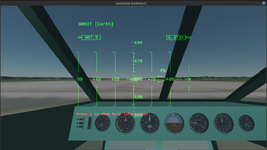
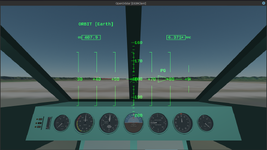
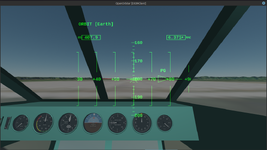
I have HUDs for each of the three VC camera positions:

Screenshot at 2025-02-24 08-15-51.png

I want to only draw the HUD for the camera position selected. I somehow need to close/destroy HUDs as I switch cameras.

I'd also like to hide the default HUD indications. I'm just trying to make instructions available to the user in a vessel specific manner.
 
I want to only draw the HUD for the camera position selected. I somehow need to close/destroy HUDs as I switch cameras.

In a VC, a hud is expected to be a physical presence in the cockpit, not an overlay as for a 2-D panel. I'm not sure how you'd go about destroying and recreating it. Might be easier to move it.
 
In a VC, a hud is expected to be a physical presence in the cockpit, not an overlay as for a 2-D panel. I'm not sure how you'd go about destroying and recreating it. Might be easier to move it.
Use a single HUD mesh, and move that? Wouldn't I still need to re-specify the hud center location?

EDIT: Yes, but the only challenge is calculating the HUD mesh shift. I can do that by saving the position of the last camera used, and taking the difference between that and the current camera position to get the vector. So that works, and I get a single HUD that follows the VC camera:

Screenshot at 2025-02-24 11-10-59.pngScreenshot at 2025-02-24 11-11-07.png
Screenshot at 2025-02-24 11-11-20.png

OK, so the final hurdle - can I shut off the default HUD visuals and just use the HUDs to display instructions when requested?
 
Last edited:
Use a single HUD mesh, and move that? Wouldn't I still need to re-specify the hud center location?
Hmph. Just took a look at your code above and have to admit that definition doesn't look what I expected it to look like. I'd have expected you to define a mesh, and a surface on that mesh, and then you get the handle to that surface to draw on. I guess I'd need to have a look in the api docs to make sense of it... Sorry, can't help currently, in that case.

Oh, I see you figured it out already. Well, glad I could "help" 😂
 
OK, so the final hurdle - can I shut off the default HUD visuals and just use the HUDs to display instructions when requested?
Switching the Hud on and off shouldn't be a problem. Not drawing it... hm. Too long ago. I don't remember there being the ability to create a custom HUD mode...? you just might have to take the mode least cluttered.
 
Switching the Hud on and off shouldn't be a problem. Not drawing it... hm. Too long ago. I don't remember there being the ability to create a custom HUD mode...? you just might have to take the mode least cluttered.
Well, what would be the point of all the sketchpad methods if you can't draw a custom HUD?
 
This is from the API_Reference.pdf, page 441:

clbkDrawHUD()
virtual bool VESSEL3::clbkDrawHUD (
int mode,
const HUDPAINTSPEC ∗ hps,
oapi::Sketchpad ∗ skp) [virtual]
HUD redraw notification.
Called when the vessel's head-up display (HUD) needs to be redrawn (usually at each time step, unless the HUD
is turned off). Overwriting this function allows to implement vessel-specific modifications of the HUD display (or to
suppress the HUD altogether).

Parameters
mode HUD mode (see HUD_∗ constants in OrbiterAPI.h)
hps pointer to a HUDPAINTSPEC structure (see notes)
skp drawing context instance
Returns
Overloaded methods should return true. If the return value is false, orbiter assumes that this method is
disabled and will try VESSEL2::clbkDrawHUD.
The bits in bold suggest that you can modify the HUD or shut it off completely, but I don't know if "modify" encompasses "replace entirely".

I tried the following, doesn't replace the default HUD:

Code:
function clbk_drawHUD(mode, hps, skp)

    local cx = hps.CX --256
    local cy = hps.CY --256
    local w = hps.W --512
    local h = hps.H --512
    local scale = hps.Scale --8.937...
    local mks = hps.Markersize --26

    skp:set_textalign(SKP.LEFT, SKP.TOP)

    local blue = 0
    local green = 0
    local red = 255
    local color = blue*65536 + green*256 + red
    skp:set_textcolor(color)

    local font = oapi.create_font(18, true, "Sans", FONT.BOLD)
    skp:set_font(font)

    if oapi.cockpit_mode() == COCKPIT.VIRTUAL and mode == bit.bxor(HUDMODE.NONE,HUDMODE.ORBIT,HUDMODE.SURFACE,HUDMODE.DOCKING) then

        if show_help == true then

            skp:text (0, 136, string.format("E to toggle engine on/off"))
            skp:text (0, 166, string.format("CTRL + NUMPAD +/- to throttle engine"))
            skp:text (0, 196, string.format("NUMPAD 0/. to set collective"))
            skp:text (0, 226, string.format("NUMPAD 1/3 to apply tailrotor torque"))
            skp:text (0, 256, string.format("A to engage altitude hold (controls collective)"))
            skp:text (0, 286, string.format("B to apply brakes, CTRL+B to toggle parking brake"))
            skp:text (0, 316, string.format("CTRL+L to toggle exterior lights"))
            skp:text (0, 346, string.format("CTRL+(+/-) to change cabin light level"))
            skp:text (0, 376, string.format("SHIFT+(+/-) to change instrument light level"))
            skp:text (0, 406, string.format("Press I to hide help information"))

        elseif show_help == false then

            if oapi.get_simtime() <= info_delay then

                skp:text (0, 406, string.format("Press I to show help information"))

            end

        end

        return true

   end

end
 
I had a dilemma when implementing the clbk_drawHUD callback since you cannot just add a VESSEL3::clbkDrawHUD(mode, hps, skp); at the start of your Lua callback as in C++ : completely replace the default HUD and have the devs need to reimplement it completely from scratch even if it's just to add a small visual aid, or call the VESSEL3 implementation and then execute the Lua callback.
I chose the second option, hence your issue.
In the future I can add another callback that does not call the default implementation.
 
I had a dilemma when implementing the clbk_drawHUD callback since you cannot just add a VESSEL3::clbkDrawHUD(mode, hps, skp); at the start of your Lua callback as in C++ : completely replace the default HUD and have the devs need to reimplement it completely from scratch even if it's just to add a small visual aid, or call the VESSEL3 implementation and then execute the Lua callback.
I chose the second option, hence your issue.
I'm sorry if I'm being obtuse, but this is a little hard for me to understand. What is the issue in plain words? Is the behavior inconsistent with the description in the API Reference?

We're missing analogous documentation for the callbacks as implemented in Lua, so all we can do is lean on the API_Reference and hope it can steer us to some understanding of a Lua equivalent. I seem to be perpetually falling down rabbit holes trying to understand and implement something, only to find that there is some critical undocumented difference that prevents things from working as expected. I'm not sure what to suggest but there still are some big holes in the Lua documentation. I understand that there must be certain differences in Lua, I just need to know what they are. What can I do to help with improving this?
In the future I can add another callback that does not call the default implementation.
All I am chasing is a neat and sensible way where I can present the user with instructions accessible in-game. A few sentences. Annotations don't work because they will conflict with other vessels loaded in a simulation. Apparently HUDs aren't an option either as the default ones can't be overwritten. Is there any other option to do something like this? I can just publish a PDF and call it a day, but I was hoping for something dead easy and accessible for the user.
 
So it seems that replacing the default HUDs is not possible. You can augment them with text and shapes with SketchPad, but you can't replace them with something your own.

So I have reverted to using annotations, I am just protecting them from spilling into other vessels by putting it in a loop to see if the current focus vessel is the interface vessel, which seems to work fine.

Code:
    if vessel:get_focusinterface () == vi and show_help == true then

        set_annotation.messages(show_help)

    else

        show_help = false
        set_annotation.messages(show_help)

    end

Onward!
 
Back
Top