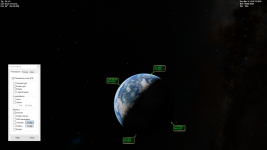
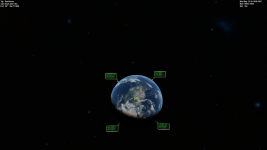
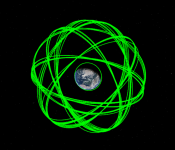
Project Orbits came for the Orbiter

The version you are using is obviously broken. Also this application is only a demonstration of what can be done with the SketchPad and there has been no development beyond that. Also a fully working (fixed) version is included with the Open Orbiter in a GitHub but right now there are no pre-compiled binaries available yet.
 
This mod draws perigee and apogee for me but not orbit lines, did I do something wrong?
 
This mod draws perigee and apogee for me but not orbit lines, did I do something wrong?
same for me buddy
but I've decided to keep it quiet, figured can't bother people with all of my problems ?
 
This mod draws perigee and apogee for me but not orbit lines, did I do something wrong?

same for me buddy
but I've decided to keep it quiet, figured can't bother people with all of my problems ?
Which Orbiter version are you using? it works with Github Orbiter

Is it possible to view orbits of multiple vessels at the same time? I tried reading the code but couldn't understand what to change :confused:
 
To view multiple vessels, slightly modified Orbits::clbkRender in Draw.cpp
Code:
        int count = oapiGetVesselCount();
        for (i = 0; i < count; i++) {
            OBJHANDLE hV = oapiGetVesselByIndex(i);
            VESSEL* hVes = oapiGetVesselInterface(hV);
            OBJHANDLE hRef = hVes->GetGravityRef();
            COrbit orb;
            orb.Create(hVes);
            orb.ReferencePole(_I_ECL, _K_ECL);
            //SetClipper(pSkp2, oapiCameraTarget(), PLN_MOON);
            SetClipper(pSkp2, hRef, PLN_MAIN);
            DrawOrbit(pSkp2, &orb, hRef, color, ODR_APS | ODR_LON | ODR_NOD | ODR_LAB);
        }
then commented out some parts to remove the labels, etc (else its too crowded)
Edit : You don't have to comment out, just replace ODR_APS | ODR_LON | ODR_NOD | ODR_LAB with NULL
 
Last edited:
  • Like
Reactions: GLS
I use standard Orbiter 2016
Ah maybe thats why. This addon was for a version of Orbiter Beta. As Jarmonik mentioned, its included with the Github version of Orbiter, and hopefully we get a release soon.
If you want to try building it yourself, you can follow this guide - https://www.orbiter-forum.com/threads/guide-orbiter-development-in-visual-studio-2019.40144/
Before Step 1, install https://www.microsoft.com/en-us/download/details.aspx?id=8109 and https://www.microsoft.com/en-us/download/details.aspx?id=6812
In Step 3 use
Code:
git clone -b d3d9client https://github.com/orbitersim/orbiter.git

After those 9 steps I did Build -> Build All and then Build -> Install Orbiter
Then you can find Orbiter installation in <your code directory>/out/install/
 
Back
Top