OHM Orbiter Space Program v1.25

OrbitHangar

Addon Comments
Joined
Apr 9, 2008
Messages
3,832
Reaction score
18
Points
0

Author: solarliner

Push up your Orbiter Experience !
This program is in different terms an another launchpad, where you can add and delete ships in Orbiter simulation. So, you can launch a DGIV to Mars and continue your station building with your Space Shuttle !

RealTime and SimTime Tools are highly recommanded to increase your Orbiter experience and help you in your plans.
Note: All the bugs should not removed at this time. If you have found one, please report it in the comments thread.

v1.25
Code cleaned, bugs removed
Added "Restorer"
No Graphics client support
Finer settings
Even more stable

v1.10 Download (obsolete)
Added "Copy" function
Documentation written
More stable

v1.00 Download (obsolete)
First (almost) stable version. You can now overwrite your old OSP files. Executable installer to do all the install work for you ;)

v0.75 Download (obsolete)Added "Save" and "Load" options, where "Save" function saves you as SCN file in Orbiter or in a OSP file that can be reloaded after.
Corrected some bugs
Added possibility to use the ATTACHED function in orbiter (right clic menu)

v0.50 Download (obsolete)
First release

DOWNLOAD
 
I don't get it... what's the point of this program?

It's extremely limited in what it can do. It's some sort of a scenario editor prior to the launch of Orbiter itself...

You can add or remove ships from the scenario, but you're very limited in what you can place and where.

The program is full of bugs. I managed to identify quite a few within seconds of running the program... if you go to Add one, select any location (of the three possible - LEO, Brighton Beach and Cape Canaveral), then close the dialog and hit Add one again, next time you try to select a location, the list is duplicated. Every item appears twice.

If you miss the selection box and click somewhere else, you sometimes get an unhandled exception...

The program has hard coded cases... I don't have Shuttle Fleet installed, but the program allows me to add it to the scenario and run. Obviously Orbiter crashes on load.

It seems there is no support for any other vessel either. That's very disappointing, given that the installer asks for the Orbiter's root folder and thus have access to every ship and space port configuration file...

The list goes on, but there's really no point in writing...


As of version 1.1, I don't recommend this program...

---------- Post added 30th Sep 2012 at 03:59 ---------- Previous post was 29th Sep 2012 at 16:11 ----------

Update:

DO NOT DOWNLOAD THIS PROGRAM!

Trying to uninstall it just makes an even bigger mess. Well, for one, it doesn't get uninstalled! Everything is still there. If you then try to run the program, you can't quit it. Quitting just gives you another unhandeled exception.


Now, if you'll excuse me, I have to go clean up this damn mess.

:facepalm:
 
Last edited:
Hum, intrsting test, RisingFury.

The program was made for begginers who don't want to write scenarios, and for orbinauts who wants to create a space program in an easier method.

Of course it is limited, just look at other scenario generator. Not as complete as inflight one. But unlike other, you can add places, and you can add vessels to spawn.

Be intelligent: If you don't have Shuttle Fleet, don't spawn it ! And if an Orbiter Crash appears, then load the last saved osp state.

The duplicating bug should be removed for a while now.

When he installer asks to point the Orb Path, it is to get "orbiter.exe" and the last sim state. I didn't found or created (yet) a function that returns bases and ships installed in Orbiter. But you can add ships to display. See Doc.

And for the installer, yeah I found this NSIS bug. After uninstall, you can simply delete the folder where OSP was.

And finnaly yes, I will remove these bugs and unhandled exceptions. Hanks again for the feedback.
 
An installer?
For an Orbiter add-on?
Really?

...Why?
 
The program was made for begginers...

Be intelligent

Those two statements don't go together. Beginners don't know what is and isn't installed with vanilla Orbiter. Besides, you should never create a program with deliberate faults and leave it up to the user not to crash it. They will crash it... Windows comes to mind...


Of course it is limited, just look at other scenario generator. Not as complete as inflight one. But unlike other, you can add places, and you can add vessels to spawn.

That's the thing, you may be able to add vessels, but what vessel and where to add it is severely limited. You have access Orbiter's root, so you should scan the Config\Vessels folder for cfgs. That way you can add any vessel that is installed and not hard-code the few you can think of... You can also scan the Configs\*planet name*\Base to see what bases are installed. You can figure out which planets are installed by parsing the particular solar system configuration file...


The duplicating bug should be removed for a while now.

Well, it's present in version 1.1...


I recommend you hold off the release of the next version of the program until you've corrected all these bugs and improved the functionality. It's quite annoying having to download updated versions frequently...
 
Be intelligent: If you don't have Shuttle Fleet, don't spawn it ! And if an Orbiter Crash appears, then load the last saved osp state.

rule number one of coding: any problem that can be caused by user stupidity is the programmers fault. ;)
 
Version 1.25 added, I think most of the problems described before was removed. Thanks to RisingFury and Jedidia, quite a great coding lesson for me :)
 
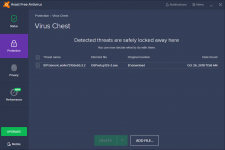
How to get rid of that?

Depends on what is generating it and if it's a real false-positive.

I'm reading a lot of reports about Avast and AVG generating false-positve IDP.generic messages. Maybe the developer can take a look into this.
 
Back
Top