
-
ORBITER-FORUM will be temporarily closed at 2026-07-23 18:00 UTC while we complete some OF maintenance tasks. The amount of downtime is expected to take up to one hour, but probably less.
You are using an out of date browser. It may not display this or other websites correctly.
You should upgrade or use an alternative browser.
You should upgrade or use an alternative browser.
Software Orbiter 2016 is taking 40 seconds to launch - SOLVED
- Thread starter oomek
- Start date


Hi there!
Are you running an anti-virus? Maybe it is checking each module online as it loads...?
Are you running an anti-virus? Maybe it is checking each module online as it loads...?
I've tried everything, Disabling Windows firewall, Windows Defender, I do not have any 3rd party antivirus. This issue is very weird as on my daughter's PC it launches instantly. The only thing that fixes it is disabling the network adapter, or unplugging the network cable.

During some of the games I play, if Discord is running, gameplay lags... badly (think old stop-motion animation).
I've eliminated all possible other software interference by disabling everything from auto start and then launching Orbiter. Then I started disabling drivers one by one and this is when I discovered that by disabling the network driver Orbiter starts normally in a fraction of a second.

From here

Gondos
Well-known member
Sometimes I get a several seconds long wait when selecting a scenario with a URL error. Do you happen to have this error shown when it finally comes up?
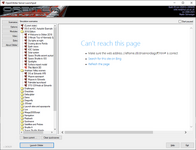
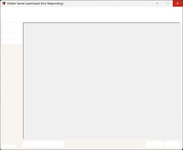
Gondos
Well-known member

Do you have any add-ons installed? Some modules can take a while to load, but 40 seconds still sounds like it's way out there...
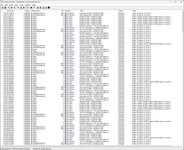

n72.75
Seize the means of computation
Orbiter Contributor
Addon Developer
Tutorial Publisher
Donator
- Joined
- Mar 21, 2008
- Messages
- 2,874
- Reaction score
- 1,718
- Points
- 128
- Location
- Saco, ME
- Website
- mwhume.space
- Preferred Pronouns
- he/him
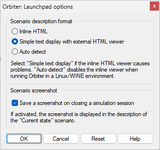
Try disabling scenerio HTML:
Extra > Debugging options > launchpad options.
Extra > Debugging options > launchpad options.

mathfly
New member

Similar threads

- Replies
- 2
- Views
- 1K

- Replies
- 9
- Views
- 5K


- Replies
- 4
- Views
- 3K

- Replies
- 8
- Views
- 5K