BETA Release OglaClient Beta 100416

Suffering CTD
Code:
**** Orbiter.log
Build Nov 24 2009 [v.091124]
Timer precision: 3.77525e-007 sec
Found 1 joystick(s)
Module AtlantisConfig.dll .... [Build 091124, API 091124]
Module AtmConfig.dll ......... [Build 091124, API 091124]
Module DGConfigurator.dll .... [Build 091124, API 091124]
Module OGLAClient.dll ........ [Build 100414, API 091124]
OGLAClient: Using OpenGL Device
Module Meshdebug.dll ......... [Build 091120, API 091120]
Module ScnEditor.dll ......... [Build 091120, API 091120]
Module TrackIR.dll ........... [Build 091120, API 091120]
TrackIR module not found.
Module transx.dll ............ [Build 091112, API 091023]
Module Rcontrol.dll .......... [Build 091120, API 091120]
Module LuaMFD.dll ............ [Build 091124, API 091124]
Module LuaConsole.dll ........ [Build 091124, API 091124]
Module FlightData.dll ........ [Build 091120, API 091120]
Module Framerate.dll ......... [Build 091120, API 091120]
Module ExtMFD.dll ............ [Build 091120, API 091120]
Module D3D7Client.dll ........ [Build 091124, API 091124]
Module CustomMFD.dll ......... [Build 091120, API 091120]

**** Creating simulation session
OGLAClient: 3D environment ok
OGLAClient: Viewport: Window 640 x 480 x 0
Module Sun.dll ............... [Build 091120, API 091120]
VSOP87(E) Sun: Precision 1e-006, Terms 554/6634
Module Mercury.dll ........... [Build 091120, API 091120]
VSOP87(B) Mercury: Precision 1e-005, Terms 167/7123
Module Venus.dll ............. [Build 091120, API 091120]
Module VenusAtm2006.dll ...... [Build 091124, API 091124]
VSOP87(B) Venus: Precision 1e-005, Terms 79/1710
Module Earth.dll ............. [Build 091120, API 091120]
Module EarthAtmJ71G.dll ...... [Build 091124, API 091124]
VSOP87(B) Earth: Precision 1e-008, Terms 2564/2564
Module Moon.dll .............. [Build 091120, API 091120]
ELP82: Precision 1e-005, Terms 116/829
Module Mars.dll .............. [Build 091120, API 091120]
Module MarsAtm2006.dll ....... [Build 091124, API 091124]
VSOP87(B) Mars: Precision 1e-005, Terms 405/6400
Module Phobos.dll ............ [Build ******, API 060425]
Module Deimos.dll ............ [Build ******, API 060425]
Module Galsat.dll ............ [Build 091120, API 091120]
Module Jupiter.dll ........... [Build 091120, API 091120]
VSOP87(B) Jupiter: Precision 1e-006, Terms 1624/3625
Module Io.dll ................ [Build 091120, API 091120]
Module Europa.dll ............ [Build 091120, API 091120]
Module Ganymede.dll .......... [Build 091120, API 091120]
Module Callisto.dll .......... [Build 091120, API 091120]
Module Satsat.dll ............ [Build 091120, API 091120]
Module Saturn.dll ............ [Build 091120, API 091120]
VSOP87(B) Saturn: Precision 1e-006, Terms 2904/6365
Module Mimas.dll ............. [Build 091120, API 091120]
SATSAT Mimas: Terms 113
Module Enceladus.dll ......... [Build 091120, API 091120]
SATSAT Enceladus: Terms 33
Module Tethys.dll ............ [Build 091120, API 091120]
SATSAT Tethys: Terms 101
Module Dione.dll ............. [Build 091120, API 091120]
SATSAT Dione: Terms 59
Module Rhea.dll .............. [Build 091120, API 091120]
SATSAT Rhea: Terms 68
Module Titan.dll ............. [Build 091120, API 091120]
SATSAT Titan: Terms 100
Module Hyperion.dll .......... [Build 091120, API 091120]
SATSAT Hyperion: Terms 595
Module Iapetus.dll ........... [Build 091120, API 091120]
SATSAT Iapetus: Terms 605
Module Uranus.dll ............ [Build 091120, API 091120]
VSOP87(B) Uranus: Precision 1e-006, Terms 1827/5269
Module Miranda.dll ........... [Build ******, API 060425]
Module Ariel.dll ............. [Build ******, API 060425]
Module Umbriel.dll ........... [Build ******, API 060425]
Module Titania.dll ........... [Build ******, API 060425]
Module Oberon.dll ............ [Build ******, API 060425]
Module Neptune.dll ........... [Build 091120, API 091120]
VSOP87(B) Neptune: Precision 1e-006, Terms 391/2024
Module Triton.dll ............ [Build ******, API 060425]
Finished initialising world
Module Atlantis.dll .......... [Build 091124, API 091124]
Module ShuttleA.dll .......... [Build 091120, API 091120]
Finished initialising status
Finished initialising camera
Finished initialising panels
Finished setting up render state
Fresh install too.

EDIT: Problem was on my end, fixed.
 
Last edited:
I don't know if you're interested in hearing about other bugs
I certainly am.

but one that I noticed is a weird texture popping issue, which looks like it rapidly tiles textures on the Earth (see the next 3 attached images)
And, that's something new. No idea yet, but definitely to be fixed.

Finally, I had a lot of trouble to get any menus to come up, e.g. by hitting F4, F3, etc. They only sometimes responded, and then would often dissappear. Because of this, I had a bit of trouble just exiting the program.
Full-screen? Known, no fix for the moment.

By the way, is there a way to get into glass cockpit view? I couldn't seem to do it.
Hm, F8? F1?

I also had trouble getting the function keys to work. It seems they sometimes completely stop working and just the F7 key responds. Also can there be maximize and minimize buttons in the window mode.
Maybe not, but i didn't try. The window is default.
All F-keys stop, including F1, F8, etc? Do other keys (RCS, thrust, gears, etc) work?

Code:
Module OGLAClient.dll ........ [Build 100414, API 091124]
Module D3D7Client.dll ........ [Build 091124, API 091124]
One client at a time should be active, at least in theory both at once can cause problems.
Then,
-did you run orbiter_ng.exe?
-is there anything in ogla.log?
 
Artlav,

The problem with the function keys bringing up menus is present (atleast for me) in Windowed mode, too.

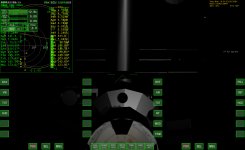
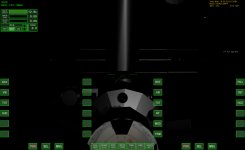
I was able to get to glass cockpit (I was pressing the wrong button). This may be a known bug, but the MFDs don't appear where they should, rather at the top left of the screen, and they flash periodically (attached 2 images).
 

Attachments

  • screenshot-100418_mfdtopleft.jpg
    screenshot-100418_mfdtopleft.jpg
    394.9 KB · Views: 17
  • screenshot-100418_noMFD.jpg
    screenshot-100418_noMFD.jpg
    194.4 KB · Views: 14
This may be a known bug, but the MFDs don't appear where they should, rather at the top left of the screen, and they flash periodically (attached 2 images).
Read the thread (and the instructions!):

Another thing noticed: The MFDs are not in their right places in the generic cockpit view. They're above the normal places and blinking very fast.

Sounds like you didn't disable the non-pot limit in the cfg.
Does disabling it fixes the issue?

The MFD mess up is really problematic though - They appear in the wrong place and are blinking hard. Also the text is ineligible.

What if you disable non-pot limit in Visual tab button menu?

Artlav, would there be any way to automatically determine if the non-pot limit is required? This seems to be a common problem. It seems to me like checking the name of the graphics device for "NVidia" or "Radeon" and changing accordingly would probably take care of the majority of the cases. Could perhaps also have a "sanity check" at some point to verify if the things are getting drawn to the right place, and if not, disable it.
 
Ah thanks Heilor. I did read the instructions, but I have an ATI card. So apparently ATI cards have this issue too.

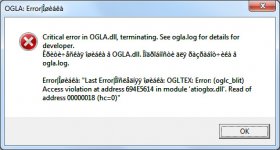
I disabled the non-pot limit, and got a CTD. I've attached a screenshot of the error. Here is ogla.log:

4/18/2010 4:56:42 PM| INIT| OGLA v100416 (GLGR)
4/18/2010 4:56:48 PM| INIT| GPU supports OpenGL 1.2
4/18/2010 4:56:48 PM| INIT| GPU supports OpenGL 1.4
4/18/2010 4:56:48 PM| INIT| GPU supports OpenGL 2.0
4/18/2010 4:56:48 PM| INIT| glgruva=1, usevbo=1, vboav=1, glgr_stensh_aupd=0, gvsync=0, gl_comp_sup=1, gl_shm4=0
4/18/2010 4:56:49 PM| OGLADBG| OGLA 100416 Debug.
4/18/2010 4:56:55 PM| OGLTEX| Error: (oglc_blit) Access violation at address 694E5614 in module 'atioglxx.dll'. Read of address 00000018 (hc=0)
 

Attachments

  • ogla_error.jpg
    ogla_error.jpg
    56.3 KB · Views: 9
Ah thanks Heilor. I did read the instructions, but I have an ATI card. So apparently ATI cards have this issue too.

I disabled the non-pot limit, and got a CTD. I've attached a screenshot of the error. Here is ogla.log:
Huh. Artlav had said that the non-pot limit was there to make it work (and not CTD) on ATI cards...so for you, it prevented the CTD, but didn't actually make it work.
 
Graphics : Geforce 7600 GT (too old, maybe ?). Drivers up to date.
Processor : AMD Athlon 64
Windows XP SP2
The last 2009 Version of OGLA was working quite well (but MFDs problems too).

I have a nice mix of the problems above :

1) 1-5 FPS max... Even with ALL options off.
2) Weird flashy MFDs (removing the non-pot limit moves them back in their correct position, but they are still flashy).
3) The HUD is very difficult to read...
4) Problems with the height maps when terrain activated. There's a Tsunami a few kilometers West of Cape Canaveral. Even worse problems on the Moon (the planet becomes transparent with some terrains polys floating).
5) Problem with ground Textures (see pic)
6) No more clouds (see pic)

 
Last edited:
Huh. Artlav had said that the non-pot limit was there to make it work (and not CTD) on ATI cards...so for you, it prevented the CTD, but didn't actually make it work.

He says disable it for NON-ATI cards, and to do so for ATI cards at your own risk (so perhaps this CTD isn't news to him).


EDIT: Ah, I think I see what you were saying here now. But I thought a possible solution for the MFD displacement/flashing was going to be disabling the non-pot limit, based on the topics you quoted. Hence the confusion.
 
Last edited:
He says disable it for NON-ATI cards, and to do so for ATI cards at your own risk (so perhaps this CTD isn't news to him).


EDIT: Ah, I think I see what you were saying here now. But I thought a possible solution for the MFD displacement/flashing was going to be disabling the non-pot limit, based on the topics you quoted. Hence the confusion.
Right, the non-pot limit was added in order to prevent the CTD on ATI cards, but it causes NVidia cards (and, apparently, yours) to display MFDs in the wrong place.
 
Take a close look at the bottom picture of M_Molson's post. Same thing happens to me when I use default Atlantis and I jettison the external tank. The ailerons and attitude thrusters move, and if there is a payload it will turn about the Z axis 180* so that its under the shuttle. I will post a screen when I can. Only tried with Atlantis, will try to replicate more.
 
... and if there is a payload it will turn about the Z axis 180* so that its under the shuttle. I will post a screen when I can. Only tried with Atlantis, will try to replicate more.

Confirmed. You can't see it on the pic, but there is a Carina Sat as payload that displays UNDER the Shuttle.

And another pic for the HUD (took on the same scenario) :

 
Last edited:
Artlav, would there be any way to automatically determine if the non-pot limit is required? This seems to be a common problem. It seems to me like checking the name of the graphics device for "NVidia" or "Radeon" and changing accordingly would probably take care of the majority of the cases. Could perhaps also have a "sanity check" at some point to verify if the things are getting drawn to the right place, and if not, disable it.
Ah thanks Heilor. I did read the instructions, but I have an ATI card. So apparently ATI cards have this issue too.
I disabled the non-pot limit, and got a CTD
Huh. Artlav had said that the non-pot limit was there to make it work (and not CTD) on ATI cards...so for you, it prevented the CTD, but didn't actually make it work.
He says disable it for NON-ATI cards, and to do so for ATI cards at your own risk (so perhaps this CTD isn't news to him).
Right, the non-pot limit was added in order to prevent the CTD on ATI cards, but it causes NVidia cards (and, apparently, yours) to display MFDs in the wrong place.
It would be a good idea, only as i remember, the last time i tried to find out how to determine GPU manufacturer i failed to find a way.
Will try again.

No way to do a sanity check - it'll either crash/BSOD or not.
The things being drawn in the wrong place is the consequence of the pot restriction, not ATI cards. So, since no surfaces for MFD's are made they are drawn onto the main screen.

There are conceivable, but complex fixes for the issue, but i'm yet to determine the exact reason for it, more specific than just non-power-of-two textures, which by themselves work here and there normally.
I'd think there is an interference pattern of two or more bugs causing the CTD, but non-pot textures is the only thing i found being removed that helps for sure.

Geforce 7600 GT (too old, maybe ?)
...
1) 1-5 FPS max... Even with ALL options off.
2) Weird flashy MFDs (removing the non-pot limit moves them back in their correct position, but they are still flashy).
3) The HUD is very difficult to read...
4) Problems with the height maps when terrain activated. There's a Tsunami a few kilometers West of Cape Canaveral. Even worse problems on the Moon (the planet becomes transparent with some terrains polys floating).
5) Problem with ground Textures (see pic)
6) No more clouds (see pic)
Not too old a one.
1) Define "ALL options off". Some must be on to gain performance, others are only disableable from visual tab button.
2) Flashy in what sense? Transparency, colors, on/off, etc?
3) I can read it fine even in the down-sampled image, could you provide a full-res one where it is hard to, and which parts are hard to?
4) See me<->daves discussion on the page 2. In essence, download Earth heightmap (not provided by default, thus terrain is random), or put "Cape Canaveral,-1,1,400000" line in place of what is in config/terrain/earth.crater file.
5) Strange. Any options short of turning terrain off that would fix the issue?
6) Same as 5.

Also, you'd probably like to turn "posteffects" off, it's a bug, not a feature.

Take a close look at the bottom picture of M_Molson's post. Same thing happens to me when I use default Atlantis and I jettison the external tank.
Reproduced, investigating.
 
The issue n°1 (framerate, regardless of what it looks) is the most important for now, so here's what is off or on :

IN-GAME PANEL (F7)

All options turned off, except :

VBO accel : on
Draw Sky : on

OGLA Configuration tab (Launchpad) :

- Shadows : off

---------------
- Projection : planar

--- MAJORS ---
- Terrain : off
- Multilight : off (and Fast Multilight off)
- GDI Emulation : off
- Advanced Graphics : off
- Advanced Atmosphere : off
- Raytraced Atmosphere : off
- Terrain Multilight : off
- Power-Of-Two (pot) limit : off
- Stereo : off

--- MINORS ----
- Additional info : on
- Wireframe : off
- Camera 2 : off
- Auto resolution : off
- Use UDP : off
- Server : off


EDIT : I just made an interesting experiment. I loaded the "Shuttle A on Olympus" scenario that comes with Orbiter. On Mars, I get the same terrible FPS (max 5 FPS). It's just like 3-5 FPS instead of 1-5 FPS on Earth.

Then I zoomed away, away, very far away. I stopped zooming out at 1 parsec frome the solar system. Orbiter has nothing to display there. Except a brighter spot for the Sun. No planets, no vessels, just the background stars. The FPS is better, but very random (in a 8-25 FPS range). Since there are no 3D objects to display, I really don't get it... If someone has an idea ? :idk:
 
Last edited:
I've got a really bad thing with a clean install of 2009 SRC2.2 and the OGLA client.

Orbiter 2009 is still using it's built in graphics client.
Orbiter_ng will load OpenGL but won't simulate it (crashes after loadup).
I have enabled OGLA client module and disabled D3D7 client. I'm running Windows 7. The log is blank.
Did you load it when running Orbiter_ng?
 
No. Only the OpenGL client was enabled.
It gets to the final screen of loading, outputs sound then goes white on me. Then no response.
Then run Orbiter_ng.exe! "ng" means "no graphics", IE it doesn't have a graphics client built into it. Or do you mean that Orbiter_ng with OGLAClient crashes on you?

In that case list your ful system specs and post the contents of ogla.og, shader.log and orbiter.log.
 
I've tried this, and i can say OMG :D

The terrain, and atmosphere looks amazing. The frame rates are very good (for me without shadows, it's nearéy always capped at 61 fps (vsync)).

But with shadows, sometimes strange things happening, fe. these happened after changing the cockpit views several times:

mapped shadows
triangles.png

other/off shadpows
triangles2.png


And there is a problem with MFDs too, in 2d views the second mfd is blank, the first is blank too, but its graphics is flickering at the left upper corner of the game window.

starting orbiter with shadows off
bug.png

when turn on mapped(only the mapped) shadows ingame fixes this, and remain correct if i turn off the shadows after this.

gpu: radeon hd3850
 
Last edited:
Disconnect, for the MFD problem - turn off the Power of Two(PoT) limit in the Orbiter Launchpad Visualization tab - OGLA Configuration. Its happened with others many times and thats the fix - currently its difficult to determine from within code if the PoT limit needs to stay or go.

I confirm the shadows problem - only high settings cause shadows for me :( which screws my frame rate - Intel GMA 4500M
Here are some pictures :
shadowshigh2.png


shadowsmapped.png


There was one other issue where the green textures seemed to spike into the landing pads :
texturebleed.png


And I again confirm the function keys problem - at this point none of my keys work(no thruster keys, attitude control, landing gear etc) - only F7 works which enabled me to show the menu.
funckeys.png


Artlav - perhaps you can put in some logging code in the part where you handle keys and let me run the client once.

Also turning of advanced graphics makes the scene very dark, buts its not much of an issue as I don't use it given that it gives low frame rates with my lower end card :
screenshot1004191429356.png


Before turning on Advanced grp, it was like this :
screenshot1004191429410.png


I dont get the lovely sunset/sunrise effect even with advanced grp turned on, the best I got was this haze effect which is lovely too :) :
screenshot1004191430380.png


Though I did have the Sun changing color as it set but only with advanced grp turned on and the entire scene going very dark. With the advanced grp off, the Sun remains white and the scene is more realistically lit:
screenshot1004191427427.png


screenshot1004191426549.png


I think you may need to add a lot of extra code to handle peculiarities associated with particular graphics cards. Cant the graphics card be detected using windows hardware API calls - because the control panel applets like device manager are able to do it. Most games have a list of "Issues with specific graphics cards" section in their docs. Which means they will be putting in code for handling particular manufacturers and are able to detect the manufacturer. So I guess you need to do that too.
 
Last edited:
Disconnect, for the MFD problem - turn off the Power of Two(PoT) limit in the Orbiter Launchpad Visualization tab - OGLA Configuration. Its happened with others many times and thats the fix - currently its difficult to determine from within code if the PoT limit needs to stay or go.

thats not a fix, since if i turn it off, the driver freezes and restarts...
 
Last edited:
thats not a fix, since if i turn it off, the driver freezes and restarts...
Right--if you'd read the thread, disabling that will cause crashes on Radeon cards.
 
Right--if you'd read the thread, disabling that will cause crashes on Radeon cards.

yes, so it isn't fix the issue...

When i enable raytraced atmosphere+ anisotropic filtering, white and black circles appearing in atmosphere.

And after some wandering on planet/solar system, this happens http://dl.dropbox.com/u/5862163/bug.mkv, and can be fixed by restarting orbiter.
 
Last edited:
Back
Top