Request New Shepard vehicle and tower

Thanks. That autopilot is going to be important for Starship and New Glenn. My New Glenn has it based off the Falcon but it isn't working correctly:(
Not sure if Starship has it
I was hoping someone might have a go at the guidance for your New Glenn, so I could see how to do it properly.
Falcon9 code has too many Falcon-specific "fudge factors" to be easily transferred.
I've done the best the best I can with the Starship - at least my Orbiter version doesn't melt ;)
Cheers,
Brian
 
@BrianJ Yes it would be nice for someone to get the autoland done. But I think we have a lot of requestors and few coders/model builders,... We need both. Just wish more coders
 
Hi,
attached below is .zip with a new .dll for the booster, .cpp code, exhaust texture (originally by @Marg I think?), some notes in the Doc, and a test scenario.

I had a lot of fun testing and enjoying the view out of the capsule window :)

Hopefully the autopilot will guide the booster from launch to landing - let me know if there's any problems/bugs/etc.

Notes:
You might want to increase the "Size" parameter of the BOlaunchpad to a few km's - otherwise the computer unloads the mesh when you get up high, and then there is a glitch when you come back down and the computer has to reload the mesh (its a fairly hefty size 10MB - my PC stutters while reloading).

The capsule is very sensitive to being jettisoned too early (while there is still any atmosphere around).
I set the autopilot to jettison the capsule when Dynamic Pressure < 8Pa (about 78km alt.)
Maybe its realistic? Anyway, you can experiment by jettisoning manually, if you want.

Here's what I came up with for the booster specs (I'm pretty sure the 75000kg launch mass figure from Wkipedia is a classic "Metric/Imperial units mix-up" ;) )

Booster Empty Mass 9000kg
Capsule Mass 5000kg
Propellant Mass 20000kg
Main Engine Max.Thrust 490kN
Main Engine ISP 3500Ns/kg
Attitude control by Main Engine thrust vector, or aft fins.

Controls:
K = Enter Booster Landing Target Name (or NULL for no target)
P = Start/Stop Autopilot (stop and re-start in mid flight will probably cause failure!)
J = Jettison Capsule
B = Deploy/Stow Air Brakes
N = Deploy/Stow Ring Fins
G = Deploy/Stow Landing Gear
M = Deploy/Stow Filters
E = Set Camera View Forward/Back

Autopilot sequence:
Retract Filters
Ramp-Up Main Engine 0-100% (3 seconds)
Ascent (Full Power), pitch bias toward landing target
Throttle down to ~95% during MaxQ (~Mach1)
MECO when Remaining Propellant = 2000kg (~48km alt.)
Capsule Jettison when Dynamic Pressure < 8Pa (~78km alt.)
Coast to Apogee (~108km alt.)
Coast Descent to Atmosphere Interface (50km alt.)
Deploy Ring Fins (50km alt.)
Begin Glide to Landing Target (50km alt.)
Deploy Air Brakes (5km alt.)
Begin Landing Burn (1100m alt.)
Touchdown, MECO, stow Ring Fins and Air Brake (0m alt.)


Big thanks to @Donamy and everyone involved in getting the Corn Ranch up-and-running (y)

Cheers,
BrianJ
 

Attachments

Thanks. I can change the launchpad size. But it didn't for me land on the Landing pad?

Weird there is no setsize on the launchpad.

@Scorch can see how it works for him
 
Last edited:
Thanks. I can change the launchpad size. But it didn't for me land on the Landing pad?
The autopilot will target the origin (0,0,0) of any base or landed vessel.
It doesn't know about off-centre landing pads.

Weird there is no setsize on the launchpad.
My BOLAUNCHPAD.CFG (I don't think it was included in your test .zip) :
Code:
; === Configuration file for vessel class Adapter ===
ClassName = BOLAUNCHPAD
Module = BOlaunchpad
Size = 5000
 
Thanks. Yes my cgf had no size? So make it more than 5000?
weird. so I have.
BASE-V2.0
Name = Corn_Ranch_Landing
Location = -104.7628 31.4517
Size = 2000

BEGIN_OBJECTLIST
LPAD1 ;Blue Origin Land Pad
POS 0 0 0
ROT 0
SCALE 0 0 0
TEX Lpad02
NAV 130.20
END
END_OBJECTLIST

so the landing pad is in the center

and the vessel ended up here:
NewShepard:newsheppard
STATUS Landed Earth
POS -104.7854739 31.4355870
HEADING 245.55
ALT 9.141
AROT 147.699 12.577 106.617
AFCMODE 7
NAVFREQ 0 0
LEGS 2 1.0000
SPEEDBRAKE 0 0.0000
RINGFIN 0 0.0000
FILTER 2 1.0000
APST 0 0
LTGT Corn_Ranch_Landing
CAP 1 1.0000
CAM 1
END
 
Thanks. Yes my cgf had no size? So make it more than 5000?
weird. so I have.
BASE-V2.0
Name = Corn_Ranch_Landing
Location = -104.7628 31.4517
Size = 2000

BEGIN_OBJECTLIST
LPAD1 ;Blue Origin Land Pad
POS 0 0 0
ROT 0
SCALE 0 0 0
TEX Lpad02
NAV 130.20
END
END_OBJECTLIST

so the landing pad is in the center

and the vessel ended up here:
NewShepard:newsheppard
STATUS Landed Earth
POS -104.7854739 31.4355870
HEADING 245.55
ALT 9.141
AROT 147.699 12.577 106.617
AFCMODE 7
NAVFREQ 0 0
LEGS 2 1.0000
SPEEDBRAKE 0 0.0000
RINGFIN 0 0.0000
FILTER 2 1.0000
APST 0 0
LTGT Corn_Ranch_Landing
CAP 1 1.0000
CAM 1
END

That looks like the place it comes down if you don't have any landing target entered 🤷‍♂️
 
Oh, here is where the ship landed:
NewShepard:newsheppard
STATUS Landed Earth
POS -104.7854739 31.4355870
HEADING 245.55
and the Base is:
Location = -104.7628 31.4517

it is close though
 
With Orbiter's "wind effects" enabled I land within ~20m accuracy, without wind its within ~1m.
Maybe someone else can give it a try. I have to have some dinner now!
Cheers,
Brian
 
I will put together something. How to turn off the wind effects?
 
Test pack .zip attached below.
I think it should have everything needed to test.
Open the scenario and press P for autopilot.
Cheers,
Brian
 

Attachments

I will put together something.
Cross-posting! Sorry, didn't mean to barge in ahead.

How to turn off the wind effects?
Orbiter 2016 : Parameters -> Atmospheric Wind Effects
Orbiter 2024 : Options -> Physics settings -> Atmopheric Wind Effects

I don't know why the landing targeting isn't working for you - if the autopilot can't find a valid target it should change the target name to NULL - so I'm baffled!

Cheers,
Brian
 
Oh. My wind was off. So I just started this and press P to start the sequence. When The capsule separates I Get a CTD.
Tried again
Landed great. I manually jettison the capsule "J"
 

Attachments

  • nesheppard2.jpg
    nesheppard2.jpg
    45.3 KB · Views: 3
  • nesheppard1.jpg
    nesheppard1.jpg
    87.3 KB · Views: 3
try this. It gives you you rocket and capsule. Once the capsule is released focus on the capsule and press 3 and that tell it to auto land sequence
 

Attachments

Pad looks great! Rocket looks great! Launch ascent good (peak 3G).
Problem with capsule sep., gets shot into NaN space! Also cam view intern only/broken? And CTD on focus after a few seconds.
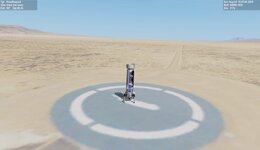
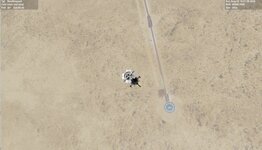
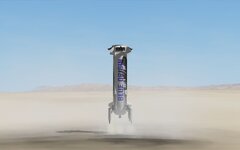
Booster descent animation cool (5Gs!), Landing very pretty, even coped with the uneven terrain! (looks like I'm missing the landing site textures?). Landing site distance= 1.46m! (no wind).
0712.jpg

Edit: Tried BrianJ's last post, different .dlls and meshes, same problem with the capsule.
 
Last edited:
Weird.
I think the rocket needs to not be moving when the capsule is released
I have a FLAT file so the terrain is even.
Can you post the log.
this is weird.
BASE-V2.0
Name = Corn_Ranch_Landing
Location = -104.7628 31.4517
Size = 2000

BEGIN_OBJECTLIST
LPAD1 ;Blue Origin Land Pad
POS 0 0 0
ROT 0
SCALE 0 0 0
TEX Lpad02
NAV 130.20
END
END_OBJECTLIST

I see the blue circle.
but shouldn't it be:
TEX BlueOrigin\landingpad

and the flat: CornRanch.flt
ELLIPSE 1131 -104.757138 31.421940 3000 3000 0 10

ELLIPSE 1130 -104.747276 31.397153 350 350 0 50
 
just ran it and no issues. On the capsule key 4 tells it to deploy chutes, at a certain height.

On the blue circle I think that is part of the hi def terrain here:
 
Can you post the log.
I did check but the only errors were 2 non-critical obsolete API calls.
On the blue circle I think that is part of the hi def terrain here:
I'll install and give it another go.

Edit: Installed Corn Ranch, works flawlessly, great job @misha.physics, pad looks even better! (I don't think the 2nd flat was working for me, I'll look into it later).
Everything is working fine except the capsule, I made a test scene with only the capsule in orbit (attach.) and tried both mode 0 and 1 but it NaNs imeadiately! (using the last .dlls etc... from Gattispilot's last post). Had a first glimpse of the interior, nice view, maybe add some emmisive to the interior textures for lighting.
 

Attachments

Last edited:
Back
Top