Gaming New Microsoft Flight Simulator?

Yeah, steam is counting the hours that the launcher is running. Not how long the game has been played. There are some players up in arms because of the steam refund policy.
 
View attachment 22684

Got the Game Pass for 1 euro. I'll pay the full price next month :p
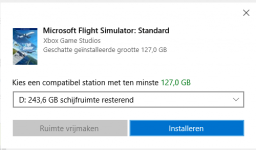
This is not the installer I was talking about. This is just the "pre-installer". I'm talking about the installer that comes after this one, the one that has the MSFS2020 background and plays music. That's where you can where the actual MSFS2020 should be installed.
 
Downloaded and installed in about 3.5 hours. Game performance is decent. Only a bit slower than FSX, but with much better graphics.
Positives - night lights; clouds and weather ; aircraft handling; real world traffic; real terrain mapping.
Negatives - interface with no menus; buildings are autogen and generic; AI autopilot / ATC act a bit strange.

I'm disappointed with the cities. I tried Edinburgh and the castle shows up as office buildings...
Buildings are just too generic. Perhaps it's better on other locations, but on those I tried, I saw the same autogen buildings and generic bridges.
So be warned about that.

I'm happy because I enjoy low level free flight. For that the satellite imagery works perfectly and the basic version is enough!
Started my Caribbean island hopping adventure and it was very enjoyable. Generic airports look good with nice details like parked cars.
 
Just found out you can walk around in Microsoft Flight Simulator after you land! :love: Details in this video:


Landed at Kitty Hawk, North Carolina tonight (KFFA) and had fun walking around the monument area that I walked around in real-life some years back. :giggle:
 
Well, it finished after nearly 24 hours, why so long? I have a fairly high speed internet connection 33Mb/s I think.

Runs ok, adjusting for my machine.
Don't know where its getting the weather from. I'm about 8 miles East of EGNT and its showing fog. CAVOK out the window at home.
 
I had it downloading overnight, but the installer crashed. Reopened the installer this morning, downloaded the remaining 59GB in 2 hours, but I can't fly. Clicking the Fly button doesn't do anything. Found some kind of "recover" button, and now it should be downloading a 4GB patch again.
 
I had it downloading overnight, but the installer crashed. Reopened the installer this morning, downloaded the remaining 59GB in 2 hours, but I can't fly. Clicking the Fly button doesn't do anything. Found some kind of "recover" button, and now it should be downloading a 4GB patch again.

I've found that sometimes it looks like it's not doing anything but it's actually just waiting on the Azure servers. More than once I've just walked away, made tea and come back to it working.
 
I had it downloading overnight, but the installer crashed. Reopened the installer this morning, downloaded the remaining 59GB in 2 hours, but I can't fly. Clicking the Fly button doesn't do anything. Found some kind of "recover" button, and now it should be downloading a 4GB patch again.

I had the same thing happen to me. It thought it was done, started up, but the 'Fly' button just did nothing. Shut down, restart, and it figured out it wasn't really done with the download and continued. In all, 24 hours to get everything installed.

There appears to be no documentation at all, so you are left hunting and pecking around for commands and keystrokes that are not were they were in FSX. I think it can be a great sim, but has some maturing and polishing to do.
 
Here is something crazy - if you have low frame rates try bringing up the ATC, Fuel and any other windows. Click on the middle icon so they "pop out" into their own windows and minimise them if you have a single monitor or move them to another monitor.

I did this and went from 20fps to near 80fps. It's been reported on the MS forums. https://forums.flightsimulator.com/t/improved-fps-but-how/160177/14
 
Last edited:
I'm disappointed with the cities. I tried Edinburgh and the castle shows up as office buildings...
Buildings are just too generic. Perhaps it's better on other locations, but on those I tried, I saw the same autogen buildings and generic bridges.
So be warned about that.


It's probably in their best interest to do this. Looks passable enough for default, but really opens it up to developers, who will be the ones keeping it alive down the road, like with FSX.
 
It's probably in their best interest to do this. Looks passable enough for default, but really opens it up to developers, who will be the ones keeping it alive down the road, like with FSX.

Sure, but still it's a bit sub-standard in some places.
And people have noticed: https://www.kotaku.com.au/2020/08/f...ne-turns-buckingham-palace-into-apartments-2/

Of course, there are plenty of 3D modeled cities https://www.rockpapershotgun.com/20...ic-cities-in-microsoft-flight-simulator-2020/
Quality there is quite good!
 
Ok one last one for you guys that have it already, is the install system resource intensive? I'm about to give in, but I'm worried it would be like SWTOR's installer and use up all the system's resources.
 
Ok one last one for you guys that have it already, is the install system resource intensive? I'm about to give in, but I'm worried it would be like SWTOR's installer and use up all the system's resources.
I'm not quite sure what you mean? It'll of course download ca. 100GB of data, but otherwise what do you mean by "resource intensive"?
 
You can use your PC for web browsing or Orbiter while installing...
Of course disc access on the same drive will be dead slow, because the installer is writing to disc most of the time.
But the PC remains usable during install.
 
Back
Top