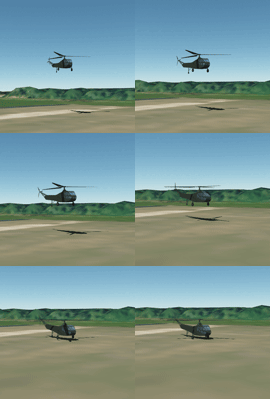
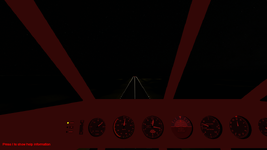
Project Lua Script Helicopters!

Thanks. I think also it needs if animate state less than 0 it is 0 and if larger than 1 it is 1
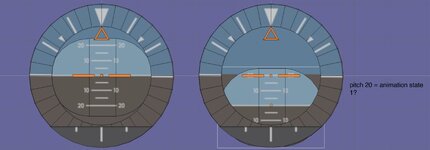
I need to look at the range the pitch on the gauge is -20 to +20 So if if the pitch is greater or less the max animation is 20 degrees pitch, right?
I might need a scale factor.
 

Attachments

  • gaugetets.jpg
    gaugetets.jpg
    35.7 KB · Views: 2
Thanks. I think also it needs if animate state less than 0 it is 0 and if larger than 1 it is 1
That should already happen with the above code if it is done correctly. It should only range from 0 to 1.
I need to look at the range the pitch on the gauge is -20 to +20 So if if the pitch is greater or less the max animation is 20 degrees pitch, right?
I might need a scale factor.
You don't want to scale it, but limit the range. You would need to limit the animation state to +/-(20/180) = +/-(1/9). If it exceeds those bounds, set the animation state equal to the bound.
 
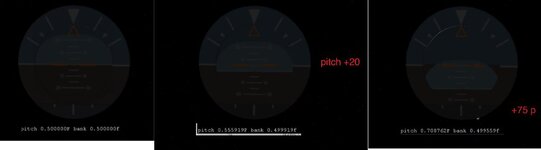
This is what I have :
void GAUGE::clbkPreStep(double SimT, double SimDT, double MJD) {

//double pitch = 0.5 + (GetPitch() / 2 * PI);
//1rad × 180/π 0.5 + (GetBank() / 2 * PI)
//SetAnimation(anim_pitch, pitch);
//double roll = 0.5 + (GetBank() / 2 * PI);
//SetAnimation(anim_ROLL, roll);
double pitch = GetPitch();

double roll = GetBank();

anim_pitch_state = 0.5 + (pitch / (2 * PI));

anim_roll_state = 0.5 + (roll / (2 * PI));
//if (anim_roll_state > .99)anim_roll_state = .99;
//if (anim_roll_state <=0 )anim_roll_state = 0;
sprintf(oapiDebugString(), "pitch %FF bank %ff ", anim_pitch_state, anim_roll_state);
SetAnimation(anim_pitch, anim_pitch_state);
SetAnimation(anim_ROLL, anim_roll_state);
}

void GAUGE::DefineAnimations(void)
{
anim_pitch = CreateAnimation(.5);
anim_ROLL = CreateAnimation(.5);
ANIMATIONCOMPONENT_HANDLE GUAGE1;
static UINT rollGrp[1] = { 4 };
static MGROUP_ROTATE ROLL(0, rollGrp, 1, _V(0, 2, 0), _V(0, 0, 1), (float)(120 * RAD));
GUAGE1=AddAnimationComponent(anim_ROLL, 0.0, 1, &ROLL);


static UINT PITCHGrp[1] = { 2};
static MGROUP_TRANSLATE PITCH(0, PITCHGrp, 1, _V(0, -4, 0));
AddAnimationComponent(anim_pitch, 0.0, 1, &PITCH, GUAGE1);

}
I guess once this is figured out and reduce the size to fit on the copter dash. I can add a mfd mesh group but no clue about LUA. I guess some of the other gauges may need to be redone

 

Attachments

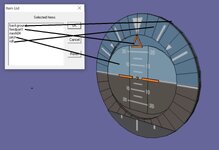
  • guageanimation.jpg
    guageanimation.jpg
    17.3 KB · Views: 4
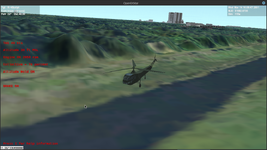
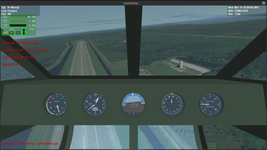
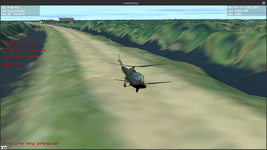
Have the R-4 flying with the correct engine and rotor specifications and vessel dimensions, and have the cockpit views and rotor animations set up. Wheels are set up with differential brakes so it can taxi.

Screenshot at 2025-01-17 12-36-25.png

It's much easier to fly than the Bell222. Not heavy, and not overpowered.

Just need to get the instrument animations hooked up and it should be good to go.
 
This is what I have :
void GAUGE::clbkPreStep(double SimT, double SimDT, double MJD) {

//double pitch = 0.5 + (GetPitch() / 2 * PI);
//1rad × 180/π 0.5 + (GetBank() / 2 * PI)
//SetAnimation(anim_pitch, pitch);
//double roll = 0.5 + (GetBank() / 2 * PI);
//SetAnimation(anim_ROLL, roll);
double pitch = GetPitch();

double roll = GetBank();

anim_pitch_state = 0.5 + (pitch / (2 * PI));

anim_roll_state = 0.5 + (roll / (2 * PI));
//if (anim_roll_state > .99)anim_roll_state = .99;
//if (anim_roll_state <=0 )anim_roll_state = 0;
sprintf(oapiDebugString(), "pitch %FF bank %ff ", anim_pitch_state, anim_roll_state);
SetAnimation(anim_pitch, anim_pitch_state);
SetAnimation(anim_ROLL, anim_roll_state);
}

void GAUGE::DefineAnimations(void)
{
anim_pitch = CreateAnimation(.5);
anim_ROLL = CreateAnimation(.5);
ANIMATIONCOMPONENT_HANDLE GUAGE1;
static UINT rollGrp[1] = { 4 };
static MGROUP_ROTATE ROLL(0, rollGrp, 1, _V(0, 2, 0), _V(0, 0, 1), (float)(120 * RAD));
GUAGE1=AddAnimationComponent(anim_ROLL, 0.0, 1, &ROLL);


static UINT PITCHGrp[1] = { 2};
static MGROUP_TRANSLATE PITCH(0, PITCHGrp, 1, _V(0, -4, 0));
AddAnimationComponent(anim_pitch, 0.0, 1, &PITCH, GUAGE1);

}
I guess once this is figured out and reduce the size to fit on the copter dash. I can add a mfd mesh group but no clue about LUA. I guess some of the other gauges may need to be redone
I'm wrestling with this same animation in Lua for the R-44. The trick with the ball is that the same mesh group has to be rotated and translated simultaneously, and I'm not clear on the cleanest way to do that. I have to dig back through some of my threads as I ran into this with my VW Thing wheel animations, and what I did in the VWThing was a hack where I made a dummy meshgroup to take the parent animation, then I could rotate the actual meshgroup with the child.

Stay tuned.
 
Oh. In my test I made the roll part a parent and the pitch a child. So the the roll rotates and the pitch translate
 
Oh. In my test I made the roll part a parent and the pitch a child. So the the roll rotates and the pitch translate
Did this work for you? I have had problems doing parent-child animations on a single meshgroup. I have a parent animation for roll and pitch for the child animation, but I needed to give the parent animation a dummy meshgroup to act on so I could nest the animations and have the ball rotate and translate simultaneously.

I made a simple mesh file Dummy.msh and put in the mesh files for the helicopter (R-4) containing a single simple meshgroup:

Code:
MSHX1
GROUPS 1
LABEL Dummy
MATERIAL 0
TEXTURE 0
FLAG 0
GEOM 3 1
1 0 0
0 1 0
-1 0 1
0 1 2
TEXTURES 0
MATERIALS 0

I define the artificial horizon animations in the following function called in clbk_setclasscaps:

Code:
function make_anim.Artificial_Horizon()

    anim_horizon_circle = vi:create_animation(0.5)

    horizon_circle =

        {
        type =  'rotation',
        mesh =  0,
        grp =   {6},
        ref = horizon_circle_location,
        axis =  indicator_axis,
        angle = -360*RAD
        }

        vi:add_animationcomponent(anim_horizon_circle,0,1,oapi.create_animationcomponent(horizon_circle))

    anim_horizon_ball_roll = vi:create_animation(0.5)

    horizon_ball_roll =

        {
        type =  'rotation',
        mesh =  1,                  --dummy mesh for parent-child animations on the same meshgroup
        grp =   {0},
        ref = horizon_circle_location,
        axis =  indicator_axis,
        angle = -360*RAD
        }

    anim_horizon_ball_pitch = vi:create_animation(0.5)

    horizon_ball_pitch =

        {
        type =  'translation',
        mesh =  0,
        grp =   {7},
        shift = get_help.rotate_pitch({x=0,y=0.034,z=0}, dash_angle) -- can translate +/- 3.4 cm in plane of dashboard
        }


    parent = vi:add_animationcomponent(anim_horizon_ball_roll,0,1,oapi.create_animationcomponent(horizon_ball_roll))
    vi:add_animationcomponent(anim_horizon_ball_pitch,0,1,oapi.create_animationcomponent(horizon_ball_pitch), parent)

end

I set the three animation states for the rotating outer ring and the rotating and translating ball in another function called in clbk_prestep:

Code:
function set_anim.Artificial_Horizon()

    local pitch = vi:get_pitch()
    local roll = vi:get_bank()

    local pitch_anim_state = 0.5*(1 - (pitch/(20*RAD))) --limits pitch range on indicator to +/- 20 degrees
    local roll_anim_state = 0.5*(1 - (roll/PI))

    vi:set_animation(anim_horizon_circle, roll_anim_state)
    vi:set_animation(anim_horizon_ball_roll, roll_anim_state)
    vi:set_animation(anim_horizon_ball_pitch, pitch_anim_state)

end

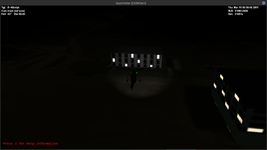
Screenshot at 2025-01-17 19-34-33.png

It's a strange animation as the center ball should actually be a ball, not a flat circle, that rotates on both axes instead of rotating on the roll axis and translating in the local Y-direction. It might be possible to make this animation using flat meshgroups, with the outer circle a mesh with a circular hole in the middle to allow the ball to be seen, and the current ball mesh could be extended to be larger and offset just behind the outer circle. It would look more like the real ball.

EDIT: I've realized that since the outer circle is undergoing the roll rotation as well, the animation for that meshgroup can stand in for the parent rotational transformation of the inner ball meshgroup without the need for a dummy meshgroup. But as far as I understand, if that outer ring didn't exist or need to be animated, I'd have to resort to using a dummy meshgroup to animate just the inner ball meshgroup in both rotation and translation.
 
Last edited:
Checking the power output of my engine model gives 117 kW at max rpm based solely on displacement and engine compression ratio, compared to the Warner SuperScarab spec of 108 kW at the same RPM, within 10% without any tweaking! I can make some fine adjustments with the polytropic specific heat ratio to improve agreement as that models the heat loss through the cylinder walls, which varies engine to engine.

Applied engineering science FTW!

SuccessKid.jpg
 
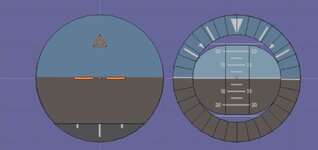
Oh I made the center orange part a group that never moves, The roll part is just a ring that moves and the pitch group is in the center.
 

Attachments

  • gaugesetup.jpg
    gaugesetup.jpg
    47.7 KB · Views: 3
Oh I made the center orange part a group that never moves, The roll part is just a ring that moves and the pitch group is in the center.
I understand that. The oval shaped part in the center representing the ball is what I was referring to. Right now if you pitch up/down 20 degrees, that part slides up and down and partially occludes the outer ring. If that was set behind the ring slightly and made bigger so the blue and green areas would always be seen, that would look more like the real instrument.
 
Oh. On mine the bank indicator is a ring. Hollow enough for the oval part to slide up and down.
 
This is what I did. But it sounds like the oval pitch or bank part should be adjusted so the background part can be seen around the sides of the oval part
 

Attachments

  • gaugesetup1.jpg
    gaugesetup1.jpg
    35.2 KB · Views: 3
Right now if you pitch up/down 20 degrees, that part slides up and down and partially occludes the outer ring. If that was set behind the ring slightly and made bigger so the blue and green areas would always be seen, that would look more like the real instrument.
Oh, that's my fault. I thought I placed the outer ring in front of the ball, but I just checked it and, so I did it wrong. But it's very easy to correct.
It's a strange animation as the center ball should actually be a ball, not a flat circle, that rotates on both axes instead of rotating on the roll axis and translating in the local Y-direction. It might be possible to make this animation using flat meshgroups, with the outer circle a mesh with a circular hole in the middle to allow the ball to be seen, and the current ball mesh could be extended to be larger and offset just behind the outer circle. It would look more like the real ball.
I just saw some pictures of real aircraft cockpit like Cessna 172, and its artifical horizon looked like here with the oval moving ball. I thought the ball is flat (or at least it's almost flat part of a sphere, but not the entire sphere). I just found it now:

By the way, I saw other mechanism. For example, here (outer ring doesn't rotate):
EDIT: I've realized that since the outer circle is undergoing the roll rotation as well, the animation for that meshgroup can stand in for the parent rotational transformation of the inner ball meshgroup without the need for a dummy meshgroup. But as far as I understand, if that outer ring didn't exist or need to be animated, I'd have to resort to using a dummy meshgroup to animate just the inner ball meshgroup in both rotation and translation.
So, the dummy meshgroup isn't needed now?
 
I just PM'd you but so everybody can see what is going on I'll also reply here.
Oh, that's my fault. I thought I placed the outer ring in front of the ball, but I just checked it and, so I did it wrong. But it's very easy to correct.

I just saw some pictures of real aircraft cockpit like Cessna 172, and its artifical horizon looked like here with the oval moving ball. I thought the ball is flat (or at least it's almost flat part of a sphere, but not the entire sphere). I just found it now:
It usually is a ball, but a flat circle located just behind the circular ring could be animated just as well and would work fine. If you make it a ball meshgroup it could be hard to read unless it was large enough and had enough triangles.

By the way, I saw other mechanism. For example, here (outer ring doesn't rotate):
This looks like what I was thinking about. My suggestion would be to take the markings on the ball meshgroup and put it on the larger background, and animate that background in place of that ball meshgroup. That would resemble the artificial horizon you linked to in your previous post. If you leave all of the orange indicators static, then the outer ring could still rotate and indicate bank angle.
So, the dummy meshgroup isn't needed now?
With the current rotating outer ring, I can use that animation as the parent to the translation animation required by the ball indicator and so the dummy meshgroup I made isn't needed. I don't know of a way to do combined parent-child animations on a single meshgroup using Orbiter methods without making a fake mesh to accept the parent animation.
 
Back
Top