
New Feature Link to your addons on OrbitHangar, displayed in all your forum posts

Tex

O-F Administrator
Administrator
Retired Staff
Tutorial Publisher
Donator
Joined
Oct 16, 2007
Messages
6,586
Reaction score
140
Points
138
Location
Houston
Website
youtube.com
Hi all.

I've made it possible for those of you with accounts on OrbitHangar to easily add the link to your addon page which will display the link in the postbit of all your posts like this:
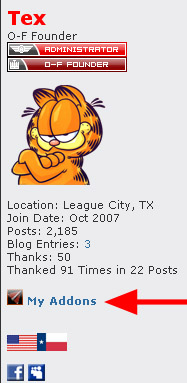
postbit-link2.jpg


You can add this from the top of your 'Options' page through your UserCP.
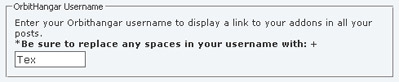
postbit-link1.jpg


*ONLY enter your username from Orbithangar, not the url to your addon page. Also, any spaces in your username must be replaced with +
 
Nice feature Tex. It would make it easier to read though if it said (eg) "Tex's Addons" rather than "My Addons". When I'm reading the page it implies that clicking the links will take me to my orbithangar page with my addons, rather than yours.
 
Nice feature Tex. It would make it easier to read though if it said (eg) "Tex's Addons" rather than "My Addons". When I'm reading the page it implies that clicking the links will take me to my orbithangar page with my addons, rather than yours.

I think I can make that happen. Time for bed now, but I'll play with it tomorrow. I'm fairly certain that's an easy fix.

Thanks for your feedback. :cheers:
 
Does this only work when the user name on O-H is the same as on O-F?
 
heh, fixed. I couldn't go to sleep when it was an easy fix. :)

Does this only work when the user name on O-H is the same as on O-F?

No doesn't matter, just enter your OH username to make it work.
 
No doesn't matter, just enter your OH username to make it work.

Strange, I have linked the account already, without any effect, just repeated it in case it failed...no change.
 
That is strange. As long as you're entering your username in the appropriate box on the Edit your Details page then it should work. I've seen several others get it working so far.
 
I bet it is the space in the name. Tried using %20 instead?
 
^ I didn't think about that, indeed that is probably the issue. Try was TSP suggested, that should work.
 
Nice, but... what did we linked the accounts on OF and OH for then?
And, BTW, what if someone places someone other's nick in there?
 
Last edited:
Doesn't work with %20 inside, then it does not recognize the user name. With space instead, it reports success, but doesn't react.
 
Nice, but now i have some weird bar popping up at the bottom of the browser.
Setting "Enable Interaction Toolbar" to no fixed it, but why did it appear in the first place?
 
Nice, but now i have some weird bar popping up at the bottom of the browser.
Setting "Enable Interaction Toolbar" to no fixed it, but why did it appear in the first place?
Hmmm, it seems the Interaction Toolbar feature did not get announced. Its been there for a little while now (~2 weeks) but some quirk in the vBulletin settings makes it so it doesn't appear until you make some change to your user options, at which time it defaults to "yes". Once you have changed it back to "no", it should stay that way even after subsequent changes to your user options.
 
I did wonder where that toolbar came from...
 
Nice, but... what did we linked the accounts on OF and OH for then?

Your accounts haven't actually been linked together yet, you've only confirmed with Vash your two accounts. More may come of this as we integrate certain parts of the sites over time.


DarkWanderer said:
And, BTW, what if someone places someone other's nick in there?

It would be no different than if someone posted a link to someone else's addon page in their signature claiming to be their own. If you or anyone else notices someone is using another members OH username then you should report it to us and we will take care of it.


Doesn't work with %20 inside, then it does not recognize the user name. With space instead, it reports success, but doesn't react.

Thanks for the feedback Urwumpe, I am looking into this issue.


Nice, but now i have some weird bar popping up at the bottom of the browser.
Setting "Enable Interaction Toolbar" to no fixed it, but why did it appear in the first place?

Look on the bottom of THIS page and select No to hide it. It's a toolbar with both O-F and Google search functionality, the ability to translate entire pages into another language, and it includes all of our social networking. It's mainly for guests, but members have the option to keep it or hide it.
 
Doesn't work with %20 inside, then it does not recognize the user name. With space instead, it reports success, but doesn't react.

This issue has been fixed. You have to replace any spaces in your OH username with +. I've updated it for you, you can edit this from your Edit Details page anytime.
 
Thank you, is working now properly :)
 
Back
Top