IUS 1.0 Development

I can't work with the tex files, but I can still write something... it just has to be somebody else inserting that into the main file.

Just write it into the tex file, you can edit it with any text editor and the LaTex syntax is pretty easy. I think I still have a good IDE for LaTex projects on my PC from university.

EDIT: Really still have it... Look for TeXnicCenter:

http://www.texniccenter.org
 
Just write it into the tex file, you can edit it with any text editor and the LaTex syntax is pretty easy. I think I still have a good IDE for LaTex projects on my PC from university.

EDIT: Really still have it... Look for TeXnicCenter:

http://www.texniccenter.org
Sometime ago I tried 2 or 3 programs and couldn't get them to work :facepalm:. I'm writing now, but later I'll take a look at that one.
 
Last edited:
Sometime ago I tried 2 or 3 programs and couldn't get them to work :facepalm:. I'm writing now, but later I'll take a look at that one.

if you need help, just ask... I remember suggesting the LaTeX format for the main manual because it allows creating professionally looking manuals AND work on multiple chapters of the manual simultaneously by a version control system.
 
I'm beginning to think that the Drive Enable switches don't determine speed but instead determine how far the movement will go: maximum will drive the table all the way to the extreme, and the intermediate will just drive the table until the next stop (29º, 58º, etc). Can anyone confirm this? And does anybody have anything else on the ASE, besides the STS 93 checklist? Reverse engineering this with just that is hard...
 
I don't think that it works like that. Drive enable usually means that a AC motor and its control electronics are powered,it does not say in which direction the table is rotated. The speed of rotation is usually only controlled by the number of motors driving the common differential.

I think that the tilt table position was controlled manually.

EDIT: Reading the checklist again, I think you could be right, MAX and intermediate seem to control where the power is removed from the deployment motor, the two position talkbacks indicate when the signal to stop the deployment at intermediate position arrive.
 
Last edited:
I don't think that it works like that. Drive enable usually means that a AC motor and its control electronics are powered,it does not say in which direction the table is rotated. The speed of rotation is usually only controlled by the number of motors driving the common differential.

I think that the tilt table position was controlled manually.

It seems the position talkbacks when gray when (at least) at 29º and 58º (or a range around those angles). And in Drive Enable Intermediate it looks like it stops automatically at those points (see page 4-5). In Drive Enable Maximum it has an indication to stop manually by going Drive Enable Off. Also supporting this is the fact that by using the drive times in the checklist to calculate the table angular rate, I got pretty much the same rate regardless of which Drive Enable setting was on.
 
It seems the position talkbacks when gray when (at least) at 29º and 58º (or a range around those angles). And in Drive Enable Intermediate it looks like it stops automatically at those points (see page 4-5). In Drive Enable Maximum it has an indication to stop manually by going Drive Enable Off. Also supporting this is the fact that by using the drive times in the checklist to calculate the table angular rate, I got pretty much the same rate regardless of which Drive Enable setting was on.

Yes, you are right there, I had correctly understood the lingo for the "drive enable" switch but not the actual implementation there. It seems like the switch controls which microswitches are responsible for removing power from the deployment motors. You have to think a bit in relays there, which are used for controlling the motors.
 
Just committed the new tilt table motion logic. The angles for the position talkbacks and motion stops might be wrong as all I had was the "Protractor Tilt Indication" diagram in page 8-8.
Any ETA on the ASE umbilical?
 
Just committed the new tilt table motion logic. The angles for the position talkbacks and motion stops might be wrong as all I had was the "Protractor Tilt Indication" diagram in page 8-8.
Any ETA on the ASE umbilical?
Not at this time. I'm still coming up short on images/schematics of it.
 
Just committed the new tilt table motion logic. The angles for the position talkbacks and motion stops might be wrong as all I had was the "Protractor Tilt Indication" diagram in page 8-8.
Any ETA on the ASE umbilical?

The checklist contains the angles at which the position talkback could indicate barberpole in the text for every rising action.
 
Well, I'm back on this and I'm adding the one missing major element, the IUS ASE umbilical boom. I have hit a critical roadblock though which is that I don't have any images whatsoever of the plug end of it that mates with the receptacles on the IUS second stage. Without any images, I can't complete it. I'm not sure how I should be proceed.
 
Well, I'm back on this and I'm adding the one missing major element, the IUS ASE umbilical boom. I have hit a critical roadblock though which is that I don't have any images whatsoever of the plug end of it that mates with the receptacles on the IUS second stage. Without any images, I can't complete it. I'm not sure how I should be proceed.

Door 1 - we ignore it and go on without
Door 2 - You guess.
Door 3 - A goat, as usual.
 
Do the attached images help? :tiphat:

Also, is it possible to also have a USAF texture and "custom" ASE mylar? (some had more than others...) No rush on these, maybe for Christmas. :lol:
 

Attachments

  • ius-18_1.jpg
    ius-18_1.jpg
    118.6 KB · Views: 501
  • ius-18_2.jpg
    ius-18_2.jpg
    86.2 KB · Views: 498
Well, I'm back on this and I'm adding the one missing major element, the IUS ASE umbilical boom. I have hit a critical roadblock though which is that I don't have any images whatsoever of the plug end of it that mates with the receptacles on the IUS second stage. Without any images, I can't complete it. I'm not sure how I should be proceed.

I'm sure best guess would be fine. If you can't find any photos, then who would know the difference?
 
I have checked in a new version of the IUS ASE that has a preliminary version of the umbilical boom. Once we have a working animation of it, I'll finish whatever needs finishing.

---------- Post added at 11:56 AM ---------- Previous post was at 11:52 AM ----------

Also, is it possible to also have a USAF texture and "custom" ASE mylar? (some had more than others...) No rush on these, maybe for Christmas. :lol:
The images doesn't help as the boom is attached to the ASE, not the IUS itself. And it so happens to be on the bottom side (when viewed from the orbiter) so it is hidden from view when the IUS/ASE/PL is in the PLB. As for the textures, I don't see why we couldn't transplant the custom orbiter texture code over to the IUS.
 
The images doesn't help as the boom is attached to the ASE, not the IUS itself. And it so happens to be on the bottom side (when viewed from the orbiter) so it is hidden from view when the IUS/ASE/PL is in the PLB.

I was under the impression that you wanted images of the plug ends, both on the ASE and and the IUS. :blush:
 
I was under the impression that you wanted images of the plug ends, both on the ASE and and the IUS. :blush:
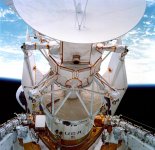
Well, I guess I could have been clearer. What I meant was the plug end of the boom to see how they interfaced with the actual boom structure as it is rectangular in shape while the plugs are cylindrical. This is the best image I got:

IUS%20complete%20vehicle.jpg
 
Well, I guess I could have been clearer. What I meant was the plug end of the boom to see how they interfaced with the actual boom structure as it is rectangular in shape while the plugs are cylindrical. This is the best image I got:

IUS%20complete%20vehicle.jpg

does this help?
IUS_ASE.jpg
 
The umbilical now moves! :hailprobe: (but it still needs more work)
I made the umbilical rotation axis parallel to the rotation axis of the tilt table, so it doesn't match the current mesh articulation. Based on photos and the position of the umbilical, I'm 99% certain that it's like this.
The movement might seem strange, but I think it's correct as the umbilical is "held down" by a cable.
The umbilical release is not "continually" animated (it just appears away from the IUS) as one is flipping the switch and can't see it. I might add it in the future if I'm too bored or something. Also, I'll try to add movement to the plugs later.

In another front, I'm thinking about adding a scenario file entry to hide 2 of the 4 IUS antennas. Any problems with that?
 
In another front, I'm thinking about adding a scenario file entry to hide 2 of the 4 IUS antennas. Any problems with that?

Fine for me. Can you also include an option to reduce the number of batteries and RCS fuel tanks?

BTW : This here shows the place where the boom attaches to the IUS in a useful way:

Magellan_Overhead.jpg


Left sector to the U, then straight up.

See here why left sector to the U:

TDRS-C_ASE.jpg


I don't know what kind of better images you look for, generally there should be enough to make it look right.
 
Back
Top