Problem I can't Go Play in Space because I can't control my craft.

Dasm

New member
Joined
Jun 4, 2016
Messages
7
Reaction score
0
Points
1
I have a compact keyboard which does not have a numpad. No way to control the craft and Orbiter does not recognize my PS4 controller, no way to move the thing around- the end, no Orbiter for me.
 
I have a compact keyboard which does not have a numpad. No way to control the craft and Orbiter does not recognize my PS4 controller, no way to move the thing around- the end, no Orbiter for me.

Aside of a USB numpad - you could also use a cheap standard size USB keyboard. Possibly cheaper than that. Not sure when gamepads will ever be supported or even more extraordinary input devices.
 
Why can't I just... change the keybinds?
 
Where can I edit the Delta Glider keybinds? D is deploying radiator but I don't see it in the default keybinds.
 
Where can I edit the Delta Glider keybinds? D is deploying radiator but I don't see it in the default keybinds.

Its hardcoded in the DLL, you would need to change the C++ code and compile the module again, if you want to change this.
 
Why can't I just... change the keybinds?
Yeah, I have a laptop and came to the same dead end. Just go to your local hardware store, it’s very possible that they have a 20 dollar or less numpad. They aren’t hard to come around these days. This was what I did.
 
I had for long time a notebook without a keypad. This did not stop me from using Orbiter.

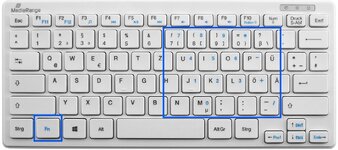
- Some notebooks can emulate a keypad via the function key. The numbers are shown in blue letters.
keyboard.jpg

- Later I bought me a joystick and programmed its keys for the most used functions
(like switching the RCS from translation to rotation). That's it.

"We fly Orbiter not because it is easy, but because it is hard."
 
If you have a Xbox controller you can connect with usb, wireless adapter or bluetooth you can use Joy2Key.
heres the virustotal scan for the latest version if you are paranoid like me :)

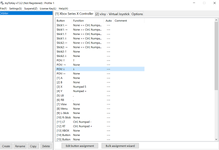
I assigned my numpad keys to my controller. Whats cool is that you can change the keybind based on the input strength of the joystick. So at 50% switch from CTRL + numpad 5 to numpad 5. I also attached a pdf with all keybinds below made by Jan Wedekind(GitHub)
Capture.PNG
 

Attachments

Back
Top