
Error How do you solve this?

Chub777

New member
Joined
Dec 2, 2009
Messages
663
Reaction score
1
Points
0
Location
LEO
Hello.

I have just downloaded some addons for Orbiter. I have placed them in the "Scenarios" folder. When I click the "Launch Orbiter" it loads then the screen turns black and this appears:
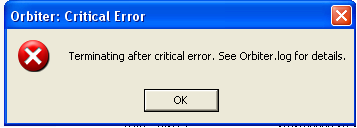
orbitererror.png


Can anyone please tell me how to solve this problem? Thanks.
 
What addons?
Did you preserve the files structure?

Can you be a bit more descriptive.

Also look at Orbiter.log

It will tell you your problem
 
Well, I have downloaded [ame="http://www.orbithangar.com/searchid.php?ID=4290"]this[/ame] and [ame="http://www.orbithangar.com/searchid.php?ID=682"]this[/ame]. I do have the file structure in My Documents. Also, I can't find orbiter.log what folder is it in?
 
Well, I have downloaded this and this. I do have the file structure in My Documents. Also, I can't find orbiter.log what folder is it in?

Don't put them into "My Documents", but into the root Orbiter folder, where you installed Orbiter. You can theoretically redirect orbiter to get the files from "My Documents", but this is not sounding to trivial to me, so forget what I said for the next 3-4 months.

Installing an add-on means: You extract the files into the orbiter folder, so that contents of the folder "Meshes" in the add-on go into the folder "Meshes" of Orbiter, etc.

"Orbiter.log" sits right next to "Orbiter.exe"
 
Last edited:
I moved the folders (with the meshes and other)to the root folder. I launched Orbiter but it just crashes. I've tried it twice now. Any other ideas?
 
Well, I have downloaded this and this. I do have the file structure in My Documents. Also, I can't find orbiter.log what folder is it in?

In the log file you can readout information of the crash. This can be very usefull.
 
you are probably missing an addon required by the scenario.

If you post the orbiter.log we can help you.
 
Do any of the default scenarios work? No point in installing addons if the defaults cause a crash.
 
Most likely, you'll need spacecraft3 (Find it in the "Recommended Addons" page here at O-F). Orbiter.log will tell you this; it's in the Orbiter root folder, open it with notepad and read it. It'll tell you where the problem is.
 
I just found orbiter.log:


**** Orbiter.log
Build Sep 29 2006 [v.060929]
Found 0 joystick(s)
Module AtlantisConfig.dll [API v.060425]
Module DGConfig.dll [API v.060425]


**** Creating simulation session
DirectDraw interface OK
Direct3D interface OK
Zbuffer: 16 bit
Render device: Fullscreen 800 x 600
Device has hardware T&L capability


After searching Google, people are also having this problem.
 
That is the full contents of orbiter.log?

Before you start the simulation session, go to the video tab and select always enumerate devices. The list of devices should refresh and you should get a device there that is capable of 32 bit colour and somewhat higher resolution. Trying using that device instead and post the Orbiter.log while Orbiter is still running (if it doesn't crash) or immediately after it crashes.

(BTW, a tip for the future: when posting the contents of log files, scenario files and the like, enclose them in
Code:
 tags, or use the CODE button. It makes it easier for us to read, especially when they get long.)
 
1. Yes, that is the full log (but see #3).
2. I ticked on enumerate devices.
3. I now have the Orbiter.log immediately after it crashed:

Code:
**** Orbiter.log
Build Sep 29 2006 [v.060929]
Found 0 joystick(s)
Devices enumerated: 6
Devices accepted: 5
==> RGB Emulation
==> Direct3D HAL
==> Direct3D T&L HAL
==> Direct3D HAL (NVIDIA GeForce FX 5500 (Microsoft Corporation))
==> Direct3D T&L HAL (NVIDIA GeForce FX 5500 (Microsoft Corporation))
Devices enumerated: 6
Devices accepted: 5
==> RGB Emulation
==> Direct3D HAL
==> Direct3D T&L HAL
==> Direct3D HAL (NVIDIA GeForce FX 5500 (Microsoft Corporation))
==> Direct3D T&L HAL (NVIDIA GeForce FX 5500 (Microsoft Corporation))

**** Creating simulation session
DirectDraw interface OK
Direct3D interface OK
Zbuffer: 16 bit
Render device: Fullscreen 800 x 600
Device has hardware T&L capability
 
Interesting. Orbiter didn't do anything at all, not even load planet data.

Are you sure you have installed Orbiter properly?

After searching with Google, I wonder what you mean.
 
Interesting. Orbiter didn't do anything at all, not even load planet data.

Are you sure you have installed Orbiter properly?

After searching with Google, I wonder what you mean.

Yes, I belive I installed Orbiter properly.

When I said "After searching Google" I meant that I Google Searched "Orbiter.log" and some of them were links to forum posts. It was this post.
 
Do any of the scenarios that are included with the base install of Orbiter work?
 
Yes, I belive I installed Orbiter properly.

Do you know it? If not you should maybe try getting this checked. for example by selecting a default scenario... without any add-ons. Any!
 
Since Orbiter is not loading any planet data at all, it is either crashing on something in the graphics drivers, or the installation is significantly malformed. I get the impression that Orbiter was working for you before these addons so it is probably not the graphics drivers. I suggest starting over with a clean install of Orbiter. Test and ensure it is working then re-installing the addons per the instructions above (ie, extract the addon zip file contents into the Orbiter installation root directory and make sure you preserve the directory structure of the addon). Do one addon at a time and test after each one.
 
I think I know why your orbiter log is so empty. Could it be that you are using win vista or 7? If so. You must have orbiter launched as administrator. When not orbiter isn't allowed to write in the log. I had the same problem while ago.
 
Back
Top