Question Getting a cube to move around?

richfororbit

Active member
Joined
Jul 8, 2013
Messages
686
Reaction score
52
Points
43
Location
Greater London
So I want to use the blender program and use a cube, to be able to manovuer in the simulator.

What do I need to do this?

If i recall I can use a mesh file with blender, I guess the one I still have is 2.74

Thanks.
 
You need to remember Newtons laws for this task. ;)

You know... Thrusters. And propellant resources.

Luckily you can power a cube alone by a configuration file, so no coding required.
 
I was reading the satellite mesh file, you know the one on the shuttle. So there is that option which allows to use some thrust or something.

I even found my own static satellite from a couple of years back, and added it in, still no texture show. I was never able to solve that.

The attachment is still in the topic. Nobody was interested.

I want to get a piece of flat mesh onto Mars, I'll need some Mars surface colour images. I think I can nip one from the Spirit rover archive.

---------- Post added 02-16-16 at 01:04 AM ---------- Previous post was 02-15-16 at 11:56 PM ----------

This is the Pathfinder config file.

Code:
BASE-V2.0
Name = surface
Location = -33.220001 19.129999
Size = 1000
ObjectSize = 100
MAPOBJECTSTOSPHERE = TRUE

BEGIN_NAVBEACON
END_NAVBEACON

BEGIN_OBJECTLIST

LPAD1
	POS 100 0 0
	SCALE 0
	ROT 0.000
	TEX Lpad01
	NAV 132.2
END
MESH
	FILE mpf\mpflander
        POS 0 .5 -10
	SCALE 1 1 1
	ROT 0
	PRELOAD
	OWNMATERIAL
END
MESH
	FILE pf_terrain
	POS 0 -.1 0
	SCALE 1 1 1
	ROT 0
	PRELOAD
	OWNMATERIAL
END
END_OBJECTLIST

BEGIN_SURFTILELIST
END_SURFTILELIST

I have a mesh called surface, and marssurface dds. The surfacetex that was generated from the mesh export isn't needed?

It isn't the most well fitted image, but for the moment, just getting the terrain is the goal.
 
Last edited:
Blender Tools add on

I'm not sure this is what you are after, but in the attached zip in the link is a tutorial on taking the Blender default cube and exporting it into Orbiter as a simple 'config' vessel. It uses the add on in that zip file to create the mesh file.

Add the following lines to the vessel config in that tutorial and you can fly it around:

Code:
PropellantResource1 = 10000
MEngineRef = 0.0 0.0 -1.0
HEngineRef = 0.0 -1.0 0.0
MaxMainThrust = 6e5
MaxHoverThrust = 6e5
MaxAttitudeThrust = 1000

Those values are completely made up, tweak them as needed.
 
Already know of that, I have yet to edit those values.

My addon is a new surface location for the moment. Notsure if using a real image is the way to go, meh why not.

I want to get it somewhere above the equator, certainly not at pathfinder's location.
 
Already know of that, I have yet to edit those values.

My addon is a new surface location for the moment. Notsure if using a real image is the way to go, meh why not.

I want to get it somewhere above the equator, certainly not at pathfinder's location.

Remember that spacecraft are no bases and not part of a surface base. Look at the other spacecraft config files to see the differences and study the orbiter manual for what the parameters mean.
 
The spacecraft is seperate, I'm focused on just getting some mesh with a texture as a terrain base for landing. I'll need specific or rough coordinates.

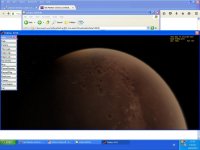
This image displays where it is, but it doesn't appear.

Code:
BASE-V2.0
Name = surfacemars
Location = -10.220001 19.129999
Size = 1000
ObjectSize = 100
MAPOBJECTSTOSPHERE = TRUE

BEGIN_NAVBEACON
END_NAVBEACON

BEGIN_OBJECTLIST

MESH
	FILE marssurface
	POS 0 -.1 0
	SCALE 1 1 1
	ROT 0
	PRELOAD
	OWNMATERIAL
END
END_OBJECTLIST

BEGIN_SURFTILELIST
END_SURFTILELIST
 

Attachments

  • mysurfacebase.JPG
    mysurfacebase.JPG
    91.8 KB · Views: 17
Last edited:
So it this just a mesh texture? Then I would just make it a simple vessel with a mesh and cfg. Open scenario editor place where you want. Then get those coordinates and use in your base cfg
 
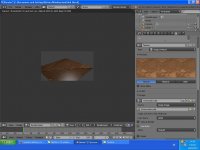
Here it is in blender.

It doesn't appear on the surface, the config file and the, texture and mesh are in their folders.
 

Attachments

  • blms.JPG
    blms.JPG
    104.9 KB · Views: 17
Here it is in blender.

It doesn't appear on the surface, the config file and the, texture and mesh are in their folders.

Did you specify the OWNMATERIAL tag on the MESH entry in the base configuration file? EDIT: Yes, you should have.
 
Can you place it somewhere else? Like I said I would make it a simple vessel then you can place it where you want using scenario editor.
 
Is the config file loaded at all?
 
The name appears in the scenario editor. But there is nothing there at the location.

Can you also select the base in the camera dialog?

EDIT: And does it also not appear then if you zoom into the base? 100m object size is pretty small.
 
I can place a flyer there, there isn't anything at all there. The user from Texas has given me assistance. Thankfully.

---------- Post added at 04:34 PM ---------- Previous post was at 02:20 PM ----------

Well gattispilot will sort it out for me since he offered. Yes of course, I only did that to get a perspective, I'm looking for an equator area not to warm or cold, suitable for personnel.
 
Back
Top