

-
ORBITER-FORUM will be temporarily closed at 2026-07-23 18:00 UTC while we complete some OF maintenance tasks. The amount of downtime is expected to take up to one hour, but probably less.
You are using an out of date browser. It may not display this or other websites correctly.
You should upgrade or use an alternative browser.
You should upgrade or use an alternative browser.
Advanced Question Falcon 9 paint
- Thread starter barrygolden
- Start date
Hi Barry,
if you have the latest Falcon 9 for Orbiter2016 (version 240524), then you can add the following line to your Falcon9 .cfg file
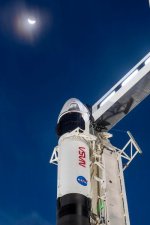
For NASA logo on 1st and 2nd stage:
For NASA logo on 2nd stage only:
Cheers,
Brian
if you have the latest Falcon 9 for Orbiter2016 (version 240524), then you can add the following line to your Falcon9 .cfg file
For NASA logo on 1st and 2nd stage:
Code:
NASASkin = 1For NASA logo on 2nd stage only:
Code:
NASASkin = 2Cheers,
Brian
barrygolden
Well-known member
where is the Falcon 9 cfg file
barrygolden
Well-known member
here you go
Not seeing anything. Try again?here you go
barrygolden
Well-known member
OK, so from the scenario , this is your Falcon9 vessel entry:
I see you tried to add the NASASkin = 1 line to the scenario, but you need to add it to the .cfg file, not the .scn file.
So, delete it from your scenario.
The first line in the vessel entry tells you the vessel name and .cfg file.
Falcon9:Falcon9R_V12\f9_v12_drg2
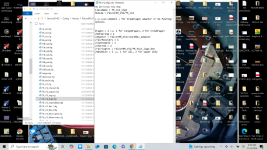
So you need to locate your Orbiter / Config / Vessels / Falcon9R_V12 / f9_v12_drg2.cfg file.
Add the NASASkin = 1 to it.
Good luck,
Brian
Code:
Falcon9:Falcon9R_V12\f9_v12_drg2
  STATUS Landed Earth
  POS -80.5771995 28.5619578
  HEADING 10.00
  ALT 41.199
  AROT 148.742 -8.484 -5.118
  ATTACHED 0:0,Strongback
  AFCMODE 7
  PRPLEVEL 0:1.000000 1:1.000000 2:1.000000
  NAVFREQ 0 0
  FAIRS 1
  SOST 0 0 0 0 1 0 1
  SOPR 0.9424778 200000.0 400000.0 23000.0 120000.0 OCISLY 1.5708
  LOTM 19 22 45 1 0.0000
NASASkin = 1
ENDSo, delete it from your scenario.
The first line in the vessel entry tells you the vessel name and .cfg file.
Falcon9:Falcon9R_V12\f9_v12_drg2
So you need to locate your Orbiter / Config / Vessels / Falcon9R_V12 / f9_v12_drg2.cfg file.
Add the NASASkin = 1 to it.
Good luck,
Brian
barrygolden
Well-known member
barrygolden
Well-known member
thanks Brian that looks super. I think NASA or Space X put some logos on all of there Falcon 9 launches or at least the manned missions.
Next issue is to remove the Shuttle tower and replace it with the new Space X one
Next issue is to remove the Shuttle tower and replace it with the new Space X one
Install LC39A SpaceXNext issue is to remove the Shuttle tower and replace it with the new Space X one
Follow the installation instructions in the Doc carefully.
barrygolden
Well-known member
thanks for the heads up really looks super. Is there a way to retract or deploy the access arm and do you have LC 40
Switch focus to "Strongback", press B.thanks for the heads up really looks super. Is there a way to retract or deploy the access arm and do you have LC 40
LC-40 included with Falcon9 add on.
Similar threads


- Replies
- 4
- Views
- 1K
