• ORBITER-FORUM will be temporarily closed at 2026-07-23 18:00 UTC while we complete some OF maintenance tasks. The amount of downtime is expected to take up to one hour, but probably less.

XR2 DGIV Cargo payloads for XR-2 Ravenstar MK1

Interceptor

Well-known member
Joined
Mar 28, 2008
Messages
2,718
Reaction score
78
Points
63
Location
Michigan,Florida
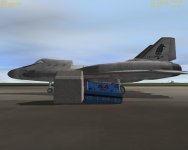
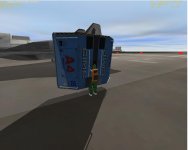
Hi I was just wondering, if someone could give me some help with this addon. Everything works fine except the way the cargo sits after it's deployed,and the way the Ummu crew grab the the cargo. I would like to know what I need to change in what config to fix these problems in the Pics, pic 1 Ummu after grappling the cargo looks like he's half inside cargo container,and Pic2 is the way the container sits after deployment I would like to have it sit straighter. thanks Heres the addon I use link [ame="http://www.orbithangar.com/searchid.php?ID=3596"]DGIV to XR2[/ame]
 

Attachments

  • messed up.JPG
    messed up.JPG
    70.3 KB · Views: 65
  • messed up 2.JPG
    messed up 2.JPG
    70.5 KB · Views: 68
Regarding #2, when a piece of cargo is deployed to the ground it always rests on its touchdown points, which are defined separately for each cargo; this is standard Orbiter core behavior and is not related to the XR code. A vessel's touchdown points are defined either in its config file or its DLL (if any). From the way it's resting in the picture it looks like the forward touchdown point is not level with the aft points; check the 'Y' dimension in the 'TouchdownPoints" setting in your payload's config file (the second of the three numbers) and make the values match.

As for #1, I haven't messed with DGIV payload grapple points, but I'm pretty sure that's a setting in the cargo's config file as well.
 
If you find out anything new about this addon, Doug please let me know. thanks for replying

---------- Post added at 11:17 AM ---------- Previous post was at 10:58 AM ----

---------- Post added at 11:26 AM ---------- Previous post was at 11:17 AM ----------

Here's the touch down points don't know which one's to match thou.Thanks TouchdownPoints = 0 -0.68 1 -1 -0.68 -1 1 -0.68 -1 1
 
Each coordinate is X Y Z, and there are three sets of coordinates: forward, aft left, and aft right. So breaking the numbers into three sets we have:

Forward: 0 -0.68 1
Aft Left: -1 -0.68 -1
Aft Right: 1 -0.68 -1
???: 1

The odd thing is that all thee Y coordinates match (-0.68), but yet the vessel still sits on the ground on a tilt. I did notice an extra trailing value ("1") on the TouchdownPoints line, so perhaps that is messing up the parser? There should be exactly nine values (three sets of three numbers) on that line, so you could try removing the extra "1" on the end, although that shouldn't make any difference -- it should just be ignored by the core.

Regarding the grapple point, I'm pretty sure that's just a standard attachment point defined with a UMMu-specific name in the cargo's config file -- take a look in the "BEGIN_ATTACHMENT" / "END_ATTACHMENT" section. Better yet, can you please post the entire attachment section? (Don't forget to enclose it in [ CODE ] tags. :))
 
Keep in mind that DGIV cargos are "sloped", and are taller on one end than the other.
 
LOL! I guess it pays to start with the obvious questions first. :) I didn't realize they were sloped. Good catch!
 
Err, regarding #1, UMMUs aren't really supposed to grapple them while on the ground.
 
The UMMU grapples the xr2 cargo in space the same way. thanks willy,and thanks guys I'll continue messing with this.

---------- Post added at 02:41 AM ---------- Previous post was at 02:37 AM ----------

Here's the attachment points Doug. I appreciate the help. BEGIN_ATTACHMENT
P 0.0 0.9 0.0 0 1 0 0 0 1 DGIVCPL
P 0 0.3 -0.7 0 1 0 0 0 1 XRCARGO
END_ATTACHMENT
 
Since the astronaut is "sinking into the cargo", you need to add +Y to the attachment point; i.e., "move it farther from the center". Did you modify that value from its default?? If not, it looks like a bug in the original config file because the attachment point is wrong.

Anyway, unless you can view the cargo mesh in a 3D editor like 3dsmax or Maya so you can get the exact coordinates of the top edge of the container, you can just experiment with the Y value until it looks about right. As a starting point, you can try this:

Code:
P 0.0 1.65 0.0    0 1 0    0 0 1  DGIVCPL
Notice we increased the Y dimension (the second number on the line) by 0.75 meter, which will move the astronaut 0.75 meter farther away (+Y dimension) from the cargo's center. You will need to experiment with that value until it looks about right. Or you can contact the cargo's author and ask him for the correct attachment point coordinates.
 
Thanks Doug, your a great help as always. cheers

---------- Post added at 09:10 AM ---------- Previous post was at 08:49 AM ----------

Tried increasing and decreasing Y coordinate and can't get UMMU figure to move, still embeded in cargo case. Confused.Thanks
 
Last edited:
Hmm...in that case it appears that UMMu does not look for the 'DGIVCPL' attachment point when grappling cargo -- perhaps it just creates an attachment point for the target cargo on-the-fly at a fixed offset and then grapples to that? Sorry I don't have more info for you, I haven't messed with DGIV cargo very much. Your best bet is to ask your question on Dan's forum. In the meantime, you will want to restore your 'DGIVCPL' line to its original values -- thinking about this some more, that attachment point is probably only used when attaching the cargo in the DGIV's bay.
 
I think your right Doug ,oh well if you find out anything or decide to mess with that addon let me know.Thanks again for your time, and patience.
 
I think you cannot switch grapple point. So whatever the first one listed is what the ummu graps on.

in the screen shot are what I found to give this. What was odd is the y value was the z.
He is attached to a XR2CHM
 
Last edited:
Back
Top