Question Custom Planet Elevation Maps for Orbiter 2016?

Thanks.
How small can one make a tile (earth), and can one make it transparent?
I'm not sure I understand correctly what you mean and what a transparent tile can help with, but if you're saying about surface tiles, then the smallest tile can have resolution 19 for Orbiter 2016 and 21 for Orbiter 2024. For example, a tile of resolution 21 has the following size:

Без імені.png

But in fact tiles of higher resolution can be used:
Yes, the max. resolution level is 21 in Orbiter (OpenOrbiter) settings, but it didn't stop me from using 22 one.

It would be great if one could fix the fire-pit issue (and Clavius base, and...and...) that plauges Orb16 onwards.
I never heard about that issue before and don't know that base. Can you explain/show a picture that demonstrates the issue?
If one could make an invisible tile small enough to fill the gap with a base mesh?
I'm afraid I don't understand how an invisible tile can help, but that's because I don't understand the issue.
Here's a good example.
It nearly works here!
I don't know how it was before fixing :unsure:

Why not to create some meshes with textures and place them on the ground to hide some unwanted areas? Or editing (painting over) the corresponding surface tiles in Photoshop?
 
I never heard about that issue before and don't know that base. Can you explain/show a picture that demonstrates the issue?
Thanks, the size looks good/doable.

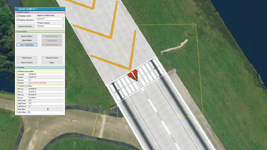
The problem is when you want to "dig" underground (think TMA pit in 2001), there are several ways to tweak the elevation, but they are not very accurate and making a nice square pit for example is impossible. The other way around it would be making a tile invisible and replacing the details with a mesh. I know there are masks for tiles but unsure if they can be used for transparency? Is it possible to make the yellow squared area in your picture see-through?
 
It looks now I understood exactly what you mean. I'm not sure it's possible to make a surface tile transparent/invisible.
 
I made some simple obvious attempts, but - no luck. But maybe disabling rendering some tiles of some resolutions is possible (now or may be implemented in the future development). So, I have no ideas :)
 
Без імені2.png
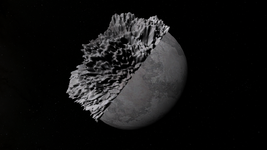
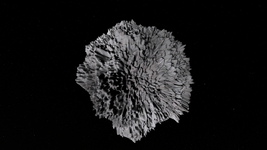
It looks my elevation tiles don't work correctly, since this picture demonstrates almost uniform (homogeneous) hills, and it doesn't look like a source bump image I used for the tiles. I think I should read documentation about the Elv Tile Splitter V2 tool that I used for creating elevation tiles.
 
I made some simple obvious attempts, but - no luck. But maybe disabling rendering some tiles of some resolutions is possible (now or may be implemented in the future development). So, I have no ideas :)
Thanks for taking a look:)
Maybe someday a solution will be found🙏

It looks my elevation tiles don't work correctly, since this picture demonstrates almost uniform (homogeneous) hills, and it doesn't look like a source bump image I used for the tiles. I think I should read documentation about the Elv Tile Splitter V2 tool that I used for creating elevation tiles.
Does look very uniform.
Keep up the landscaping:)
 
Inspired by the impressive work done by @misha.physics and @Mr Martian (please make more!) I had a go at making some surf tiles with some limited success.
I managed to create various tiles (using plsplit64) up to level 8 (although it looks like for it to be worthwhile one needs at least level 15!) but hit some problems:

1. I can't get texpack.exe to run- posted a query here.
2. Finding source data with the required resolution is nearly impossible. @misha.physics I see you've been using AI upscaling, but ther's literally already 100's of services out there, paid and free, do you have a suggestion for a (free) good one?
3. Elv tiles, I've managed (somehow) to create some using TileEdit andElvTileSplitter but they don't seem to work and I'm a bit lost. There is a lot of information on how to use these tools to add/change existing tiles but sadly no guide to making one from scratch. @Mr Martian, I would like to take up your offer (or anyone that can help!) if you could give a brief outline of how you did your moons that would be great!

I'm testing/working on Europa, would love to have some (Deathstar) ice canyons to fly through! And I think one could do a nice cryo geyser effect with the Orbiter particle system!
Also would like to see Io's volcanoes, maybe with a lava night glow!:cool:
 
(please make more!)
I had a go at making some surf tiles with some limited success.
2. Finding source data with the required resolution is nearly impossible.
Do you mean surface or elevation tiles here? What the limitations? This thread is just related to the custom planet elevation maps. For making surface tiles I could refer you to this thread for Earth maps. Or do you mean maps for other celestial moon like here?
@misha.physics I see you've been using AI upscaling, but ther's literally already 100's of services out there, paid and free, do you have a suggestion for a (free) good one?
I'm not sure about a free upscaler, maybe someone could suggest something.
3. Elv tiles, I've managed (somehow) to create some using TileEdit andElvTileSplitter
Me too. They worked in some way, but I don't understand them enough yet. Elv Tile Splitter V2 may be very useful, but I didn't learned it yet. Mayba the add-on author could help us with the tool?
@Mr Martian, I would like to take up your offer (or anyone that can help!) if you could give a brief outline of how you did your moons that would be great!
I join this request.
 
Do you mean surface or elevation tiles here? What the limitations? This thread is just related to the custom planet elevation maps. For making surface tiles I could refer you to this thread for Earth maps. Or do you mean maps for other celestial moon like here?
It's the Elvs, and the first steps when starting from scratch, otherwise apart from the padding they seem to work pretty much like the surf tiles (how/where did you import the first greyscale height map?).

Another question, is the original Europa surface texture available? I'd like to smooth some of the transitions and fill in some of the blanks and make a bump map from it, the texture I'm currently using is not very hires and looks very different.
 
It's the Elvs, and the first steps when starting from scratch, otherwise apart from the padding they seem to work pretty much like the surf tiles (how/where did you import the first greyscale height map?).
Actually, I was working very little with ELV tiles, so I don't remember exactly how I made them. Probably, I've used a bump map that I exported in high resolution from Space Engine, and then I used the "Elv Tile Splitter V2", but I may be wrong.
Another question, is the original Europa surface texture available?
I suppose the "texpack" tool can unpack the "Surf.tree" archive of Europa included into the "Minor Bodies" original add-on, so you can get DDS tiles, join them, edit with a graphic editor and compress again into archive format. I haven't tried to do that.
 
then I used the "Elv Tile Splitter V2
This is the bit I need more detail. What resolution? What split settings? Even if I import an entire map it seems to require padding? Hopefully a short guide can be put together. :)
I suppose the "texpack" tool can unpack the "Surf.tree" archive of Europa included into the "Minor Bodies" original add-on, so you can get DDS tiles, join them, edit with a graphic editor and compress again into archive format. I haven't tried to do that.
This could be 1000's of files? That's why I was hoping that the original might be available.
 
Well, I'll try to remember how I did it, and write later when I get more free time.
 
Well, I'll try to remember how I did it, and write later when I get more free time.
Oh, that would be great.
I was actually hoping someone in the know would help enlighten us both! But any information is very much appreciated, hopefully we (the community) can piece together a basic guide and get it posted on the forum.
Thanks again:)
 
This could be 1000's of files? That's why I was hoping that the original might be available.
Let's start from this. I used "texpack" for unpacking all available levels of Surf.tree archive (45.8 Mb) of Europa that comes with Minor Bodies add-on. I got DDS tiles of levels 1-8. If you want to preserve the highest quality and make some repaints in a graphic editor, then you need to work with tiles of level 8. There're 16 folders with 32 DDS tiles in each, so there're 512 DDS tiles. Well, that's pretty much. Every tile has resolution 512x512, so if you join all these tiles you will get one picture of resolution 16384x8192. You edit this picture (of course, if you want) and you need to cut in on tiles of levels 1-8. It looks I can adapt my automated script for this purpose. Or you can use "plsplit64" 8 times for each level. I apply an archive with exported Europa DDS tiles of levels 1-8 if you would like to take a look at it.
 

Attachments

Actually, I was working very little with ELV tiles, so I don't remember exactly how I made them. Probably, I've used a bump map that I exported in high resolution from Space Engine, and then I used the "Elv Tile Splitter V2", but I may be wrong.
Sadly, I can't remember how I made this global elevation tiles :(:
I tried to repeat it with "Elv Tile Splitter V2", but I don't see any elevations. Maybe I made it with "tileedit"...
 
Let's start from this. I used "texpack" for unpacking all available levels of Surf.tree archive (45.8 Mb) of Europa that comes with Minor Bodies add-on. I got DDS tiles of levels 1-8. If you want to preserve the highest quality and make some repaints in a graphic editor, then you need to work with tiles of level 8. There're 16 folders with 32 DDS tiles in each, so there're 512 DDS tiles. Well, that's pretty much. Every tile has resolution 512x512, so if you join all these tiles you will get one picture of resolution 16384x8192. You edit this picture (of course, if you want) and you need to cut in on tiles of levels 1-8. It looks I can adapt my automated script for this purpose. Or you can use "plsplit64" 8 times for each level. I apply an archive with exported Europa DDS tiles of levels 1-8 if you would like to take a look at it.
Thanks! That's great, I was at a bit of a loss without Texpack. I'm interested to see if my PC can cope with that, might have to work in stages.
An auto-script sounds interesting!
And I think it will much easier to use another single custom map for global Europe surface texture, and then cut them into tiles of different levels.
Yes but in high resolution, and it looks like someone made a lot of effort to piece this one together, I think it's good to use this one. Well, I'll give it a go. Thanks again.
I tried to repeat it with "Elv Tile Splitter V2", but I don't see any elevations. Maybe I made it with "tileedit"...
Wish there was a tool like plsplit64 for elvs! It's the elvs I'm most interested in making.
 
I wonder if there is a way to fix the poles? I wonder like in 2010 where a mesh of the pole could be added? not then walking/ driving would be an issue
 
I wonder if there is a way to fix the poles? I wonder like in 2010 where a mesh of the pole could be added? not then walking/ driving would be an issue
I think unfortuneately there's going to be problems one way or the other.
It's also a very large area that's affected on the moon, maybe Elev mod might help although it uses the same coord system? Might try with a very large .flt?
 
Hi @misha.physics the zip had 1 corrupt file! Unfortuneately level 8 and a detail border tile. 08/000004/000006 if you could post just that one tile that would be great:)

Looking at it, I'm thinking a AI could probably do a good job of filling in the blurry bits based on data from the detailed areas? But no idea how to set that up.
I'll take a look at what I can remaster, mostly just wanted to see if I can soften some of the hard edges. Then make a bump map from it, and somehow make elev tiles out of it?
 
Back
Top