Project CST-100

Mesh Update

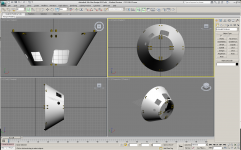
Spent some time cutting out the holes, I was able to fill the RCS as you can see. Now for the tough part, getting the hatch and windows.
 

Attachments

  • Image1.png
    Image1.png
    187.1 KB · Views: 68
Sorry about the delay folks, work has had me extrordinarily busy the past few weeks. I'm earning my paycheck while loosing 10 lbs. I promise I have not forgotten, and will work on it just as soon as I can. Just the hatch and windows need to be cut in and spliced.

I dont have a screen cap to show you the progress I've made so far, but rest assured I am trying.
 
A CST-100 was in the works, but never been made. - Kyle
Is in the works. Capt_Hensley is working on the mesh, I know everyone is waiting with baited breaths on any updates on this, but real life commitments make it hard to have anytime to devote to this project, but we are still working on it, and vow not to abandon this promising project. I'll put as much time into this as I can in the next month, and I hope to get a beta released by at least March, so bear with us on this.

34xn9d1.jpg
 
Last edited:
Sorry I've been out for a while, got married, did Christmas, and two TDY's since I last was here, But I want to echo KY's comments, Were working on it. I have not abandon my mesh efforts. Like the man said it takes time. I'll be working on this all weekend, pausing occasionly for the cause, and to eat, Sleep is over rated.
 
CST-100 meshes Ver 13-14 (Autodesk 3DS Max ver 2012)

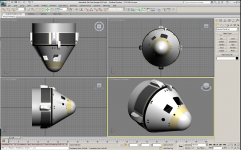
Find here the Meshes I've been working on. Dispite my best efforts I can't figure out how to make a door/panel/window from the objects that I slice out of the body. So this is an incomplete 3DS mesh.

I have zipped up the entire package, but there are individual 3DS meshes see below

CST-100-09.3DS
CST-100-09.max
CST-100-10.max
CST-100-11.max
CST-100-12.max
CST-100-13.max
CST-100-13_ChuteShroud.max
CST-100-13_CommandModule.max
CST-100-13_Interstage.max
CST-100-13_NoseCone.max
CST-100-13_ServiceModule.max
CST-100-14.max
CST-100-Cone.max
Ref.png
WIP.png

Version 13 is the most current version
Version 14 is merely the entire mesh put together in the single drawing.
There are other previous versions should anyone decide to work with them.

These meshes and included textures are free to alter, change, modify, or otherwise mutilate at anyones discretion. I want this add-on to become a nice work, but I've taken it as far as I can with my limited knowledge and time.

Things to do:
Create the interior pressure shell
Create a proper interior, the "KY" control panel is included for the VC
Create/modify the chute and instrumentation area between the CM body and Chute shroud
Properly texture the entire model
Create the objects located between the heat shield and the CM body like preasure tanks, instrumentation, pipeing and the like...
Create the grebles in the upper bay of the SM including the presure tanks and seperation gear

The zipfile size is 87,056 Kb or 87 meg whatever size type you prefer. It took me 8 min to download the file, speeds may vary.
http://h-10-k.net/downloads/cst100/cst-100_13-14.zip

See images at the links below
http://h-10-k.net/downloads/cst100/image2.png
http://h-10-k.net/downloads/cst100/image3.png
http://h-10-k.net/downloads/cst100/image5.png
http://h-10-k.net/downloads/cst100/image6.png
http://h-10-k.net/downloads/cst100/image7.png

Sadly I must take my leave of this project to continue work on my Masters project "Gateway Station". The deadline draws near for my first draft.
 

Attachments

  • Image2.png
    Image2.png
    265 KB · Views: 39
Last edited:
Sadly I must take my leave of this project to continue work on my Masters project "Gateway Station". The deadline draws near for my first draft.

:jawdrops: wow, this is awesome! Thanks for your work on it, and good luck on your Gateway Station! :cheers:
 
I have zipped up the entire package, but there are individual 3DS meshes see below
CST-100-09.max
CST-100-10.max
CST-100-11.max
CST-100-12.max
CST-100-13.max
CST-100-13_ChuteShroud.max
CST-100-13_CommandModule.max
CST-100-13_Interstage.max
CST-100-13_NoseCone.max
CST-100-13_ServiceModule.max
CST-100-14.max
CST-100-Cone.max
Can you convert these to .3ds, because Sketchup cant open .max files, and I dont have 3ds Max to open or convert them.
 
Sure, I'll post a new link tonight...

Link Posted
http://h-10-k.net/downloads/cst100/cst-100_3ds.zip

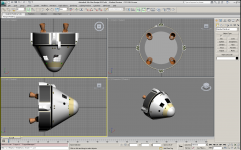
I noticed while saving to 3DS format that the version 11 engines have more detail and a better appearance for texturing, so I saved off those objects in version 14 for everyone. See thumb below. Enjoy!

PS. the angle may be off by a few degrees, but if you create the .cfg properly it may not make a visable difference. These engines are at 20 degrees instead of 12.5 degrees as they should be.
 

Attachments

  • Image8.png
    Image8.png
    233 KB · Views: 78
Last edited:
This post is for anyone that uses Sketchup: What is your process of converting the models to get it into Orbiter? My way of doing it hasn't been working lately, so I just want to see how others do it.
 
Run it through Babel 3D to a .3ds format, then through Wings3D. I am still trying to keep the normal vectors pointed in the right direction (without success)
 
I would only go through Babel3D if your model is untextured. Textures are NOT ported through the Babel3D software.

I have SketchUp Pro v8, which has a built in converter to .3ds format.

If all else fails, just Google .skp to .3ds plugin.
 
Looks like I wont get any time to work on this til summer, just want to keep everyone updated.
 
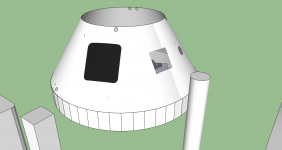
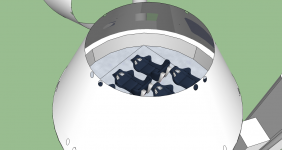
I've been working on the CST on and off for the past month, I've made some improvements to the VC, but there is still more to add to the interior. I also made changes on the placement of the hatches and windows. I've used these two photos as reference, but I don't know which is the correct placement, and I would like your opinion on the matter.

ccdev-iss_level2.jpg


boeing-cst-120418c-02.jpg
 

Attachments

  • CM VC 1.png
    CM VC 1.png
    68.4 KB · Views: 18
  • CM VC 2.png
    CM VC 2.png
    161.1 KB · Views: 30
Last edited:
The problem with choosing is resolved by getting more images of the boiler plates that exist. When this project was started the boiler plate was in developement. Very few photos existed. When I was making my mesh I stuck with a set design reference CG images. Do the research and find more photos of the actual articles.
 
I can try to help with basic coding. Im definitely nowhere near advanced with it, but Im able to code most of what a Spacecraft3 file contains
 
Back
Top