
-
ORBITER-FORUM will be temporarily closed at 2026-07-23 18:00 UTC while we complete some OF maintenance tasks. The amount of downtime is expected to take up to one hour, but probably less.
You are using an out of date browser. It may not display this or other websites correctly.
You should upgrade or use an alternative browser.
You should upgrade or use an alternative browser.
Project Blender Mesh Tools add-on
- Thread starter Blake
- Start date

 in the previous post I took a screenshot, you will get the same picture?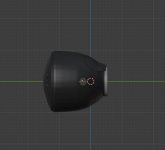
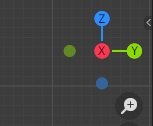

Yup +Y forward, +X right, +Z top... Do you use Blender 2.91 too or an earlier version ? Which one ?
Made a simple test object in Blender, brand new scene... As you can see the result in Orbiter is awful. Flat shading, simple shape, I didn't touch any setting... I don't know what to do.
I'd almost think my graphic card is dying but it runs other 3D games without any noticeable glitches (say KSP, Civ VI, Fallout 4...)


Made a simple test object in Blender, brand new scene... As you can see the result in Orbiter is awful. Flat shading, simple shape, I didn't touch any setting... I don't know what to do.
I'd almost think my graphic card is dying but it runs other 3D games without any noticeable glitches (say KSP, Civ VI, Fallout 4...)

The flickering probably is because there are 2 surfaces there.
About the correct orientation of the mesh axis, what should be used in Orbiter is detailed in the (I think) 3Dmodel.pdf file. What that means for blender... I don't think there should be a difference.
Also, does the recalculate normals button do anything?
@GLS : I made that test object dead simple, its a standard cylinder (add->mesh-cylinder) with a conical end (extrude one end then merge vertices at center), the idea was to have a simple but oriented object (the cone being "forward"). No smooth shading.
I really think we have a shading issue, it is of course related to normals but not only. Usually, messing with normals in Orbiter gives "invisible" faces, because in Orbiter faces are 1-sided, but not that kind of lighting or flickering mess.
I'm glad there is a way around with ShipEdit, but again it seems important to me we have a working and up-to-date import/export plugin (for someone who is new to Orbiter, making add-ons from scratch is currently a daunting task - hence the popularity of Multistage etc... -). Just my two cents but I think it would contribute to keep the community and the simulator well alive. ?
About recalculate normals button you mean in Blender or in ShipEdit ? Recalculate normals (inside or outside) sure works in Blender, and the "Generate normals" option in ShipEdit seems to have fixed my meshes, so it does something, and it does it rather very well.
For the axis yes I've seen the doc and figured out. Also the small Soyuz pic posted by Maxbuzz above was worth a thousand words
I really think we have a shading issue, it is of course related to normals but not only. Usually, messing with normals in Orbiter gives "invisible" faces, because in Orbiter faces are 1-sided, but not that kind of lighting or flickering mess.
I'm glad there is a way around with ShipEdit, but again it seems important to me we have a working and up-to-date import/export plugin (for someone who is new to Orbiter, making add-ons from scratch is currently a daunting task - hence the popularity of Multistage etc... -). Just my two cents but I think it would contribute to keep the community and the simulator well alive. ?
About recalculate normals button you mean in Blender or in ShipEdit ? Recalculate normals (inside or outside) sure works in Blender, and the "Generate normals" option in ShipEdit seems to have fixed my meshes, so it does something, and it does it rather very well.
For the axis yes I've seen the doc and figured out. Also the small Soyuz pic posted by Maxbuzz above was worth a thousand words
Last edited:
The recalculate normals is in blender. As far as issues with normals in blender, I've only noticed that it seems they don't get updated if the orientation of an object is changed while not in edit mode (no problems with translations). This in blender 2.79 + plugin from vlad. The workaround is "always work in edit mode".
Other than that, the normals only require attention in regards to "what surfaces do you want smooth and where do they end", and this is managed by controlling what vertices are shared between faces. E.g., a cylinder should have 3 such surfaces: the round part and the 2 caps (where needed of course). This means that the vertices have to be duplicated so they are not shared by the caps and the round part, as is the default in a new cylinder object.
There are probably better/easier ways to do this in blender, but I control this by separating the surfaces that I want smooth into new objects, doing the remove doubles command in each object (which merges vertices that are in the same location), and finally merging all into one object. So for the cylinder, this would mean selecting the round part (selecting faces is better), separate (no remove doubles should be needed is it is a newly created cylinder) and then merge the caps back with the round part.
You can think of the way the meshes are illuminated in Orbiter (and probably many other programs) as the light level of one triangle being "shared" with its neighbor triangles (i.e., triangles that use the same vertices). This is how the round part of the cylinder looks smooth, as they share the same vertices.
This is why it is important to control the vertex usage, at least from an Orbiter point-of-view.
How does this affect normals? Well, the normals in the Orbiter mesh format are saved in the vertices, and AFAIK each triangle gets its normal calculated by averaging the normals of the 3 vertices that make it up. Continuing with the cylinder, if a vertex is shared between the cap and the round part, then its normal is going to be tilted somewhere between the cap and the round part. When calculating the normal of a triangle in the cap (which should be all up or down) that "tilted vertex" will make that surface normal... hmm not so normal , resulting in weird lighting.
Is there an issue with a/all blender versions? Or is it the plugins? Or both? I don't know, but with my process above, I can't complain about the results.
BTW: on top of this you have to consider UV coordinates, which might create the need for new vertices, e.g., wrapping a cylinder round surface will create a seam somewhere as one has to "unroll" that 3D surface into 2D. I think there is a way around this "ugly" issue... if I remember I'll post something when I get to the UV mapping phase of SSV. Anyway, this is not a big issue, the core of this normals business is in the previous lines.
Other than that, the normals only require attention in regards to "what surfaces do you want smooth and where do they end", and this is managed by controlling what vertices are shared between faces. E.g., a cylinder should have 3 such surfaces: the round part and the 2 caps (where needed of course). This means that the vertices have to be duplicated so they are not shared by the caps and the round part, as is the default in a new cylinder object.
There are probably better/easier ways to do this in blender, but I control this by separating the surfaces that I want smooth into new objects, doing the remove doubles command in each object (which merges vertices that are in the same location), and finally merging all into one object. So for the cylinder, this would mean selecting the round part (selecting faces is better), separate (no remove doubles should be needed is it is a newly created cylinder) and then merge the caps back with the round part.
You can think of the way the meshes are illuminated in Orbiter (and probably many other programs) as the light level of one triangle being "shared" with its neighbor triangles (i.e., triangles that use the same vertices). This is how the round part of the cylinder looks smooth, as they share the same vertices.
This is why it is important to control the vertex usage, at least from an Orbiter point-of-view.
How does this affect normals? Well, the normals in the Orbiter mesh format are saved in the vertices, and AFAIK each triangle gets its normal calculated by averaging the normals of the 3 vertices that make it up. Continuing with the cylinder, if a vertex is shared between the cap and the round part, then its normal is going to be tilted somewhere between the cap and the round part. When calculating the normal of a triangle in the cap (which should be all up or down) that "tilted vertex" will make that surface normal... hmm not so normal
, resulting in weird lighting.Is there an issue with a/all blender versions? Or is it the plugins? Or both? I don't know, but with my process above, I can't complain about the results.
BTW: on top of this you have to consider UV coordinates, which might create the need for new vertices, e.g., wrapping a cylinder round surface will create a seam somewhere as one has to "unroll" that 3D surface into 2D. I think there is a way around this "ugly" issue... if I remember I'll post something when I get to the UV mapping phase of SSV. Anyway, this is not a big issue, the core of this normals business is in the previous lines.
@Blake : Sure here you go !
Tested it today and for some reason its not all black, but the lighting is still wrong. I can't reproduce the flickering issue. I suspect I ran Orbiter D3D9 many many times without rebooting and the video memory or DirectX might have get corrupted at some point... happens...
@GLS : Yes that's where the "Auto Smooth angle" option in Blender is very useful (it automates the splitting process), but currently Blake's exporter only works with the fixed value of 30°.
Tested it today and for some reason its not all black, but the lighting is still wrong. I can't reproduce the flickering issue. I suspect I ran Orbiter D3D9 many many times without rebooting and the video memory or DirectX might have get corrupted at some point... happens...
@GLS : Yes that's where the "Auto Smooth angle" option in Blender is very useful (it automates the splitting process), but currently Blake's exporter only works with the fixed value of 30°.
Attachments
Last edited:
Here are 2 cylinders (from blender 2.79b): when exported, the "good" should look good, and the "bad"...@N_Molson, can you post the cylinder blend file you made?
Attachments
Files from other versions should open in recent ones, but not the other way around.There were major changes in Blender 2.8, and I'm using 2.91

No. 2.91 has all the latest bug fixes and bells and whistles. Some experimental features may be added. 2.83 will be maintained at a constant level. Bug fixes will be made as they occur and are fixed but not all of the latest features are added. 2.83 is a solid commercially usable product.
That being said, I use both.
That being said, I use both.
Ok, I finally had a minute to try out some things. It appears that the various transforms are not getting applied during export, not sure when this broke, it could be Blender version related or some other change, but it messes up the lighting.
A quick work around is to select an object and press Ctrl-A, All Transforms prior to exporting. I'll look into why the export process is no longer doing that.
...edit
On further investigation, I'm probably confusing transforms and modifiers. Modifiers are applied when you create an 'export' mesh. Transforms, in general, should be applied as part of the modelling processes. At least that is how I have always worked; Rotate and/or scale an object, place it where you want, and then Ctrl-A, All Transforms.
@N_Molson, when I apply all transforms to your files, they export and look correct.
Also, I tested with different settings for the Auto Smooth amount using the AxisTest blend file and could not see any issues. Setting it very low produced hard edges everywhere, and very high it tried to smooth everything. This was done, of course, with all transforms applied. If someone has a specific scenario that is causing issues let me know.
So I will look around and see how other exporters work, but at this point I'm not inclined to change any behavior in the export script.
A quick work around is to select an object and press Ctrl-A, All Transforms prior to exporting. I'll look into why the export process is no longer doing that.
...edit
On further investigation, I'm probably confusing transforms and modifiers. Modifiers are applied when you create an 'export' mesh. Transforms, in general, should be applied as part of the modelling processes. At least that is how I have always worked; Rotate and/or scale an object, place it where you want, and then Ctrl-A, All Transforms.
@N_Molson, when I apply all transforms to your files, they export and look correct.
Also, I tested with different settings for the Auto Smooth amount using the AxisTest blend file and could not see any issues. Setting it very low produced hard edges everywhere, and very high it tried to smooth everything. This was done, of course, with all transforms applied. If someone has a specific scenario that is causing issues let me know.
So I will look around and see how other exporters work, but at this point I'm not inclined to change any behavior in the export script.
Last edited:
@N_Molson, when I apply all transforms to your files, they export and look correct.
I still have no luck with that, applying all transforms in Blender seems to cause all kind of horrible things to happen. Now I use the workaround, which is ShipEdit->Generate Normals ; and it does work well, its just one more step. It would be cool if there was a way to automate this process.
Now another question : in the "Orbiter Materials" panel you have a "Specular Power" field which is set to 10 on default (I'd say it looks like rough aluminium, which is perfect for a lot of spacecraft). I've been trying to enter different values to simulate very reflective surfaces like solar panels or MLI (aka "goldfoil") but I'm having trouble. It seems there is no upper limit to the value so what kind of range are we talking about ? What kind of value should I enter if I want a mirror-polish look like glass or chrome ? I'll run more trial and error but could be useful for other users to make some kind of "scale" in the documentation.
Overall it works very well great job you did there !
Edit : so I looked in the D3D9 Debug material controls and the "Specular Power" slider ranges from 1 to 4096. If you want a "shiny" material you should LOWER that value, which is a bit counter-intuitive. So the value for a mirror-like finish should be 1.
Last edited:
- Joined
- Feb 4, 2008
- Messages
- 9,758
- Reaction score
- 1,028
- Points
- 203
Reflections is not native to Orbiter, so it doesn't exist in the .msh file format. It only exists in the D3D9Client which is an unofficial add-on. So you need to take a look at its documentation. With the native Orbiter all you get is specular highlights, aka sun reflections. Environmental reflections can only be had with the D3D9Client and even then its limited to one source.I still have no luck with that, applying all transforms in Blender seems to cause all kind of horrible things to happen. Now I use the workaround, which is ShipEdit->Generate Normals ; and it does work well, its just one more step. It would be cool if there was a way to automate this process.
Now another question : in the "Orbiter Materials" panel you have a "Specular Power" field which is set to 10 on default (I'd say it looks like rough aluminium, which is perfect for a lot of spacecraft). I've been trying to enter different values to simulate very reflective surfaces like solar panels or MLI (aka "goldfoil") but I'm having trouble. It seems there is no upper limit to the value so what kind of range are we talking about ? What kind of value should I enter if I want a mirror-polish look like glass or chrome ? I'll run more trial and error but could be useful for other users to make some kind of "scale" in the documentation.
Overall it works very well great job you did there !
Yeah I think I'm mixing specularity and reflexion. Still after more trial-and-error 1 is too low even for something like solar panels, something around 3 looks better (still useful to have those kind of reference-values).
So - bear with me - the only way to set "advanced" material properties for such as reflections is through the D3D9 Debug client material controls (that allow to save material properties), right ? And hand-editing the mesh file, of course...
I get that the stock D3D7 renderer is a bit "antique"
I get that the stock D3D7 renderer is a bit "antique"
Similar threads

- Replies
- 17
- Views
- 6K


- Replies
- 12
- Views
- 5K

- Sticky
- Replies
- 6
- Views
- 10K


- Replies
- 1
- Views
- 4K
