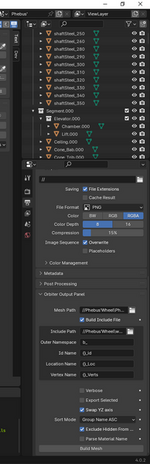
Project Blender Mesh Tools add-on

still using 3.1.2, any advantages in upgrading (for Orbiter devs)?
 
Last edited:

Probably not, if that is working for you. A lot of the work in Blender is in areas we don't much care about for Orbiter work. Still, I usually work with the latest that will work with the plugin. For now that is 4.0. I do notice that 4.0 is slower to open on my machine, so there is that.
 
Thanks, good to know. I'll take another look when 4.1.2 comes out (hopefully no compatibility issues)
(I'm a little worried that updating will change the layout, I have an older version installed for 3ds support but except for import/export I can't use it!)
 
How can I get Blender to export vertex normals texture uv coordinates for a mesh group without texture?

I'm trying to get HUD, MFDs working and figured out the problem is that the display panel is only a material and blender exports it without uv coord., (only 6 and not 8 entries in the vertex list) which is correct, but HUDs etc. need them. I've tried adding a uv map, use nodes image, but it either exports without or an error due to missing tex. file?
I've done this in 3dsmax and not had this issue. Does anyone have any experience making HUDs, MFDs in Blender?
 
How can I get Blender to export vertex normals texture uv coordinates for a mesh group without texture?

I'm trying to get HUD, MFDs working and figured out the problem is that the display panel is only a material and blender exports it without uv coord., (only 6 and not 8 entries in the vertex list) which is correct, but HUDs etc. need them. I've tried adding a uv map, use nodes image, but it either exports without or an error due to missing tex. file?
I've done this in 3dsmax and not had this issue. Does anyone have any experience making HUDs, MFDs in Blender?

For a VC?

In Blender you will have a plane that represents the HUD or MFD surface, unwrap that and assign it a texture. SR-71R does this, and uses the same texture where the VC controls are laid out. In Blender you will see that texture on that plane, but you don't see it at runtime--just whatever is drawn to that surface.

The code to load the HUD looks like this:

Code:
bool HUD::handle_load_vc(bco::vessel& vessel, int vcid)
{
    // Register HUD
    static VCHUDSPEC huds =
    {
        1,                        // Mesh number (VC)
        bm::vc::HUD_id,            // mesh group
        { 0.0, 0.8, 15.25 },    // hud center (location)
        0.12                    // hud size
    };

    oapiVCRegisterHUD(&huds);    // HUD parameters
    return true;
}

The mesh file entry:

Code:
LABEL HUD
MATERIAL 4
TEXTURE 4
FLAG 7
GEOM 4 2
-0.0634 0.8619 15.2558 0.0000 0.0000 -1.0000 0.0001 0.0004
0.0633 0.8619 15.2558 0.0000 0.0000 -1.0000 0.9996 0.0001
-0.0634 0.7352 15.2558 0.0000 0.0000 -1.0000 0.0004 0.9999
0.0633 0.7352 15.2558 0.0000 0.0000 -1.0000 0.9999 0.9996
...
... <MATERIAL 4>
MATERIAL VC_100_Cockpit_MAT
0.800 0.800 0.800 1.000
0.000 0.000 0.000 1.000
0.000 0.000 0.000 1.000 49.030
0.600 0.600 0.600 1.000
 
Thanks for the clarification. So I can link it to any texture to get it to export the UVs, and then I can set tex, to 0 manually in the .msh file or just leave it.
Works, thanks again :)
 
hi, small bug + easy fix: you export the objects with their exact same names in the .h (+prefix/suffix possibly). Hence, if an object name contains a dot ".", it turns into a syntax error. It happens whenever I duplicated an object multiple times, e.g.:

Code:
    const UINT Ceiling.000_id = 0;
    const UINT Ceiling.001_id = 1;
...

Easy fix on user's side is to replace all ".0" by "_0" in the .h
But a clean fix would be to do the same in the addon itself.

(excellent addon, by the way, it saved my life! congrats)
 
hi, small bug + easy fix: you export the objects with their exact same names in the .h (+prefix/suffix possibly). Hence, if an object name contains a dot ".", it turns into a syntax error. It happens whenever I duplicated an object multiple times, e.g.:

Code:
    const UINT Ceiling.000_id = 0;
    const UINT Ceiling.001_id = 1;
...

Easy fix on user's side is to replace all ".0" by "_0" in the .h
But a clean fix would be to do the same in the addon itself.

(excellent addon, by the way, it saved my life! congrats)

This is an issue I'm aware of, and have run into often. Blender, when you duplicate an object, will append the .001 to the object name. the '.' is invalid in C++ as an identifier, so you end up with a compiler error. I thought I at one point had added (or intended to add) code to just convert any '.' with '_'. The other side of that coin is that I do like when the compiler complains because I forgot to give an object in Blender a proper name. I then go back and give those objects more meaningful names, removing the .00x. The down side of automatically converting the . is that the C++ identifier, and the Blender object names don't match, but that is minor, so I'll probably take a look at that.

Regardless, I've found that giving my Blender objects meaningful names sure does help understanding the C++ code that ends up using those objects.
 
Golden rule is to keep meaningful names. In my case, I duplicate with a Blender python script several objects 36 times, so that I end up with a lot of .0xx indices, they all "mean" something and I can't change them manually in Blender... Nevertheless, I can fix in C++ easily but it needs to be redone after every update of the genuine model.
 
Yea, there are times you cannot avoid the .0xx issue easily. I'll take a closer look at this and maybe at least provide a way to turn off the automatic conversion of . to _ if needed.

Thanks for the input.
 
Latest

This should clean up the naming issue for the C++ include files. I've done some cursory testing, so if you find issues let me know.
 
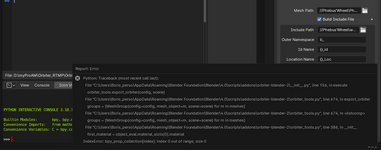
Sorry to report an error while exporting from Blender 4.0 with your 2.1.7 version. I can PM you my file if it helps (I've got a somewhat-large collection hierarchy).

orbiter-blender-2_error.pngContext => orbiter-blender-2_context.png

Now I want to re-install v2.1.4 in Blender (after removing Addon v2.1.7 from User Preferences panel) and I can't anymore => do I have to clean anything before re-installing?

:eek:
 
Last edited:
Yes, PM me your file, I'll take a look. Does not appear to be related to these changes, but you never know.

As for rolling back, you should be able to just remove the current version (the Remove button in preferences/add on/Orbiter Mesh Tools). Then select the Install... button at the top of that dialog and select the .zip file for the version you want.
 
Thank you for the quick fix. Version 2.1.8 works also for me now! Again, excellent Blender addon.
 
Hello! Amazing work you did here. But it wont work for Blender 4.1, it throws an error 'mesh' object has no attribute 'create_normals_split'.
According to stack exchange: "The function create_normals_split was removed in Blender 4.1. Fixing this requires the importer authors to update their addon."
Will it be updated so it can be used with blender 4.1?
Thanks!
 
Hello! Amazing work you did here. But it wont work for Blender 4.1, it throws an error 'mesh' object has no attribute 'create_normals_split'.
According to stack exchange: "The function create_normals_split was removed in Blender 4.1. Fixing this requires the importer authors to update their addon."
Will it be updated so it can be used with blender 4.1?
Thanks!

In short, no. I'm looking at supporting 4.2. There are changes to how normals and shading are handled in Blender, and I've seen a good bit of discussion that 4.1 is problematic. The changes do cause the plugin to break on 4.1. So stick with 4.0 for now and I will be looking at 4.2 support when it is officially released.

I explain this on the github page, under Compatibity: Github

Blender 4.0 Download
 
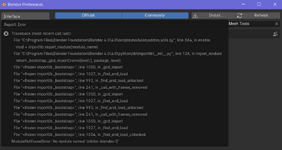
Hi. I followed the installation instructions on GitHub, namely download the "Source code (zip)". But I get the error after clicking the check box to enable the add-on:

b.png

But if I download "orbiter-blender-2.zip", then everything seems to be okay. So, should I use the "orbiter-blender-2.zip" instead of the "Source code (zip)"? Is it the last (actual) version? The problem seems to be related to the module name.
 
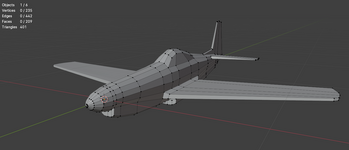
Recently I made a low poly plane from a single circle mesh using extrusion in Blender following blueprints. I thought it looks pretty accurate in Blender, namely has a good topology/geometry without any "singularities":

p.png

Before I tried to use the "Blender Mesh Tools" I converted this plane to OBJ to import it by Anim8or to export it to 3DS to convert it to MSH using the "3ds2msh" script.

Today I decided to convert it to MSH using the "Blender Mesh Tools". I followed the first three pages of the "Orbiter Tools Tutorial.pdf" and got a MSH.

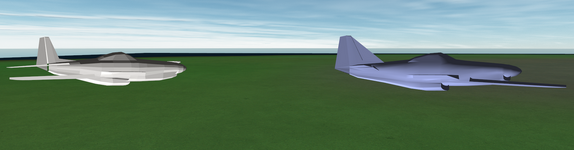
It looks like the both MSH files look similar in game (but have different sizes) and have the same issues (only one side of the wings is visible, for example). Maybe it's related to normals, I don't know:

2p.png

I'm going to read all the "Orbiter Tools Tutorial.pdf", maybe I will find answers to my problems there?

I attach my BLEND file here (maybe it's needed to select the object and convert it to mesh, since I used the mirror modifier, so the only half of the object has vertices). I'll be glad if someone could look at it and try it in Orbiter. I'm wondering if this mesh could look smoother in game. What ways are there to do this? Adding vertices, normal maps for textures, etc?

@Matias Saibene, maybe you could advise me something, since you're modelling your Boeing in Blender.

I'm using Blender 4 (4.0.2). And I have almost no skills in 3D modeling yet :)
 
Last edited:
Back
Top