
You are using an out of date browser. It may not display this or other websites correctly.
You should upgrade or use an alternative browser.
You should upgrade or use an alternative browser.
Installation Atlantis Textures
- Thread starter lipool
- Start date


What do you mean? Nobody is psychic.

- Joined
- Aug 5, 2008
- Messages
- 4,261
- Reaction score
- 1
- Points
- 0
What do you mean by "work"?
Do you mean that the meshes are untextured?
Do you mean that the meshes are untextured?
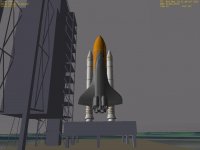
Sorry I just realized I haven't said in my post, except for the title, that I need help with the textures of Atlantis. The inside and outside of Atlantis are grey, EXCEPT FOR THE CARGOBAY.
---------- Post added at 01:48 PM ---------- Previous post was at 01:47 PM ----------
Got to go
---------- Post added at 01:48 PM ---------- Previous post was at 01:47 PM ----------
Got to go
Since people are saying I'm not being specific enough I would like help on these steps.
1) Unzip Orbitor to a directory
2) Install Orbitor Sound to the same directory
3) Open Launch Pad
3.1) Activate All Modules
3.2) Set Joystick
3.3) Change Screen Dimensions
3.4) Set Scenario to Atlantis Launch Satillite
3.5) Start Orbitor
4) I'm on the ground and the simulator is running fine but the inside and outside of Atlantis is grey
So How Do I Get Textures for Atlantis?
1) Unzip Orbitor to a directory
2) Install Orbitor Sound to the same directory
3) Open Launch Pad
3.1) Activate All Modules
3.2) Set Joystick
3.3) Change Screen Dimensions
3.4) Set Scenario to Atlantis Launch Satillite
3.5) Start Orbitor
4) I'm on the ground and the simulator is running fine but the inside and outside of Atlantis is grey
So How Do I Get Textures for Atlantis?

TSPenguin
The Seeker
- Joined
- Jan 27, 2008
- Messages
- 4,073
- Reaction score
- 4
- Points
- 63
3.3) Change Screen Dimensions
What output device did you select?
Does other vessels have textures? Try the deltaglider
Can you post the logfile when running orbiter please?

Kaito
Orbiquiz Coordinator
- Joined
- Jul 24, 2008
- Messages
- 857
- Reaction score
- 0
- Points
- 0
1) Unzip Orbitor to a directory
Right click on the zip file, unzip
2) Install Orbitor Sound to the same directory
OrbiterSound has an installer, just find the same directory as you unzipped orbiter to.
3) Open Launch Pad
Double-click orbiter.exe
3.1) Activate All Modules
Modules tab, active all
3.2) Set Joystick
Joystick Tab, Joystick Device
3.3) Change Screen Dimensions
Video Tab, Screen Resolution
3.4) Set Scenario to Atlantis Launch Satillite
Scenario Tab
3.5) Start Orbitor
Click Launch Orbiter
4) I'm on the ground and the simulator is running fine but the inside and outside of Atlantis is grey
Can you show us a picture?
Right click on the zip file, unzip
2) Install Orbitor Sound to the same directory
OrbiterSound has an installer, just find the same directory as you unzipped orbiter to.
3) Open Launch Pad
Double-click orbiter.exe
3.1) Activate All Modules
Modules tab, active all
3.2) Set Joystick
Joystick Tab, Joystick Device
3.3) Change Screen Dimensions
Video Tab, Screen Resolution
3.4) Set Scenario to Atlantis Launch Satillite
Scenario Tab
3.5) Start Orbitor
Click Launch Orbiter
4) I'm on the ground and the simulator is running fine but the inside and outside of Atlantis is grey
Can you show us a picture?
Similar threads


- Replies
- 11
- Views
- 3K

- Replies
- 34
- Views
- 6K

- Replies
- 6
- Views
- 3K

