

-
ORBITER-FORUM will be temporarily closed at 2026-07-23 18:00 UTC while we complete some OF maintenance tasks. The amount of downtime is expected to take up to one hour, but probably less.
You are using an out of date browser. It may not display this or other websites correctly.
You should upgrade or use an alternative browser.
You should upgrade or use an alternative browser.
Request Artemis landers
- Thread starter Kyle
- Start date


barrygolden
Well-known member
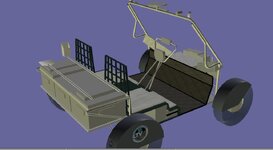
you might stand them up
barrygolden
Well-known member
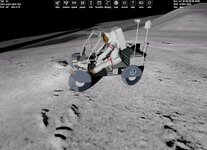
Super where are you testing this
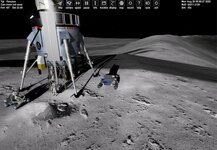
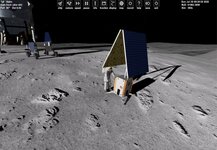
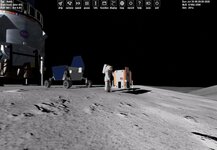
Ukert base. The rover is UACS.
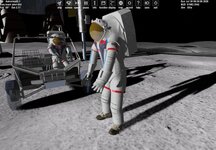
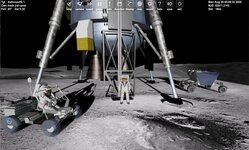
I need to figure out which is which. Right now I have the solid red commander broke red pilot. I suppose specialist and can candy red and white.
These are the FLEX crew.
I can add cargo boxes to the lander and fake rover. press a key and the fake rover disappears and a new rover vessel appears,...
I need to figure out which is which. Right now I have the solid red commander broke red pilot. I suppose specialist and can candy red and white.
These are the FLEX crew.
I can add cargo boxes to the lander and fake rover. press a key and the fake rover disappears and a new rover vessel appears,...
Attachments
barrygolden
Well-known member
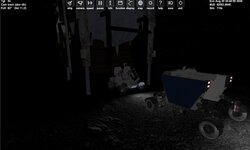
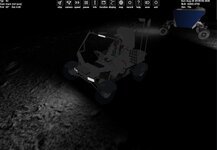
gattis do you have the lights working
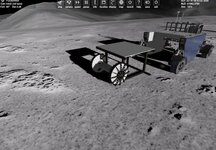
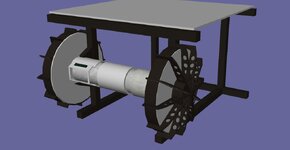
barrygolden
Well-known member
Oh Wow !!! that looks and sounds way cool. I wonder if NASA is going to let that thing crawl down into Shackleton Crater
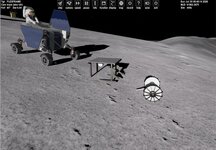

- Joined
- Mar 23, 2008
- Messages
- 1,327
- Reaction score
- 1,657
- Points
- 128
- Website
- francisdrakex.deviantart.com
Your equipment on the ground looks super!
Never thought, Ukert crater to become so popular!
The site (base) there was actually created out of despair. After several Moon bounces I ended up on the Lunar geographical coordinates 0°N, 0°E on the Moons equator. I was looking for a site reasonably close for a suborbital hop, and which is visually interesting.
Ukert crater is close (7,7° N, 1,35° O) and landing on the rim provides a nice view. If you drive down into crater, you can can actually start sliding down the slope.
Never thought, Ukert crater to become so popular!
The site (base) there was actually created out of despair. After several Moon bounces I ended up on the Lunar geographical coordinates 0°N, 0°E on the Moons equator. I was looking for a site reasonably close for a suborbital hop, and which is visually interesting.
Ukert crater is close (7,7° N, 1,35° O) and landing on the rim provides a nice view. If you drive down into crater, you can can actually start sliding down the slope.
add movement to the Moondiver.
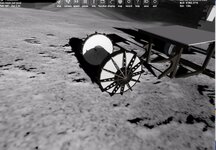
Because I am just showing meshes seen or not. I have run into an issue. The issue is the FLEX moves up/down. But the meshes don't. I can tie so modules to the animation. But not the UACS guys.
Here the attachment is moving with the body_proc.
I need to shift the addional modules meshs to the body Proc.
If I do this SHIft Mesh 10,bodyproc. It moves it very high or low
Because I am just showing meshes seen or not. I have run into an issue. The issue is the FLEX moves up/down. But the meshes don't. I can tie so modules to the animation. But not the UACS guys.
BODY = new MGROUP_TRANSLATE(0, BGrp4, 13, _V(0, -.7, 0));Here the attachment is moving with the body_proc.
I need to shift the addional modules meshs to the body Proc.
If I do this SHIft Mesh 10,bodyproc. It moves it very high or low
if (BODY_check == SPANEL_UP) {
        CARGO1ATTACHMENT.y = (.38 - (.7 * BODY_proc));
        SetAttachmentParams(CARGO1, CARGO1ATTACHMENT, _V(0, -1, 0), _V(0, 0, 1));
        body_tip[0].y = (.39 - (.7 * BODY_proc));
        CARGO2ATTACHMENT.y = (.158 - (.7 * BODY_proc));
        SetAttachmentParams(CARGO2, CARGO2ATTACHMENT, _V(0, -1, 0), _V(0, 0, 1));
        body_tip1[0].y = (.158 - (.7 * BODY_proc));
        CARGO3ATTACHMENT.y = (.39 - (.7 * BODY_proc));
        SetAttachmentParams(CARGO3, CARGO3ATTACHMENT, _V(0, -1, 0), _V(0, 0, 1));
        body_tip2[0].y = (.39 - (.7 * BODY_proc));

    }
    if (BODY_check == SPANEL_DOWN) {
        CARGO1ATTACHMENT.y = (.38 - (.7 * BODY_proc));
        SetAttachmentParams(CARGO1, CARGO1ATTACHMENT, _V(0, -1, 0), _V(0, 0, 1));
        body_tip[0].y = (.39 - (.7 * BODY_proc));
        CARGO2ATTACHMENT.y = (.158 - (.7 * BODY_proc));
        SetAttachmentParams(CARGO2, CARGO2ATTACHMENT, _V(0, -1, 0), _V(0, 0, 1));
        body_tip1[0].y = (.158 - (.7 * BODY_proc));
        CARGO3ATTACHMENT.y = (.39 - (.7 * BODY_proc));
        SetAttachmentParams(CARGO3, CARGO3ATTACHMENT, _V(0, -1, 0), _V(0, 0, 1));
        body_tip2[0].y = (.39 - (.7 * BODY_proc));
        //
    }
Attachments
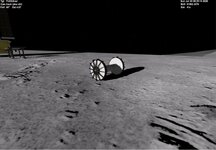
Progress:
This moves the meshes with the animation
But When I reload the meshes are int he correct place. But when you move the animations they are wrong.
load and move the meshes
This moves the meshes with the animation
bodychangemesh.y = (0 + (.7 * BODY_proc));
    difference = bodychangemesh - bodymesh;
    if (bodychangemesh.y != bodymesh.y) {
        ShiftMesh(10, difference);
        //ShiftMesh(2, difference);
        //ShiftMesh(3, difference);
        ShiftMesh(4, difference);
        ShiftMesh(5, difference);
        ShiftMesh(6, difference);
        ShiftMesh(7, difference);
        ShiftMesh(8, difference);
        //ShiftMesh(9, difference);
    }
    //ShiftMesh(10, bodymesh);
    bodymesh = bodychangemesh;
    //difference = bodychangemesh;
    sprintf(oapiDebugString(), "bodymesh y  %2.4f  bodychange %2.4f diff %2.4f ", bodymesh.y, bodychangemesh.y, difference.y);
}
if (BODY_check == SPANEL_DOWN) {

    //

    bodychangemesh.y = (0 - (.7 * BODY_proc));
    difference = bodychangemesh - bodymesh;
    //difference1 = bodychangemesh - bodymesh;
    //difference2 = bodychangemesh - bodymesh;
    //difference3 = bodychangemesh - bodymesh;
    if (bodychangemesh.y != bodymesh.y) {
        ShiftMesh(10, difference);
        //ShiftMesh(2, difference);
        //ShiftMesh(3, difference);
        ShiftMesh(4, difference);
        ShiftMesh(5, difference);
        ShiftMesh(6, difference);
        ShiftMesh(7, difference);
        ShiftMesh(8, difference);
        //ShiftMesh(9, difference);
    }

    //ShiftMesh(10, bodymesh);
    bodymesh = bodychangemesh;
    //difference = bodychangemesh;
    sprintf(oapiDebugString(), "bodymesh y  %2.4f  bodychange %2.4f diff %2.4f ", bodymesh.y, bodychangemesh.y,difference.y);
}
But When I reload the meshes are int he correct place. But when you move the animations they are wrong.
load and move the meshes
bodychangemesh.y = (0 - ( .7*BODY_proc));
//difference = bodychangemesh - bodymesh;
ShiftMesh(10, bodychangemesh);
//ShiftMesh(2, difference);
//ShiftMesh(3, difference);
ShiftMesh(4, bodychangemesh);
ShiftMesh(5, bodychangemesh);
ShiftMesh(6, bodychangemesh);
ShiftMesh(7, bodychangemesh);
ShiftMesh(8, bodychangemesh);
bodymesh = bodychangemesh;
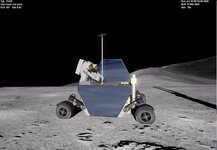

MarkWatney2015
The Desktop Orbinaut
- Joined
- Oct 14, 2016
- Messages
- 1,276
- Reaction score
- 1,632
- Points
- 128
- Location
- San Jose Del Monte, Bulacan
- Preferred Pronouns
- He/him
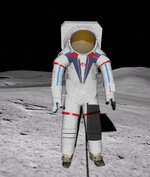
New AxEMU suits being tested at NASA's Johnson Space Center last year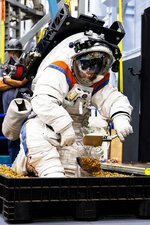
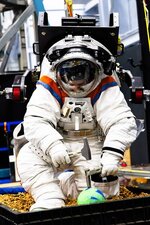
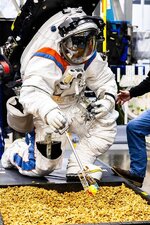
This is what I have. Might need to add that center section? Looks like a wide blue and red edged stripe on the legs. No blue strip on the arms
I need some code help. In the Artemis2 and Flex I sometimes get an odd error in the save state. For the Flex it uses same code as @Max-Q
and initalize
but in the saved state:
this is bad EARTHTRACKING 622033369435602237596528279552.0000 0.9653
I need some code help. In the Artemis2 and Flex I sometimes get an odd error in the save state. For the Flex it uses same code as @Max-Q
void FLEXUACS::clbkSaveState(FILEHANDLE scn) {


        char cbuf[256];
        //UACS
        mdlAPI.clbkSaveState(scn);

    sprintf(cbuf, "%0.4f ", BODY_proc);
    oapiWriteScenario_string(scn, "BODY", cbuf);

    sprintf(cbuf, "%d %0.4f", SPANEL_status, SPANEL_proc);
    oapiWriteScenario_string(scn, "SPANEL", cbuf);

    sprintf(cbuf, "%d %0.4f", HGA_status, HGA_proc);
    oapiWriteScenario_string(scn, "HGA", cbuf);

    sprintf(cbuf, "%0.4f %0.4f", hga_azimuth_proc, hga_elevation_proc);
    //sprintf(cbuf, "%0.4f ", hga_elevation_proc);
    oapiWriteScenario_string(scn, "EARTHTRACKING", cbuf);

    sprintf(cbuf, "%0.4f %0.4f %0.4f %0.4f  %0.4f  %0.4f ", arm_sy, arm_sp, arm_ep, arm_wp, arm_wy, arm_wr);
    oapiWriteScenario_string(scn, "ARM_STATUS", cbuf);

    sprintf(cbuf, "%0.4f ", CAMERAROTATE_proc);
    oapiWriteScenario_string(scn, "CAMROT", cbuf);

    sprintf(cbuf, "%0.4f ", CAMERAELEVATE_proc);
    oapiWriteScenario_string(scn, "CAMELE", cbuf);

    sprintf(cbuf, "%d %0.4f", CAM_status, CAMERA_proc);
    oapiWriteScenario_string(scn, "CAM", cbuf);

    sprintf(cbuf, "%d %0.4f", DRILL_status, DRILL_proc);
    oapiWriteScenario_string(scn, "DRILL", cbuf);
    double hga_azimuth_proc;
    double hga_elevation_proc;
and initalize
    hga_elevation_proc = .25;
    hga_azimuth_proc = 0;
but in the saved state:
FLEX:FLEXUACS
  BODY 0.0000
  SPANEL 1 1.0000
  HGA 0 0.0000
  EARTHTRACKING 622033369435602237596528279552.0000 0.9653
  ARM_STATUS 0.0000 0.0000 0.0000 0.0000  0.0000  0.0000
  CAMROT 0.0000
  CAMELE 0.0000
  CAM 0 0.0000
  DRILL 1 1.0000
  STATUS Landed Moon
  POS 1.2858009 7.3634759
  HEADING 6.19
  ALT 1.530
  AROT 83.926 7.725 91.123
  AFCMODE 7
  NAVFREQ 0 0
  XPDR 468
END
this is bad EARTHTRACKING 622033369435602237596528279552.0000 0.9653
Attachments
Similar threads


- Replies
- 10
- Views
- 4K
