News A note on beta feature "local light sources"

martins

Orbiter Founder
Orbiter Founder
Joined
Mar 31, 2008
Messages
2,448
Reaction score
474
Points
83
Website
orbit.medphys.ucl.ac.uk
It seems that the "local light source" feature added to a recent orbiter beta version has caused quite a bit of excitement - excellent! To avoid misunderstandings, I repeat here my original message in the beta forum:
I've just uploaded a new beta (100812). I've implemented "localised light sources" (spot lights and isotropic point lights with limited range). Has some nice effects (to get an impression, enable "local light sources" on the visual effects tab, and run the "2010 Edition | visual improvements | spotlights" scenario.

Before you get too excited: this works ok for illuminating other vessels, but not for planet surfaces. There are two reasons:

  • planet surfaces are currently rendered without z-buffer, so the illumination from the point sources can't be calculated
  • even if that were changed, DX7 is limited to per-vertex lighting. Since the vertices for surface meshes are far between, they wouldn't work very well.
Even so, the new feature offers some nice effects. It provides a framework for addons and other graphics clients to implement localised lighting effects in a consistent manner (and I'm confident that the OGLA client can do a better job at lighting the ground).

The implementation is fairly complete (including full control of all features via script). Let me know if you find bugs with it.
In addition, please note that multiple light sources are a computationally expensive effect. Vertex lighting calculations must add the effects from each light source, so frame rate will suffer if there are lots of sources within visual range. Please don't go overboard with it! As with mesh complexity, less is often more. Even if your top-of-the-range graphics card takes it in its stride, spare a thought for the rest of us with obsolete cards. Or allow users to select a version of your vessel addon with reduced lighting effects.

Also, I am not sure if there is a limit imposed by DX7 on the maximum number of sources. I haven't found a reference to that.
 
Also, I am not sure if there is a limit imposed by DX7 on the maximum number of sources. I haven't found a reference to that.

At least 3e4 while in visual range on my machine, at least 5e5 while not in visual range of creation.
 
That should be enough for our needs :lol:
 
"computationally"......Nice use of words there Martins. :facepalm:
 
Also, I am not sure if there is a limit imposed by DX7 on the maximum number of sources. I haven't found a reference to that.
According to this, there is a limit of 8 lights enabled simultaneously (with no limit for defined lights) for Fixed Function Pipeline (i.e. Transform & Lighting):
If you are referring to the fixed function pipeline, then yes, you are only allowed to have 8 lights enabled at any given time, however you are allowed to define an unlimited amount of lights. You are only allowed to have 8 of them enabled at any given time.

With the Programmable Pipeline(e.g. Shaders) you can have as many lights as you want.
Programmable Pipeline allows unlimited light sources, but I don't think it's (i.e. the shaders are) used by Orbiter with embedded graphics or D3D7Client.

And according to this:
If your light number goes beyond that limit, illumination will be computed on the software driver, with the predictable loss of performance.
 
Yes, I've noticed a significant FPS drop with lights on-screen, especially with Computerex's Thruster Lights enabled. Add to this the drop caused by FRAPS recording, and I've got myself a whopping 3 FPS. :hotcool:

Very nice feature nonetheless! It adds very little the simulation itself (not that there's much left to add to the simulation; it's already thoroughly accurate as far as I can tell,) but the value added to any recordings and general eye-candy is very much appreciated. Nighttime in LEO is both less and more creepy now.
 
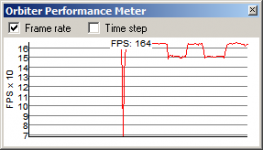
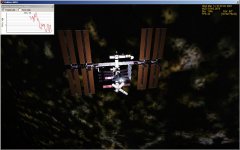
With DG's docking light, a light source for everyone of Deltaglider's thrusters, and the one defined by the DG itself, along with the ISS, I see a drop of roughly 100 FPS. The other shot you see of the framerate plug-in dialog is the effects of toggling the docking light on the DG. Roughly 10 FPS loss with the light on. Not bad.
 

Attachments

  • fps.png
    fps.png
    5.5 KB · Views: 28
  • dgiss.jpg
    dgiss.jpg
    190.3 KB · Views: 69
That's because just having the DG light isn't over this limit yet:

According to this, there is a limit of 8 lights enabled simultaneously (with no limit for defined lights) for Fixed Function Pipeline (i.e. Transform & Lighting):

According to that, once more than eight lights are enabled (shining), performance will go down rapidly because the additional lights won't be hardware-accelerated anymore. It would be interesting to see a benchmark adding one more light at a time.
 
That's because just having the DG light isn't over this limit yet:

Well, for the second picture there are far more then eight shining lights. In any case, I started off with this scenario:

Code:
BEGIN_DESC
Contains the latest simulation state.
END_DESC

BEGIN_ENVIRONMENT
  System Sol
  Date MJD 55270.1373869376
  Help Default\Checklists\Quickstart,Quickstart
END_ENVIRONMENT

BEGIN_FOCUS
  Ship GL-01
END_FOCUS

BEGIN_CAMERA
  TARGET GL-01
  MODE Extern
  POS 9.17 -18.09 -11.47
  TRACKMODE TargetRelative
  FOV 50.00
END_CAMERA

BEGIN_HUD
  TYPE Surface
END_HUD

BEGIN_MFD Right
  TYPE User
  MODE Star Wars Physics MFD
END_MFD

BEGIN_SHIPS
ISS:ProjectAlpha_ISS
  STATUS Orbiting Earth
  RPOS -3183146.67 -5530452.52 2177557.85
  RVEL -6628.981 3883.983 189.254
  AROT 110.10 -10.53 79.96
  AFCMODE 7
  PRPLEVEL 0:1.000000
  IDS 0:588 100 1:586 100 2:584 100 3:582 100 4:580 100
  NAVFREQ 0 0
  XPDR 466
END
Mir:Mir
  STATUS Orbiting Earth
  RPOS 6286648.82 135461.71 2211124.34
  RVEL -2568.084 444.631 7283.475
  AROT 0.07 -45.24 89.95
  AFCMODE 7
  IDS 0:540 100 1:542 100 2:544 100
  XPDR 482
END
Luna-OB1:Wheel
  STATUS Orbiting Moon
  RPOS 1969363.06 -1063208.49 704.02
  RVEL 703.337 1302.503 -0.253
  AROT 0.00 0.00 -74.96
  VROT 0.00 0.00 10.00
  AFCMODE 7
  IDS 0:560 100 1:564 100
  XPDR 494
END
GL-01:DeltaGlider
  STATUS Landed Earth
  POS -80.6824940 28.5967940
  HEADING 330.01
  RCSMODE 0
  AFCMODE 7
  PRPLEVEL 0:0.995000 1:1.000000
  NAVFREQ 94 524 84 114
  XPDR 0
  GEAR 1 1.0000
  PSNGR 2 3 4
  AAP 0:0 0:0 0:0
END
SH-03:ShuttleA
  STATUS Landed Earth
  BASE Habana:4
  POS -82.3982414 23.0005396
  HEADING 70.00
  AFCMODE 7
  PRPLEVEL 0:1.000000 1:1.000000
  NAVFREQ 0 0
  XPDR 0
  PODANGLE 0.0000 0.0000
  DOCKSTATE 0 0.0000
  AIRLOCK 0 0.0000
  GEAR 0 0.0000
  PAYLOAD MASS 0.0 0
END
PB-01:ShuttlePB
  STATUS Landed Earth
  BASE Habana:1
  POS -82.4000000 22.9994604
  HEADING 22.00
  AFCMODE 7
  PRPLEVEL 0:1.000000
  NAVFREQ 0 0
END
GL-02:DeltaGlider
  STATUS Landed Mars
  BASE Olympus:3
  POS -135.4300000 12.7366196
  HEADING 0.00
  AFCMODE 7
  PRPLEVEL 0:1.000000 1:1.000000
  NAVFREQ 0 0 0 0
  XPDR 0
  GEAR 1 1.0000
  AAP 0:0 0:0 0:0
END
SH-01:ShuttleA
  STATUS Landed Moon
  BASE Brighton Beach:1
  POS -33.4375000 41.1184067
  HEADING 0.00
  AFCMODE 7
  PRPLEVEL 0:1.000000 1:1.000000
  NAVFREQ 0 0
  XPDR 0
  PODANGLE 0.0000 0.0000
  DOCKSTATE 0 0.0000
  AIRLOCK 0 0.0000
  GEAR 0 0.0000
  PAYLOAD MASS 0.0 0
END
END_SHIPS

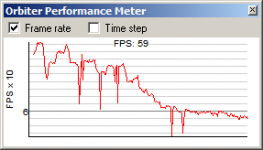
I got roughly 65 FPS in the external view without any lights. Then I started adding lights, one by one. From 0 to 8 lights, I lost the most FPS, with each additional light causing a 1-2 FPS hit. But after 8 lights, there was no significant FPS drop. It's pretty cool. In the graph the seemingly steep decline is from 0-8 lights. I added a total of 20 lights in all. You see the graph essentially becoming a horizontal line near the end.
 

Attachments

  • fpsmeter.png
    fpsmeter.png
    5.7 KB · Views: 15
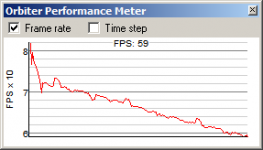
This one is 1 light per second for 220 seconds. Again, the majority of the FPS decline takes place in the first few lights.
 

Attachments

  • fpsmeter2.png
    fpsmeter2.png
    5.2 KB · Views: 30
...limit imposed by DX7 ...

I know nothing about Orbiter's code (or, for that matter, DirectX code)... but I was wondering, why DX7? Hasn't DX9 been out forever?

Kudo's for the lighting effects though, they look very cool. :tiphat:
 
While a DX9 version is being worked on (by others), DX7 is what martin has used for however long.
 
I don't know about you, but with thruster lights and everything firing, i get my usual steady ~60 fps (trust me, I don't know what's causing it).
 
Last edited:
I know nothing about Orbiter's code (or, for that matter, DirectX code)... but I was wondering, why DX7? Hasn't DX9 been out forever?

Kudo's for the lighting effects though, they look very cool. :tiphat:

Going from DX7 to 9 inst just flipping a few lines of code. Each DX version has major major changes which is why any engine getting an update to a new DX or OpenGL version is usually a long difficult process.

What Orbiter has done with the limited DX7 is downright Amazing!
 
I don't know about you, but with thruster lights and everything firing, i get my usual steady 60 fps (hardware forced frameskip, no way I can increase it... stupid ATI).
Is it your monitor's refresh rate?

You need to change 2 options to make Orbiter give you more FPS, at cost of [ame=http://en.wikipedia.org/wiki/Page_tearing]page tearing artifact[/ame] mostly noticeable for fast horizontal scene changes:
  1. Place the mark on the "Disable vertical sync." checkbox at Video tab of Orbiter Launchpad.
  2. Find a similar setting in graphics driver options, and change it either to an option described like "Use application setting", or "Force disabled".
The "Disable vertical sync." will work only if a graphics driver allows it. I'd recommend "Use application setting" as a global setting, or if there are per application settings in graphics driver's control panel, you can try either of mentioned in the 2nd point.
 
not that there's much left to add to the simulation; it's already thoroughly accurate as far as I can tell
Combining Orbiter with Algodoo would produce an uber sim, for example. You would be able not only to fly your rocket, but to design and build it, and see it work in details. Then, combine the result with Powder Toy to get the ultimate sim, where you would also be able to see your ship blowing up, in details.

And that's just a start.
 
Back
Top