coming soon (hopefully yall can tell what this will be)

ORBITER-FORUM will be temporarily closed at 2026-07-23 18:00 UTC while we complete some OF maintenance tasks. The amount of downtime is expected to take up to one hour, but probably less.

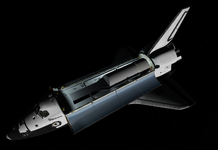
Will you be able to launch, deploy the new one, grab the old one (you'll need the RMS for that), and land in one orbit? (probably not because ascent guidance isn't that great for rendezvous, and also the real one never got the upgrade to also target downrange position at MECO, to place the vehicle on an intercept trajectory with the target... but just making a deployment in one orbit should be fun enough).View attachment 46194
coming soon (hopefully yall can tell what this will be)
ive been doing some testing to try to somewhat pull off that mission. ive edited to ascent targets in the mission file but that causes a negative HP at MECO hahaWill you be able to launch, deploy the new one, grab the old one (you'll need the RMS for that), and land in one orbit? (probably not because ascent guidance isn't that great for rendezvous, and also the real one never got the upgrade to also target downrange position at MECO, to place the vehicle on an intercept trajectory with the target... but just making a deployment in one orbit should be fun enough).
BTW: a better thread for payloads: https://www.orbiter-forum.com/threads/space-shuttle-vessel-payload-development-thread.42248/
Hi there!Hello!
I'm unable to start the mission editor, do i need to set something up?
Not getting the promt to point it towards Orbiter.exe
Thanks
Just to confirm, you are NOT using SSV v1.13, right?No, just came back to SSV after a few years. Fresh install, mission editor wont launch. I do have the latest .Net
ive been doing some testing to try to somewhat pull off that mission. ive edited to ascent targets in the mission file but that causes a negative HP at MECO haha
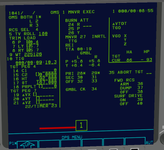
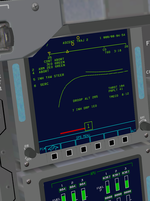
I don't think a negative HP at MECO is a problem (it actually needs to be, so the ET doesn't land in Africa or Europe).... but going to a 90NM altitude MECO means that ASCENT TRAJ 2 display is useless (in v2.0 those trajectory lines will be I-Loaded so they can be changed for each mission).
Those are the PEG-4 targets for the OMS burns. PEG-7, using the dvX, dvY, dvZ items at the bottom of the display just "blindly" burn to get that dV, but PEG-4 is smarter, and more complex: it targets an altitude HT, at an angle THETA from the launch site (in OPS1), so that the vehicle gets to that target point with a velocity dictated by C1 and C2. I'm not remembering exactly which is which now, but they represent a relationship between vertical and horizontal velocity. These should be described much better in the SCOM and/or the DPS Dictionary (in the XXXXX MNVR YYYYY display section).for the I-Loads, C1 and C2 and THETA-OMS, are those for a rendezvous intercept or something else? they are described as "target xxxx" in the I-Load list file
yeah i more so started it to see how much is possible, Indy also gave me the warning of "this probably wont work like you want it" hahaThose are the PEG-4 targets for the OMS burns. PEG-7, using the dvX, dvY, dvZ items at the bottom of the display just "blindly" burn to get that dV, but PEG-4 is smarter, and more complex: it targets an altitude HT, at an angle THETA from the launch site (in OPS1), so that the vehicle gets to that target point with a velocity dictated by C1 and C2. I'm not remembering exactly which is which now, but they represent a relationship between vertical and horizontal velocity. These should be described much better in the SCOM and/or the DPS Dictionary (in the XXXXX MNVR YYYYY display section).
For this case, you need to know where the target is, HT and THETA, and then C1 and C2 need to be something such that the delta velocity on approach between the OV and the KH-9 can be nulled without using all of the RCS... not easy to calculate right now.
Another factor to consider is the plane matching, which seems like it would be done pretty much all during ascent, which is currently a weak point in SSV.
This deploy and retrieve mission is beginning to look like a bit too much to ask out of SSV at the moment... if I were you, I'd would focus more on a deploy mission alone, getting the KH-9 accurate, etc.
That is the only thing it does...how does the KU work for radar? does the target vessel need anything special on it?

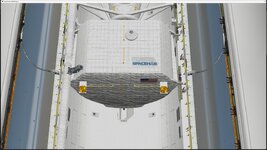
I've placed 2 DFI pallets at those locations and they show up there as expected, and counting the PLIDs, the latches seem to be in the correct place.I think there's a bug either in the SSV Mission Editor or SSV itself as I can't get the payload retention latches to line up with the actual pins on the SpaceHAB SRM. Visually the module is in the correct location but not the latches themselves. PL IDs are 214 for the FWD trunnion pins and 238 for the aft trunnion pins along with the keel pin. I have doubled checked coordinates for the SpaceHAB itself and they're exactly right.
This is with SSV v1.15.
The attachment is on the keel pin of the SpaceHAB and the coordinates are correct, no mixing up of positive or negative.I've placed 2 DFI pallets at those locations and they show up there as expected, and counting the PLIDs, the latches seem to be in the correct place.
Where is the attachment for the SpaceHAB? Looking at a photo of STS-95, the PLIDs (and latches) are in the right place, so my guess is the SpaceHAB attachment isn't where it should be.