

Hey everyone,
I have been searching through the Simpit Forum for a while now, and I couldn´t find a solution for my particular case. I am building a simpit (see the image below) which works with a single PC that has 3 Monitors. My goal is to display the simulation on the center screen, and 2 MFDs on the side screens.
The easiest solution for that would obviously be ExtMFD, but it has a positioning problem, a focus problem and a aspect ratio problem, which is already perfectly outlined here. Now the solution this thread proposes, and which all roads seem to lead to is VNCMFD. This is the perfect solution for most simpit builder who want to use tablets and rasberry pis as MFDs, but in my case it makes no sense at all. Sending an MFD over the Network to a different screen on the same PC? Doesn´t seem very sensible.
But for some reason, it seems like there is nothing for my case. I found some obscure post that says it should be possible to multiscreen with a few modifications to the D3D9 client, but it didn´t really go further into detail so it was not very useful and I can´t find it anymore.
Am I missing something, and if not, what is the difficulty in solving the focus problem and the aspect ratio problem for ExtMFD? I found the Simpit Controller Addon, which seems to solve positioning of the MFDs, but not much else and has been dead since 2008.
Any pointers what should be done in my situation would be much apprechiated.
Adrian
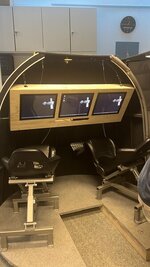
I have been searching through the Simpit Forum for a while now, and I couldn´t find a solution for my particular case. I am building a simpit (see the image below) which works with a single PC that has 3 Monitors. My goal is to display the simulation on the center screen, and 2 MFDs on the side screens.
The easiest solution for that would obviously be ExtMFD, but it has a positioning problem, a focus problem and a aspect ratio problem, which is already perfectly outlined here. Now the solution this thread proposes, and which all roads seem to lead to is VNCMFD. This is the perfect solution for most simpit builder who want to use tablets and rasberry pis as MFDs, but in my case it makes no sense at all. Sending an MFD over the Network to a different screen on the same PC? Doesn´t seem very sensible.
But for some reason, it seems like there is nothing for my case. I found some obscure post that says it should be possible to multiscreen with a few modifications to the D3D9 client, but it didn´t really go further into detail so it was not very useful and I can´t find it anymore.
Am I missing something, and if not, what is the difficulty in solving the focus problem and the aspect ratio problem for ExtMFD? I found the Simpit Controller Addon, which seems to solve positioning of the MFDs, but not much else and has been dead since 2008.
Any pointers what should be done in my situation would be much apprechiated.
Adrian


