Project Lua Script Helicopters!

Displacement is undefined for non-reciprocating engines.
Isn't displacement an essential parameter in your r4 code? Should I define it as 0?

I think this is the code needed for UACS. This can be written in LUA too?

Setup Walkthrough for vessels.
Start by including the module API header making variables of it and the astronaut and cargo information structs. Override clbkLoadStateEx, clbkSaveState, clbkPostCreation, and clbkGeneric methods if not already overridden. Override clbkGeneric only if the vessel supports astronauts.
In the constructor, initialize the API instance in the initializer list. You can set the cargo options in the constructor as well. If the vessel doesn’t support astronaut or cargoes, pass nullptr instead of the relevant struct.
In the clbkSetClassCaps method, set the airlocks and cargo slots. The airlock and cargo slot position below are based on the UACS Carrier. Set action areas here an necessary.
In the clbkLoadStateEx method, call the vessel API ParseScenarioLine method as appropriate. Use the implementation below if the method isn’t already implemented.
Code:
#include <UACS/Module.h>

………………………

public:

void clbkLoadStateEx(FILEHANDLE scn, void* status);

void clbkSaveState(FILEHANDLE scn);

void clbkPostCreation();

int clbkGeneric(int msgid, int prm, void* context);

private:

UACS::Module uacs;

UACS::VslAstrInfo vslAstrInfo; // Add if the vessel supports astronauts

UACS::VslCargoInfo vslCargoInfo; // Add if the vessel supports cargoes

Vessel::Vessel(OBJHANDLE hVessel, int flightmodel) : VESSEL4(hVessel, flightmodel), uacs(this, &vslAstrInfo, &vslCargoInfo)

void Vessel::clbkSetClassCaps(FILEHANDLE cfg)

{

………………………

UACS::AirlockInfo airInfo;

airInfo.name = "Airlock";

airInfo.pos = { 0,-0.74, 3.5 };

airInfo.dir = { 0,0,-1 };

airInfo.rot = { -1,0,0 };

airInfo.hDock = CreateDock({ 0,-1,-1 }, { 0,-1,0 }, { 0,0,-1 });

airInfo.gndInfo.pos = { 4,0,-1.3 };

vslAstrInfo.airlocks.push_back(airInfo);

vslAstrInfo.stations.emplace_back("Pilot");

UACS::SlotInfo slotInfo;

slotInfo.hAttach = CreateAttachment(false, { 0,1.3,-1 }, { 0,1,0 }, { 0,0,1 }, "UACS");

slotInfo.holdDir = { 0, -1, 0 };

slotInfo.relVel = 0.05;

slotInfo.gndInfo.pos = { -4,0,-1.3 };

vslCargoInfo.slots.push_back(slotInfo);

}

void Vessel::clbkLoadStateEx(FILEHANDLE scn, void* status)

{

char* line;

while (oapiReadScenario_nextline(scn, line))

if (!uacs.ParseScenarioLine(line)) ParseScenarioLineEx(line, status);

}


In the clbkSaveState method, call the vessel API clbkSaveState method.

In the clbkPostCreation method, call the vessel API clbkPostCreation method. Update the vessel empty mass to include mass of astronauts onboard.

In the clbkGeneric method (only if the vessel supports astronauts), update the vessel empty weight based on the received message. If the vessel has action areas, implement their logic as appropriate.

For action areas, simply add UACS::ACTN_TRIG to the switch statement, get the action area index, and handle as required.

The API setup is now complete. You can call all API methods as required.

void Vessel::clbkSaveState(FILEHANDLE scn)

{

VESSEL4::clbkSaveState(scn);

uacs.clbkSaveState(scn);

}

void Vessel::clbkPostCreation()

{

uacs.clbkPostCreation();

SetEmptyMass(GetEmptyMass() + uacs.GetTotalAstrMass()); }

int Vessel::clbkGeneric(int msgid, int prm, void* context)

{

if (msgid == UACS::MSG)

{

switch (prm)

{

case UACS::ASTR_INGRS:

{

auto astrIdx = *static_cast<size_t*>(context);

auto& astrInfo = vslAstrInfo.stations.at(astrIdx).astrInfo;

SetEmptyMass(GetEmptyMass() + astrInfo->mass);

return 1;

}

case UACS::ASTR_EGRS:

{

auto astrIdx = *static_cast<size_t*>(context);

auto& astrInfo = vslAstrInfo.stations.at(astrIdx).astrInfo;

SetEmptyMass(GetEmptyMass() - astrInfo->mass);

return 1;

}

default:

return 0;

}

}

return 0;

}

 
Isn't displacement an essential parameter in your r4 code? Should I define it as 0?
The R-4 used a Warner reciprocating engine with cylinders where displacement was described. It didn't use a turboshaft engine.

You could try this engine spec with my gas turbine engine code:

In clbk_setclasscaps:
Code:
engine_spec =

{
    rp = 8.4,               --pressure ratio
    max_rpm = 9600,         --maximum engine speed (rpm)
    min_rpm = 6720,         --idle engine speed (rpm)
    max_air_flow = 0.575,   --mass air flow at max rpm
    HV = 43e6,              --lower heating value of fuel (J/kg) (~43 MJ/kg for typical liquid fuels)
    AF = 14.6               --air fuel ratio (mass air/mass fuel) (stochiometric ~14.6:1 for typical liquid fuels)
}

efficiency = get_engine.brayton_efficiency(engine_spec) --get thermal efficiency of engine

In module get_engine.lua:
Code:
function get_engine.brayton_efficiency(engine_spec)
    local rp = engine_spec.rp
    local k = 1.2   --specific heat ratio for air (can tweak based on engine size to account for heat losses)
    local efficiency = 1 - (1/((rp)^((k-1)/k))) -- Brayton cycle efficiency
    return efficiency
end

function get_engine.gas_turbine_power(efficiency, engine_spec, fuel_tank_handle, throttle_level)

    --Determines power and torque based on efficiency for Brayton cycle turboshaft engines

    --Ambient air properties

    local air_density = oapi.get_atm().rho
    local air_density_stp = ATMD --air density at STP from Orbiter

    --Engine specs needed for power calculation

    local min_rpm = engine_spec.min_rpm
    local max_rpm = engine_spec.max_rpm
    local max_air_flow = engine_spec.max_air_flow
    local HV = engine_spec.HV
    local AF = engine_spec.AF

    if engine_on == true then

        rpm_comm = min_rpm + throttle_level*(max_rpm - min_rpm)

    elseif engine_on == false and vi:get_groundcontact() == false then

        rpm_comm = 0.5*engine_spec.max_rpm

    elseif engine_on == false and vi:get_groundcontact() then

        rpm_comm = 0
        main_rotor_spec.prop_eff = 0

    end

    if rpm ~= nil then

        rpm = rpm + 0.002*(rpm_comm-rpm)

    else

        rpm = rpm_comm

    end

    --Calculate engine speed (omega in rad/s)

    local omega = rpm*(2*math.pi)/60

    if engine_on == true then

        --Calculate air mass flow rate based on spec air flow and corrected for density

        local mass_flow_air = max_air_flow*(air_density/air_density_stp)*(rpm/max_rpm)
        local mass_flow_fuel = mass_flow_air/AF

        local fuel_level =  vi:get_propellantmass(fuel_tank_handle)-mass_flow_fuel*oapi.get_simstep()

        vi:set_propellantmass(fuel_tank_handle, fuel_level)

        if fuel_level > 0 and throttle_level > 0 then

            local QH = mass_flow_fuel*HV
            power = efficiency*QH
            torque = power/omega

        elseif fuel_level <= 0 then --out of fuel

            engine_on = false

        end

    else

        power = 0
        torque = 0

    end

    return power, torque, rpm

end

In clbk_prestep or poststep:

Code:
power, main_engine_torque, main_engine_rpm = get_engine.gas_turbine_power(efficiency, engine_spec, main_fuel_tank, throttle_level)

I think this is the code needed for UACS. This can be written in LUA too?

Reading the UACS documents, it is basically a special library for the C++ API. Unless the developer wrote some sort of Lua interpreter for it I don't think you're getting that to work with Lua script.
 
How are hard is it to convert the LUA script into CC+ so one can have UACS crew? I got meshes that need updated for 2024/2026
It's not difficult. I managed to convert ThunderChicken's VW Thing to C++ from Lua. I wasn't very successful for other reasons (I need to learn more), but it's possible.
 
You could try this engine spec with my gas turbine engine code:
Thanks, some new numbers to plug in:)
It's a little more specifically defined than I presumed, but along with the module setup easy to expand(y)
Just swapping the mesh causes ctd, so still a lot to do!

Reading the UACS documents, it is basically a special library for the C++ API. Unless the developer wrote some sort of Lua interpreter for it I don't think you're getting that to work with Lua script.
OK, thanks for taking a look.
Sounds like it makes more sense to translate the Lua code to C++ than do all the UACS libraries for Lua (AFAIK UACS is open source, code in the download, so an interpreter could be made?).
 
Thanks, some new numbers to plug in:)
It's a little more specifically defined than I presumed, but along with the module setup easy to expand(y)
The information you need to put into the engine spec tables is usually information you can easily find from an internet search. It's basically the simplest thermodynamic model for IC engines that can give you good estimates for power. You do need to put correct data into that table to model the engine correctly.
 
I don't know if it is possible, but perhaps a C++ module to handle the UACS bits could be made and work in conjunction with a Lua script for the vessel? I know Lua is often used to extend the capabilities of other programs, but I have no direct experience with doing that.
 
Updated the contact model to keep the helicopter from sliding around in the wind. Here we are with the engine off at a dead stop on the tarmac, with atmospheric wind enabled. 12-15 knot breeze with turbulence showing on the airspeed indicator!

Screenshot at 2025-02-28 11-42-00.png

It's challenging to fly and land. We really could use a wind sock for an indication of wind speed and direction.
 
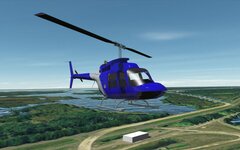
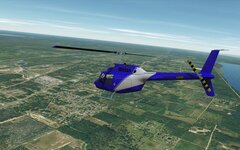
IT FLYS!!!
0007.jpg
0006.jpg
After many error messages and some tinkering it flys quite well.
Extern 95% done, cockpit, coding still to do.

It's running "by the numbers", the only data I'm unsure about is the max airflow. The figure I got seems to give it far too much power, so I've halved?
It also seems very unresponsive, pitch, bank, yaw, unsure how to best adjust?
Also noticed provisions for flight stick/pedal animation, I might be able to implement that :)

Thinking it would be good to have Trim control added.
And further down the wish list: sound and exhaust textures.;)

Have encountered some problems with the R-4 code: camera pos. on reload jumps to the middle seat? and how does one change the cam pos. in game?
And the power module throws an error on reload sometimes, will have to look further into it, I think it was landed engine off?
Interestingly in the Bell206 with the other engine code the engine doesn't shut down, seems to spool down and then start again?

I like LUA:)
 
(y)
It's running "by the numbers", the only data I'm unsure about is the max airflow.
You must do some homework on the engines to get correct parameters. You CANNOT wing this step. If this is a Bell 206, it uses 2x Allison/Rolls Royce C250s or similar. https://en.wikipedia.org/wiki/Allison_Model_250. The data is available in the Wiki.
The figure I got seems to give it far too much power, so I've halved?
Put correct information into the engine spec table. Again, this is a turboshaft engine, not a reciprocating engine, so you need to use the correct spec table and the Brayton cycle functions for the engine efficiency and power.
It also seems very unresponsive, pitch, bank, yaw, unsure how to best adjust?
You can try adjusting the set_rotdrag values in clbk_setclasscaps to lower values. Also note that it's a helicopter and not a fighter jet. It's really easy to over-control when trying to hover and land, and having it a bit sluggish in pitch and roll can be useful.
Have encountered some problems with the R-4 code: camera pos. on reload jumps to the middle seat? And the power module throws an error on reload sometimes, will have to look further into it, I think it was landed engine off?
For some reason Orbiter doesn't always reload the scripts correctly on reload, and sometimes Orbiter just decides to crash. Best practice is to exit out of Orbiter entirely, restart, and then select the scenario.
and how does one change the cam pos. in game?
It's a VC. CTRL+left or right arrow moves you seat to seat.
Interestingly in the Bell206 with the other engine code the engine doesn't shut down, seems to spool down and then start again?
Engine on/off is toggled by pressing E. Hitting numpad * will just bring the throttles to idle.
 
You must do some homework on the engines to get correct parameters. You CANNOT wing this step. If this is a Bell 206, it uses 2x Allison/Rolls Royce C250s or similar. https://en.wikipedia.org/wiki/Allison_Model_250. The data is available in the Wiki.
Wouldn't start without doing my homework! The early model, for which I have specs has only one engine, but I'm no engineer.
You can try adjusting the set_rotdrag values in clbk_setclasscaps to lower values. Also note that it's a helicopter and not a fighter jet. It's really easy to over-control when trying to hover and land, and having it a bit sluggish in pitch and roll can be useful.
(y)I've been flying sims etc. since a kid, have a good feel for accurate flight characteristics, and no it shouldn't be a fighter jet.
Engine on/off is toggled by pressing E. Hitting numpad * will just bring the throttles to idle.
No this is not the problem, being able to read simple instructions is not the issue:(
The engine doesn't shut down, seems to have something to do with the parking brake, toggled and then it worked. Will look further into such things after cockpit etc. is done. When it's a bit more rounded would appreciate an "engineers overview":)
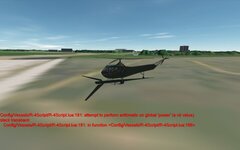
This is the error message I mentioned:
0008.jpg
 
The engine doesn't shut down, seems to have something to do with the parking brake, toggled and then it worked. Will look further into such things after cockpit etc. is done. When it's a bit more rounded would appreciate an "engineers overview":)
There is no relation between the engine and the parking brake.

For some reason it won't always accept keypress events. Sometimes you have to hit the key repeatedly for the event to trigger. Are you running on Linux or Windows?
This is the error message I mentioned:

View attachment 42575
Check the Orbiter.log when you see this. Often this isn't the problem, but a problem triggered by another error. Look for the first error you see in Orbiter.log and fix that.

This can also happen on a reload. Again, best practice is to shut down Orbiter completely and restart.
 
There is no relation between the engine and the parking brake.

For some reason it won't always accept keypress events. Sometimes you have to hit the key repeatedly for the event to trigger. Are you running on Linux or Windows?
It's not a keypress problem, it happens after landing and "does" seem to be influenced by the parking brake. Note this is only in my modified code which still has a lot of loose ends so probably not worth worrying about it till later. :)
On Win. by the way.

Check the Orbiter.log when you see this. Often this isn't the problem, but a problem triggered by another error. Look for the first error you see in Orbiter.log and fix that.
This is also the only error in the log file.
This can also happen on a reload. Again, best practice is to shut down Orbiter completely and restart.
I've been playing with Orbiter so long and that was one of the first things I "learned", I instinctively never start a .scn without reloading the launcher for over a decade now (launcher doesn't ctd btw)!
The error still occurs.
 
It's a VC. CTRL+left or right arrow moves you seat to seat.
Yes, I can confirm it is. Appologies.
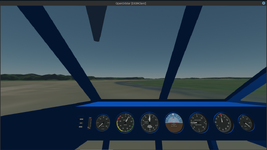
I made the Bell a right seater, which works but the CTRL+left or right are now reversed! Hence the confusion and question, do you have an idea how to make it work with a right seater?
You can try adjusting the set_rotdrag values in clbk_setclasscaps to lower values
I ran the .msh through shipedit for a more accurate PMI and halved the Rotdrag and it's better.
Haven't found any entry for Cross Sections. size?
 
Nice. I wonder if we need a hover mode. Might be time for me to update meshes. May i reuse you vc cockpit gauges
 
Nice. I wonder if we need a hover mode
The AP holds altitude, none of the default programs are functional, but once you get the CG right (highly sensitive!) it's incredibly tame. A Horiz. level and/or trim might be nice though.
@Thunder Chicken Looks like your experiments with transitioning touchdown points were suprisingly successful :)
This might be nice as a standard feature so vessels without pontoons etc. sink in water (maybe killing the engine?).
 
May i reuse you vc cockpit gauges
If you mean gauges in the R-4 add-on, then I used the sources I mentioned earlier:
An interesting thing on GitHub:
I edited them a little and made new ones for fuel and tachometer indicators. You can use them if you want. Personally, I don't mind.
 
Ok. I think for me the issue is the code part. No idea how to convert to c++
I'm downloading the Lua code to see if I can translate it to C++. If you want, I can put it in a GitHub repository, so you can add more features like UACS support later.
 
Back
Top