Orbiter 2024 Release

Status
Not open for further replies.
Did you check the working folder?
Yes. Actually the program link in your screenshot points to Orbiter.exe, which runs fine here.
It is the Orbiter_ng.exe, that troubles me.
____
Found a workaround:
If I right-click the shortcut and say "Run as administrator", the error window only flashes briefly, but then Orbiter starts.
:unsure:
 
Yes. Actually the program link in your screenshot points to Orbiter.exe, which runs fine here.
It is the Orbiter_ng.exe, that troubles me.
____
Found a workaround:
If I right-click the shortcut and say "Run as administrator", the error window only flashes briefly, but then Orbiter starts.
:unsure:
Where in your system did you unpack Orbiter to? This sort of behaviour might be expected if you're running from somewhere protected, like "C:\Program Files".
 
Where in your system did you unpack Orbiter to?
I use a separate folder for games, to keep them apart from other applications..
Orbiter is in "C:\Spiele\Orbiter-2024". The folder properties show nothing suspicious ('change' is allowed in the security tab).
 
Try creating a shortcut to the orbiter.exe in the "Server" subfolder, but give it the Orbiter root directory as working directory. AFAIK, the _ng.exe in the root just calls that server executable, anyway.
 
Try creating a shortcut to the orbiter.exe in the "Server" subfolder, but give it the Orbiter root directory ...
Sorry, that did not work either.

But interestingly, when I copy the zlib.dll into the Server subfolder, the launchpad starts.
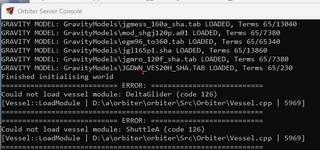
But when trying to launch a mission this window comes up and Orbiter stops:
1737195836507.png

The path to the Deltaglider shown here looks strange.
I don't have a drive D:\ and it points to a source folder.

Did I trigger a debug function, or something?
 
.... interestingly, when I copy the zlib.dll into the Server subfolder, the launchpad starts.

I tried this (copying zlib.dll from the root directory into Orbiter-2024\Modules\Server) and now Orbiter 2024 WORKS!

Unsure if anyone has been following my experience with Orbiter 2024 (I posted over in the General Questions & Help subforum), but this is the first time I've been able to get it to run without CTD following the initial splash screen. I don't know what this might mean for anyone else (I don't know what zlib.dll is or does), but thank you francisdrake for putting this out there.

Peace,

Sam
 

Attachments

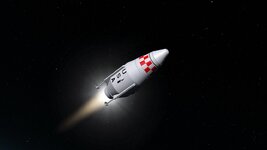
  • SASSTO.jpg
    SASSTO.jpg
    34.3 KB · Views: 14
Last edited:
Is OrbiterSound 5.0 not working with Orbiter 2024 or is it just me ???
Yes, OrbiterSound is working, but you have to disable XRSound before (in the Orbiter-LauncPad, tab "modules")

If I'm not mistaken the use of XRSound is recommended since OrbiterSound isn't really supported.
You're not mistaken. But as I said, you can (if you whant) choose OrbiterSound but don't forget to go to the tab "module" blabla...


@Face : do you remember when you did a "bridge" file for OrbiterSound... (I remember !!! 😉 )
that would be a great and good idea.... :hailprobe:
 
@Face : do you remember when you did a "bridge" file for OrbiterSound... (I remember !!! 😉 )
that would be a great and good idea.... :hailprobe:
Is the bridge not working with the 2024 build? IIRC, Doug hinted at it in his XRSound documentation, anyway.
 
Hi,
OpenOrbiter2024 working well on my old PC, integrated graphics chip, Windows8.1

For me, OrbiterSound5.0 seems to work OK with OpenOrbiter2024 D3D9 Graphics Client - but causes immediate CTD with default D3D7 graphics.

My mouse scroll wheel stops working sometimes with OpenOrbiter2024 D3D9 Graphics Client (I haven't noticed it with default D3D7 graphics).

Is there a list of OpenOrbiter2024 changes/updates in the Docs anywhere?

Many thanks,
Brian
 
Is the bridge not working with the 2024 build? IIRC, Doug hinted at it in his XRSound documentation, anyway.
Hi Face :cheers:

I haven't tried it yet.
Probably it should work ? I will test and tell you...

But I don't remember if you made this "bridge" for Orbitersoundc version 4, 5, or 5.1 ?
(The latest version is 5.1)
 
Hi Face :cheers:

I haven't tried it yet.
Probably it should work ? I will test and tell you...

But I don't remember if you made this "bridge" for Orbitersoundc version 4, 5, or 5.1 ?
(The latest version is 5.1)
It should work for all of them, as it is essentially just implementing the interface with XRSound calls. AFAIK that interface did not change in a compatibility-breaking way.
 
I think I remember something about a sound bridge but if someone could explain how that secret ingredient makes it all work ???
Face made this file to be able to use both XRSound and OrbiterSound without having to enable/disable one or the other in the "Orbiter Launchpad".
(In Orbiter2024 the name is OpenOrbiter Server Launchpad)

So I tested the bridge. :cool:

It seems to work, but... the OrbiterSound's commands that can be included in the scenario as well as the explanatory texts that can be displayed on the screen (feature of version 5.0 then 5.1) do not work, so OrbiterSound works as with version 4.0.

So I think that - for the moment - the easiest thing is to disable or enable OrbiterSound (and therefore disable XRSound) as needed (and vice versa) before launching the scenario.

OrbiterSound 5.1 works fine with Orbiter2024. ;)

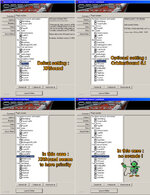
XRvsOS.jpg
 
Status
Not open for further replies.
Back
Top