Project Lua Script Helicopters!

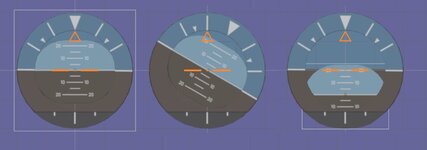
I created four separate mesh groups and they all are flat textured meshes with the corresponding border:
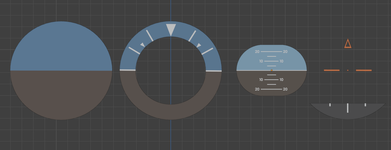
1.png

I supposed the only 2nd and 3rd (if count from left to right) have to be animated. The 2nd (circle) should rotate in its plane, whereas the 3rd can rotate in its plane and move in its plane. Maybe we could get its animation like here (please, look how the elements move):


Coud such the bahavior be implemented? I hope it's not necessary to make a textured sphere for the 3rd element :)
 
I created four separate mesh groups and they all are flat textured meshes with the corresponding border:

View attachment 41696

I supposed the only 2nd and 3rd (if count from left to right) have to be animated. The 2nd (circle) should rotate in its plane, whereas the 3rd can rotate in its plane and move in its plane. Maybe we could get its animation like here (please, look how the elements move):


Coud such the bahavior be implemented? I hope it's not necessary to make a textured sphere for the 3rd element :)
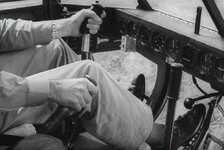
It could be animated like that, but the animation shown in your link is limited to +/- 15 degrees or so of pitch. But that may be fine. If the R-4 had an artificial horizon at all it was probably something like a Sperry unit commonly used during WWII and in the postwar era:

 
I think this is how it should work? Code wise The ring with the white triangle is the parent and rotates for roll? and then the center mesh group is pitch and translates with the pitch.

The orange triangle doesn't move.

I might could built this as a vessel just to test. I would need to get the values and then set the gauge parts
 

Attachments

  • gaugelevel1.jpg
    gaugelevel1.jpg
    28.5 KB · Views: 4
Finally have lights and sound restored in the Bell 222. I kept trying to modify the beaconspec.active to switch the lights on and off, not the beacon.active vtable parameter. 😐

The C++ API Bell222 has UMMU and UCGO capabilities, but I'm not sure there are Lua equivalents to them. I've never worked with UMMU or UCGO.
 
I've attached my script code to date. If you install your Bell 222 and extract this zip in the same Orbiter directory you can play with it.
I tried to make it. I downloaded the mesh and sccript, and tried to create a vessel in Scenario Editor, but the helicopter wasn't there, so I created a CFG file with lines:
Code:
ClassName = Helicopter.lua
Module = ScriptVessel
Script = Helicopter/Helicopter.lua
It appears in Scenario Editor, but I get the issues and very low frame rate after the vessel creation:

Без імені.png

It's Orbiter 2024 on Windows.
 
I tried to make it. I downloaded the mesh and sccript, and tried to create a vessel in Scenario Editor, but the helicopter wasn't there, so I created a CFG file with lines:
Code:
ClassName = Helicopter.lua
Module = ScriptVessel
Script = Helicopter/Helicopter.lua
It appears in Scenario Editor, but I get the issues and very low frame rate after the vessel creation:

View attachment 41731

It's Orbiter 2024 on Windows.
The cfg file should have already existed. You need to download the original Bell222 add-on for it to have the meshes and textures.

Anyway, that version is ancient history. I'm nearly done with the Lua script (sans UMMU and UCGO, which can't be done with a Lua script). I'm going to send it to @gattispilot for their input and to figure out how best to release it. It should be possible to release it in such a way that the original add-on is still available, but the Lua script version can also be used. The original code does seem to work in Orbiter 2024. It probably could go out as version 2 of that addon.
 
The cfg file should have already existed. You need to download the original Bell222 add-on for it to have the meshes and textures.
Thanks, I just copied Meshes and Textures directories since I thought that would be enough. Now I copied all files and the helicopter is available in Scenario Editor (but I had to change .CFG to .cfg, because it still wasn't present without this change). It seems I can't activate engine (key E doesn't work). Comma/period (I suppose they're standard hover engine keys, namely "0(Ins)" and ".(Del)" keys on numpad don't work too. Also, the helicopter sink under ground when start to press "0(Ins)" key.
 
Thanks, I just copied Meshes and Textures directories since I thought that would be enough. Now I copied all files and the helicopter is available in Scenario Editor (but I had to change .CFG to .cfg, because it still wasn't present without this change). It seems I can't activate engine (key E doesn't work). Comma/period (I suppose they're standard hover engine keys, namely "0(Ins)" and ".(Del)" keys on numpad don't work too. Also, the helicopter sink under ground when start to press "0(Ins)" key.
Default hover engines aren't used, but come to think of it, I should probably map the collective to those keys as that would probably be more intuitive for that motion.

The config file with the .CFG extension is probably the original config file for the compiled add-on.

Be patient. I am wrapping up a better version soon.
 
Yes, of course, I just thought to try what exists, but no problem at all. Take your time :)
 
So on the gauge. I have the pitch and roll animation on the mesh. I am having issues though. center the animation is set at .5. But I get the pitch and bank.
double pitch = (GetPitch()*180/PI);

SetAnimation(anim_pitch, pitch);
double roll = (GetBank() * 180 / PI);;
now pitch and bank are in degrees
but:
16.46.3.29 OAPIFUNC BOOL oapiGetPitch ( OBJHANDLE hVessel, double pitch ) Returns a vessel's pitch angle w.r.t. the local horizon. Parameters hVessel vessel handle pitch pointer to variable receiving pitch value Returns Error flag (false on failure) Note Unit is radian [rad] Returns pitch angle w.r.t. closest planet The local horizon is the plane whose normal is defined by the distance vector from the planet centre to the vessel. The handle passed to the function must refer to a vessel
 
Last edited:
So on the gauge. I have the pitch and roll animation on the mesh. I am having issues though. center the animation is set at .5. But I get the pitch and bank.
double pitch = (GetPitch());

SetAnimation(anim_pitch, pitch);
double roll = GetBank();
SetAnimation(anim_ROLL, roll);

but:
16.46.3.29 OAPIFUNC BOOL oapiGetPitch ( OBJHANDLE hVessel, double pitch ) Returns a vessel's pitch angle w.r.t. the local horizon. Parameters hVessel vessel handle pitch pointer to variable receiving pitch value Returns Error flag (false on failure) Note Unit is radian [rad] Returns pitch angle w.r.t. closest planet The local horizon is the plane whose normal is defined by the distance vector from the planet centre to the vessel. The handle passed to the function must refer to a vessel
Divide both the pitch and bank by 2*pi. I think Orbiter makes pi available as "PI" in the API. That will set your animation state to 0 at -180 degrees and 1 at +180 degrees
 
So I have this:
double pitch = (GetPitch()/2*PI);
SetAnimation(anim_pitch, pitch);
double roll = (GetBank() / 2 * PI);
SetAnimation(anim_ROLL, roll);
sprintf(oapiDebugString(), "pitch %FF bank %ff ", pitch,roll);

anim_pitch = CreateAnimation(.5);
anim_ROLL = CreateAnimation(.5);
ANIMATIONCOMPONENT_HANDLE GUAGE1;
static UINT rollGrp[1] = { 4 };
static MGROUP_ROTATE ROLL(0, rollGrp, 1, _V(0, 2, 0), _V(0, 0, 1), (float)(60 * RAD));
GUAGE1=AddAnimationComponent(anim_ROLL, 0.0, 1, &ROLL);


static UINT PITCHGrp[1] = { 2};
static MGROUP_TRANSLATE PITCH(0, PITCHGrp, 1, _V(0, .5, 0));
AddAnimationComponent(anim_pitch, 0.0, 1, &PITCH, GUAGE1);

but need to get if to be when pitch is 0 the pitch animation value =.5 which is level and same for bank
 

Attachments

  • gaugetest.jpg
    gaugetest.jpg
    32.1 KB · Views: 1
Wow. I may need to update the dash
 

Attachments

  • belldash.jpg
    belldash.jpg
    57.4 KB · Views: 9
So I have this:
double pitch = (GetPitch()/2*PI);
SetAnimation(anim_pitch, pitch);
double roll = (GetBank() / 2 * PI);
SetAnimation(anim_ROLL, roll);
sprintf(oapiDebugString(), "pitch %FF bank %ff ", pitch,roll);

anim_pitch = CreateAnimation(.5);
anim_ROLL = CreateAnimation(.5);
ANIMATIONCOMPONENT_HANDLE GUAGE1;
static UINT rollGrp[1] = { 4 };
static MGROUP_ROTATE ROLL(0, rollGrp, 1, _V(0, 2, 0), _V(0, 0, 1), (float)(60 * RAD));
GUAGE1=AddAnimationComponent(anim_ROLL, 0.0, 1, &ROLL);


static UINT PITCHGrp[1] = { 2};
static MGROUP_TRANSLATE PITCH(0, PITCHGrp, 1, _V(0, .5, 0));
AddAnimationComponent(anim_pitch, 0.0, 1, &PITCH, GUAGE1);

but need to get if to be when pitch is 0 the pitch animation value =.5 which is level and same for bank
Yes. If your indicator is level at an animation state of 0.5, you'll need to do a bit more math:

animation_state = 0.5 + (GetBank() / 2 * PI) --similar for pitch.

At a bank angle of 0 this gives you 0.5. At a bank angle of +180 degrees (+pi radians) this gives you 1.0, and 0 for a bank angle of -180 degrees.
 
Wow. I may need to update the dash
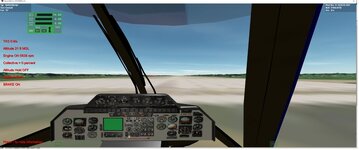
I see the green screen where I assume the MFD goes, but never sorted out how to get it to display. It wasn't functional even in your original module, so I wonder if it is an Orbiter issue. It's equally possible I am just unclear on how to get the MFD into the VC.
 
Yes. I can add it to the vc mesh. No idea for Lua. Let me get the gauge working. I can clean up the dash
 
double pitch = 0.5 + (GetPitch() / 2 * PI);

SetAnimation(anim_pitch, pitch);
double roll = 0.5 + (GetBank() / 2 * PI);
SetAnimation(anim_ROLL, roll);
sprintf(oapiDebugString(), "pitch %FF bank %ff ", pitch,roll);
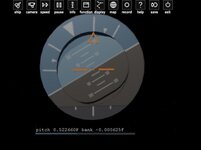
the values for pitch and bank are 2.556 pitch and 2.459 pitch from the hud it looks like a pitch of 75+
 

Attachments

  • gaugetest1.jpg
    gaugetest1.jpg
    62.5 KB · Views: 4
double pitch = 0.5 + (GetPitch() / 2 * PI);

SetAnimation(anim_pitch, pitch);
double roll = 0.5 + (GetBank() / 2 * PI);
SetAnimation(anim_ROLL, roll);
sprintf(oapiDebugString(), "pitch %FF bank %ff ", pitch,roll);
the values for pitch and bank are 2.556 pitch and 2.459 pitch from the hud it looks like a pitch of 75+
What you are calling the values of pitch and bank for output are the calculated animation levels, not the angles. You're confusing the terminology. You also have an order of operations error. You aren't dividing by 2*PI, you're dividing by 2 and multiplying the result by PI.

Taking your value of "pitch" of 2.556, subtracting 0.5 from that and multiplying the result by 2 and dividing by PI gives the pitch angle (the output of GetPitch() of 1.309 radians, which is 75 degrees as you are seeing.

Try something like this (note the parentheses around the 2*PI term):

Code:
double pitch = GetPitch()

double roll = GetBank()

anim_pitch_state = 0.5 + (pitch/(2 * PI))

anim_roll_state = 0.5 + (roll/(2 * PI))
 
Last edited:
Back
Top