Orbiter 2024 Release

Status
Not open for further replies.
Congrats to all involved on this new release! Looking forward to trying out this version. I do have a question. Can I use the 2016 high res planet textures in this version, i.e. can I just port those files from 2016 over to 2024? Or are there updated high res planet textures to go along with this release somewhere? Thanks again!
You can use the 2016 high-res textures.

The 2016 textures are level 19 max. Orbiter 2024 supports up to level 21, however no level 21 textures exist yet. These would be absolutely massive in size (hundreds of GB).

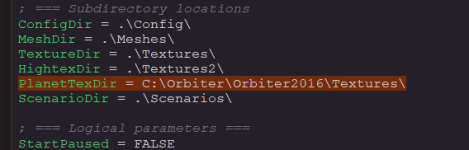
If you already have a 2016 install with the high-res textures, you can add:

Code:
PlanetTexDir = "path/to/2016/textures"

Like this.

1736036242107.png

Orbiter User Manual. Other config options are described in the Orbiter User Manual: Section 21.
 
Perfect, thank you! I do already have a 2016 install, so that method will save a lot of hard drive space.
 
WHICH file do you edit with the line above to specify location of 2016 high-res textures? Is this the main configuration file (Orbiter_NG.cfg)?

Thanks,

Sam
Yes, that's the one. You need to change EchoAllParams from FALSE to TRUE and then run Orbiter_NG.exe once first.
 
The 2016 textures are level 19 max. Orbiter 2024 supports up to level 21, however no level 21 textures exist yet. These would be absolutely massive in size (hundreds of GB).
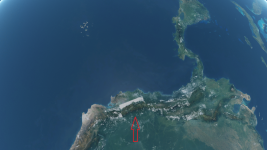
By the way, the total size of high resolution textures for Earth, Moon and Mars from the official site are about 53.4 GB. That's pretty much. Personally, I'm pretty satishfied with the 19 level of global textures. I think the 21 resolution level makes sence for custom areas (bases) (recently I published one such add-on – "Block Island"). Also, different areas of Earth has various resolution with the high resolution textures. And there're "problem" textures like this (looks like Ecuador):

Без імені.png
 
By the way, the total size of high resolution textures for Earth, Moon and Mars from the official site are about 53.4 GB. That's pretty much. Personally, I'm pretty satishfied with the 19 level of global textures. I think the 21 resolution level makes sence for custom areas (bases) (recently I published one such add-on – "Block Island"). Also, different areas of Earth has various resolution with the high resolution textures. And there're "problem" textures like this (looks like Ecuador):

View attachment 41621
Also high-res textures north of ~ 57N latitude were never released.
 
Does this mean DirectX9.0c is no longer required?
The D3D9 client is now integrated in the downloaded Orbiter 2024 release.

The specific D3D9on12 is I think something present in newer Windows versions to enable D3D9 compatibility without having to have a native D3D9 implementation, but having it run "on top" of newer versions. It seems to be required especially for newer GPUs that do not have a native D3D9 support anymore.
 
You can use the 2016 high-res textures.

The 2016 textures are level 19 max. Orbiter 2024 supports up to level 21, however no level 21 textures exist yet. These would be absolutely massive in size (hundreds of GB).

If you already have a 2016 install with the high-res textures, you can add:

Code:
PlanetTexDir = "path/to/2016/textures"

Like this.

View attachment 41614

Orbiter User Manual. Other config options are described in the Orbiter User Manual: Section 21.
If you're missing the label.tree file to see all the cities, you can download it at http://orbit.medphys.ucl.ac.uk/mirrors/orbiter_radio/tex_mirror.html . Put the file in /root folder/Textures/Earth/Archive. After a scenario is running, click the options gear and under visual helpers - labels, highlight the "City" box. Thank you all for the tedious work it takes to produce this wonderful sim!
 
I cannot download any .html file from this mirror. Can anyone point me to a working mirror for the earth label.tree file, please?
 
By the way, the total size of high resolution textures for Earth, Moon and Mars from the official site are about 53.4 GB. That's pretty much. Personally, I'm pretty satishfied with the 19 level of global textures. I think the 21 resolution level makes sence for custom areas (bases) (recently I published one such add-on – "Block Island"). Also, different areas of Earth has various resolution with the high resolution textures. And there're "problem" textures like this (looks like Ecuador):

View attachment 41621
Yes, I noticed that some time ago when I orbits around and observe planet earth. It needs to be fixed.

We need document about how to import from USDA and others into tree pack files. I am figuring out which QIS application that I need to edit textures and insert them into tree pack files.
 
Does anyone to plane to update earth texture packages and others for L21 resolution level? We expect those several hundred gigabytes of texture packages. I think that torrent downloads are better than direct download for huge packages.
 
I cannot download any .html file from this mirror. Can anyone point me to a working mirror for the earth label.tree file, please?
There are 4 mirrors on http://orbit.medphys.ucl.ac.uk/download.html#goodies , but the Europe mirror is the only one you can download the texture files without a torrent client. The label.tree is not a very large file (110Mg), and doesn't take a long time to download if you have good speed internet.
 
The D3D9 client is now integrated in the downloaded Orbiter 2024 release.

The specific D3D9on12 is I think something present in newer Windows versions to enable D3D9 compatibility without having to have a native D3D9 implementation, but having it run "on top" of newer versions. It seems to be required especially for newer GPUs that do not have a native D3D9 support anymore.

I am confused. Is it still necessary to manually install DirectX 9.0c (not D3D9Client) even if the hardware is not compatible with it?
 
I think I managed to enable the DX9 through DX12, so I have a new patch for testing. There is a new configuration option "EnableDX12Wrapper = 0" added to D3D9Client.cfg
With the DX12 wrapper enable I have noticed a rendering problem in DG ID label on the wing (black square) and the frame rate is about 50% lower, so, it's not really a victory. Could you test it with and without the wrapper.

I get it... there are two options. If DX12 wrapper is enabled, D3D9Client will run on DirectX12. If DX12 wrapper is disabled, it will use DirectX9.
I'm not sure if "0" means "enabled" or "disabled", though.
 
Well, this was a pleasant surprise when I opened the "See what you've been missing" email this morning! Kudos to the devs that have contributed to this and thanks for your hard work! I haven't had much time for Orbiter these days but I do still have 2016 installed. Heading over now to download 2024.
 
The D3D9 client is now integrated in the downloaded Orbiter 2024 release.

The specific D3D9on12 is I think something present in newer Windows versions to enable D3D9 compatibility without having to have a native D3D9 implementation, but having it run "on top" of newer versions. It seems to be required especially for newer GPUs that do not have a native D3D9 support anymore.

Confused...is the base client using D3D7 still, or D3D9? I didn't see an option in the modules tab to enable D3D9 client out of the box, and the default installation is CTD when the 3D window tries to render, with zero errors in Orbiter.log.

Also, I have an ASUS ROG M16 (2023) with both intel graphics and nVidia RTX 4070, and only the intel Hardware T&L HAL is being enumerated.

Thanks,
VU
 

Attachments

Confused...is the base client using D3D7 still, or D3D9? I didn't see an option in the modules tab to enable D3D9 client out of the box, and the default installation is CTD when the 3D window tries to render, with zero errors in Orbiter.log.

Also, I have an ASUS ROG M16 (2023) with both intel graphics and nVidia RTX 4070, and only the intel Hardware T&L HAL is being enumerated.

Thanks,
VU
orbiter.exe -> MOGE (D3D7)
orbiter_NG.exe -> pick graphics client (MOGE or D3D9)
 
Status
Not open for further replies.
Back
Top