- Joined
- Feb 4, 2008
- Messages
- 9,758
- Reaction score
- 1,028
- Points
- 203
Check out page 18, the one you want is RUNWAY.What would the procedure be to do this? There is nothing in the Orbiter_Config documentation that shows how to do this.

ORBITER-FORUM will be temporarily closed at 2026-07-23 18:00 UTC while we complete some OF maintenance tasks. The amount of downtime is expected to take up to one hour, but probably less.
Check out page 18, the one you want is RUNWAY.What would the procedure be to do this? There is nothing in the Orbiter_Config documentation that shows how to do this.

I am looking at that. There is nothing there that tells me how to put a number on a runway texture. I'm looking to put the runway number markings on the runway texture.Check out page 18, the one you want is RUNWAY.

As @LordCroussette said, that's the manual by @jacquesmomo. And I've got a lot of advice and help from @LordCroussette. The Tile Making thread is dedicated to this subject. Also, on the second page here I described my algorithm (although I improved and added some moments since then, like making the mask tiles, etc).Can you point me to any guidance or tutorial to do this?
The number would need to be part of the runway texture. There's nothing that automatically puts it on the texture.I am looking at that. There is nothing there that tells me how to put a number on a runway texture. I'm looking to put the runway number markings on the runway texture.
I understand that, but that is what I wanted to know - are there textures with numbers that already exist? I am also a little confused about how the runway texture files work - it seems each file has a number of component textures within it for different parts of the runway, and I don't quite yet see how they are referenced for different runway sections.The number would need to be part of the runway texture. There's nothing that automatically puts it on the texture.

As far as I know, no, there isn't a runway texture with numbers ready to put on. I could be wrong, but I'm pretty sure you need to use a custom mesh if you want numbers on your runway. Either a transparent mesh with the number as texture placed over a regular runway, or a full custom runway mesh and texture.I understand that, but that is what I wanted to know - are there textures with numbers that already exist? I am also a little confused about how the runway texture files work - it seems each file has a number of component textures within it for different parts of the runway, and I don't quite yet see how they are referenced for different runway sections.
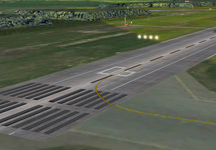

Here is an excel file I made for myself a few years back.I guess that answers another question - how to make taxiways and aprons and such. I assume all of that is done by mesh?
One other matter, looking at the surface textures - is there any relationship to the surface tile numbering and the lat/long range of the tile? The airfield I am looking to improve is in southeast Massachusetts and the area is peppered with lakes and ponds and I am having a hard time isolating which texture tile contains it. I understand that there are different resolution levels and each level doubles the resolution (Level 12 textures will have four tiles covering the same area as a single Level 11 tile, etc..).
Yes, unfortunately. They're a fucking pain to do. They aren't really worth the effort unless your goal is to go maximum details. I don't know how it works in say Blender, but I use 3DS Max and its a royal pain.I guess that answers another question - how to make taxiways and aprons and much. I assume all of that is done by mesh?

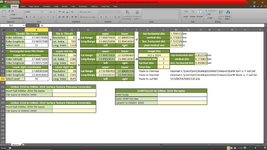
Holy moly! You're a life saviour!Here is an excel file I made for myself a few years back.
View attachment 38304
You enter the coordinates and resolution level and it returns the tile (and some other useful info). If you don't have excel, I'm pretty sure you can import it in a google spreadsheet or some other program that opens xlsx files (Open Document?).
Perfect! Works fine in Libre Office.Here is an excel file I made for myself a few years back.
View attachment 38304
You enter the coordinates and resolution level and it returns the tile (and some other useful info). If you don't have excel, I'm pretty sure you can import it in a google spreadsheet or some other program that opens xlsx files (Open Document?).

I think you can import .svg into Blender and export with the orbiter plugintracing them in InkScape. If there is some pathway to something that can export an Orbiter mesh
I can get the taxiway mesh into Blender as an svg, but there doesn't seem to be an export option for Orbiter.msh (only an import option for this?).I think you can import .svg into Blender and export with the orbiter plugin
Output properties->(scroll down to) Orbiter Output Panel.I can get the mesh into Blender as an svg, but there doesn't seem to be an export option for Orbiter.msh (only an import option for this?).
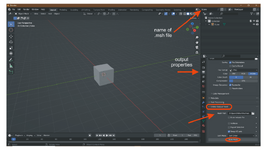
I am doing those things, but it only spits out an empty mesh.Output properties->(scroll down to) Orbiter Output Panel.
View attachment 38319
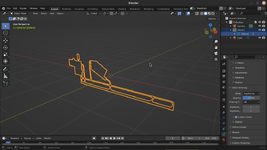
Object->Convert ->MeshI am doing those things, but it only spits out an empty mesh.
View attachment 38320
Contents of mesh file Mansfield.msh
MSHX1
GROUPS 0
MATERIALS 0
TEXTURES 0
Not sure if this geometry is actually exportable. It should be the 2D profile of the taxiways of the base.
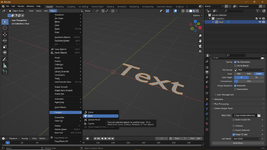
I am not seeing a Convert/Mesh option. Only offers Path, Bezier Curve, or Polygon Curve. The taxiway object is a Grease Pencil object from the SVG file import, whatever that is.Object->Convert ->Mesh
View attachment 38321
Not familiar with GPencil either, but I just tried it. Convert the GPencil to Path and select the GP_layer that gets created. You can convert that to a mesh. Delete the GPencil and Build Mesh.I am not seeing a Convert/Mesh option. Only offers Path, Bezier Curve, or Polygon Curve. The taxiway object is a Grease Pencil object from the SVG file import, whatever that is.
No luck, throws an error when I try to build the mesh:Not familiar with GPencil either, but I just tried it. Convert the GPencil to Path and select the GP_layer that gets created. You can convert that to a mesh. Delete the GPencil and Build Mesh.
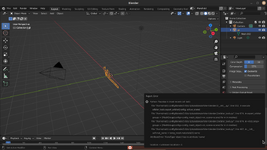
Can you share the svg file so I can try it?No luck, throws an error when I try to build the mesh:
View attachment 38322
I've attached the SVG file that I am working with if that helps.


