Question Cant see textures for my hangar model

OvalDreamX

Active member
Joined
Sep 16, 2019
Messages
86
Reaction score
167
Points
33
Location
Bariloche, Patagonia Argentina
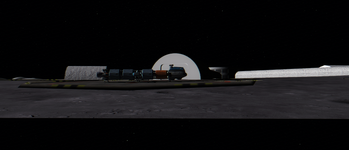
Ive been modelling some props for orbiter. like this hangar
render.png

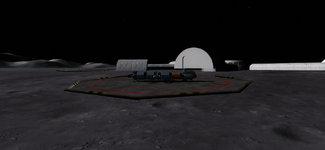
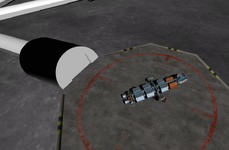
Thing is, when I try to add it to a base (like Brighton Beach) not only the shading is all wrong but also the textures wont show:
1659527463342.png

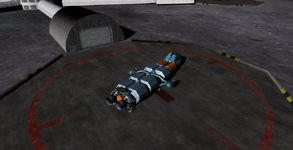
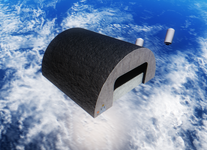
I renamed the .msh file to see if the problem were my mesh and/or textures, but they seem fine when used as a ship mesh (forgot to turn off bloom in reshade in this one):
1659527648484.png
So the problem isnt the msh file. Idk if im doing something wrong with the base cfg or something, so Ill attach the codey stuff.

On BEGIN_OBJECTLIST, Ive replaced one of the hangars with:
Code:
MESH
    FILE Hangar
    POS 142 0 0
    SCALE 1 1 1
    ROT 90
    PRELOAD
END

Tried also with SHADOW, OWNMATERIAL, without PRELOAD and even calling TEXTURE and referencing to the .dds, to no avail.
Anyone can help me make this work so I can continue onto the rest of the structures?
 
Ive been modelling some props for orbiter. like this hangar
render.png

Thing is, when I try to add it to a base (like Brighton Beach) not only the shading is all wrong but also the textures wont show:
View attachment 29753

I renamed the .msh file to see if the problem were my mesh and/or textures, but they seem fine when used as a ship mesh (forgot to turn off bloom in reshade in this one):
View attachment 29754
So the problem isnt the msh file. Idk if im doing something wrong with the base cfg or something, so Ill attach the codey stuff.

On BEGIN_OBJECTLIST, Ive replaced one of the hangars with:
Code:
MESH
    FILE Hangar
    POS 142 0 0
    SCALE 1 1 1
    ROT 90
    PRELOAD
END

Tried also with SHADOW, OWNMATERIAL, without PRELOAD and even calling TEXTURE and referencing to the .dds, to no avail.
Anyone can help me make this work so I can continue onto the rest of the A couple of questionsstructures?
 
Weird. I wonder if it below the surface. Can you raise the Y POS value?
 
Can you make a zip of the mesh and textures. I guess nothing in the log?
 
You need to add the texture name to the Base.cfg file, in the Config folder.
 
You need to add the texture name to the Base.cfg file, in the Config folder.
Tried that too like this
Code:
MESH
    FILE Hangar
    POS 142 0 0
    SCALE 1 1 1
    ROT 90
    PRELOAD
    TEX1 Hangar 1 1
END

Still the same problem. Also Ive been looking around some addon .cfg bases and they just call the file, not the texture?
 
Tried that too like this
Code:
MESH
    FILE Hangar
    POS 142 0 0
    SCALE 1 1 1
    ROT 90
    PRELOAD
    TEX1 Hangar 1 1
END

Still the same problem. Also Ive been looking around some addon .cfg bases and they just call the file, not the texture?
I think the TEX entry in the surface base file is just for the "default shapes", i.e., HANGAR, BLOCK, etc.

What I meant was that you need to add the texture name to the list of textures in the Config/Base.cfg file.

Code:
; === Generic surface base resources

; === List of generic object meshes ===
BEGIN_MESHES
END_MESHES

; === List of generic textures ===
BEGIN_TEXTURES
Fcd01
Fcd02
Fcd03
Fcd04
Fcd05
Fcd06
Fcd07
Fcd08
Fcd09
Fcd10
Fcd11
Fcd12
Fcd13
Fcd14
Fcd15
Roof01
Roof02
Wall01
Door01
Lpad01
Lpad02
Lpad02a
Taxiway1
Taxiway2
Monorail
Hangrail
Solpanel
Runway2
Ball
Cape17
Cape18
Cape19
Cape20
Cape21
Cape22
Cape23
Concrete1
<your texture name>
END_TEXTURES
 
I think the TEX entry in the surface base file is just for the "default shapes", i.e., HANGAR, BLOCK, etc.

What I meant was that you need to add the texture name to the list of textures in the Config/Base.cfg file.

Code:
; === Generic surface base resources

; === List of generic object meshes ===
BEGIN_MESHES
END_MESHES

; === List of generic textures ===
BEGIN_TEXTURES
Fcd01
Fcd02
Fcd03
Fcd04
Fcd05
Fcd06
Fcd07
Fcd08
Fcd09
Fcd10
Fcd11
Fcd12
Fcd13
Fcd14
Fcd15
Roof01
Roof02
Wall01
Door01
Lpad01
Lpad02
Lpad02a
Taxiway1
Taxiway2
Monorail
Hangrail
Solpanel
Runway2
Ball
Cape17
Cape18
Cape19
Cape20
Cape21
Cape22
Cape23
Concrete1
<your texture name>
END_TEXTURES
Yeah Ill try, but I dont think thats the problem, because otherwise each base mod wanting to add a model to their bases would have to modify Base.cfg
 
Yeah Ill try, but I dont think thats the problem, because otherwise each base mod wanting to add a model to their bases would have to modify Base.cfg
Yes, they do.
 
Found it:
Note that textures used by base objects must be listed in the texture list of the
Base.cfg configuration file.
from Config/OrbiterConfig.pdf, page 16
 
Found it:

from Config/OrbiterConfig.pdf, page 16
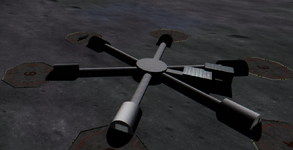
Welp, I know what I was doing wrong. PRELOAD was last on the list of calls.
1659536979868.png
And as you can see, the textures work without calling them on Base.cfg. In fact, Base.cfg is as default even though I have several mods installed that add bases. Maybe it refers to the Base name .cfg? Like Brighton.cfg?
 
  • Like
Reactions: GLS
Welp, I know what I was doing wrong. PRELOAD was last on the list of calls.
Hmm, looks like the Base.cfg file entries are only for the TEX parameter textures of "default meshes", and the "user meshes" are actually "self-contained".
Anyway, the PRELOAD shouldn't make a difference for the textures, only for loading the mesh at the start vs when needed.... there might be a bug there... :unsure:

And as you can see, the textures work without calling them on Base.cfg. In fact, Base.cfg is as default even though I have several mods installed that add bases. Maybe it refers to the Base name .cfg? Like Brighton.cfg?
No, that definitely is for the Base.cfg file.
 
But I raised it 5 units (meters?)
Yes, it seems to be in meters.
and they just call the file, not the texture?
From my experiments:
If your mesh has its own texture defined in the mesh file, then you have to use OWNMATERIAL option, otherwise the texture won't be displayed. In this case you don't need to add the name of this texture to Config/Base.cfg file. But, also you can delete OWNMATERIAL option, so you can use some other texture using TEX option. In this case the texture name should be presented in Config/Base.cfg.

I was going to ask something, I was just looking at your hangar and it's shape is so smooth. Maybe someone knows if Orbiter has the limit on the number of points/faces of the mesh? Or it depends on 3D software where a mesh is created? By the way, could you tell what program do you use to model your hangar?
 
Back
Top