Important Orbiter Forum Migration to XenForo

I'm a fan of :compbash:, :leaving:, and :censored:.
EDIT: "censored" seems to be recognized, but gives a zip-lipped emoji.
EDIT2: :tumbleweed: will be necessary for when the chatbox gets quiet.
 
Last edited:
Looked around on "Account details" but found nothing.

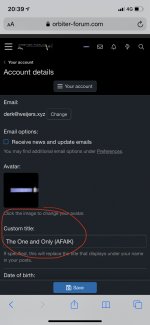
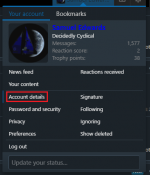
Are you sure you are looking in the right place? I attached some images showing where it can be found. Do you not see that section there?

EDIT: Dammit, now I owe Derk a coke.
 

Attachments

  • 1.png
    1.png
    36.1 KB · Views: 6
  • 2.png
    2.png
    46.9 KB · Views: 5
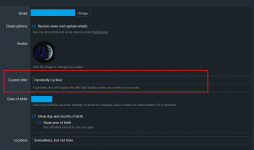
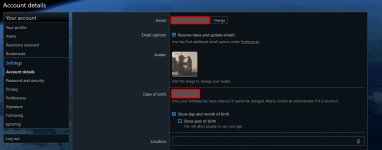
I can't see the "Custom Title" in Account Settings either. I've attached a screenshot showing how the Account Settings page looks like for me.
 

Attachments

  • AccountSettings.jpg
    AccountSettings.jpg
    178.3 KB · Views: 7
I can't see the "Custom Title" in Account Settings either. I've attached a screenshot showing how the Account Settings page looks like for me.

I went through the base user group and added a handful of permissions that should've been granted but weren't. Can you check again?
 
Does anyone know the size limitations to uploading screenshots using ctrl-P?

I think it'll hit a PHP configured limit of 8MB at the moment. I can increase that if you need it to be greater.
 
Ok, I found an issue. There's a link hidden in this post, can you see it? Exactly. It's using the default font color. To make matters worse, I can't even override that color manually...
(probably varries based on skin selection, I'm using default).
 
Ok, I found an issue. There's a link hidden in this post, can you see it? Exactly. It's using the default font color. To make matters worse, I can't even override that color manually...
(probably varries based on skin selection, I'm using default).

Yeah, that's on my list of things to fix. It's almost impossible to see them!

Edit: Hmm. Changing that value worked, but it changed all the links in the skin, which I'm less keen on.
 
Ok, I found an issue. There's a link hidden in this post, can you see it? Exactly. It's using the default font color. To make matters worse, I can't even override that color manually...
(probably varries based on skin selection, I'm using default).

It appears only a very similar color on my display, but not the same. It is especially visible if you stop reading, just view the post like a picture.
 
Right. I've amended the CSS for this style, so it will change links that are within a post to be rgb(11, 107, 175) instead of that similar colour to the main text.
 
It appears only a very similar color on my display, but not the same. It is especially visible if you stop reading, just view the post like a picture.
My brain is really bad at these "spot the 10 differences"-things, or any other thing that requires attention to visual details... :cautious:
 
My brain is really bad at these "spot the 10 differences"-things, or any other thing that requires attention to visual details... :cautious:

I am too much used at letting server log files run over the screen with tail -f ....
 
Back
Top