
You are using an out of date browser. It may not display this or other websites correctly.
You should upgrade or use an alternative browser.
You should upgrade or use an alternative browser.
Idea Shuttle Fleet recompile for Orbiter 2016
- Thread starter Jeremyxxx
- Start date

So in 2010 Sf used ACFS. Which does not work. If we had the code then maybe. Not sure how to code one though.
So another option I have been asked about is different cockpit. I think it can be done but it would require a separate dll like the eva one.
Maybe the direction might be why AFCS doesn't work in 2016.
---------- Post added at 05:10 PM ---------- Previous post was at 01:26 PM ----------
So now we get this:

and after SRB seperation

So another option I have been asked about is different cockpit. I think it can be done but it would require a separate dll like the eva one.
Maybe the direction might be why AFCS doesn't work in 2016.
---------- Post added at 05:10 PM ---------- Previous post was at 01:26 PM ----------
So now we get this:
and after SRB seperation

barrygolden
Well-known member
No doubt an AP for landing winged vehicles in 2016 is a must. ACFS was one of the best features in 2010 and you could follow the Shuttle landings using that. My fear is that when the shuttle retired a lot of the orbiter folks did as well. A few are keeping this alive and those of us who enjoy this thank you guys greatly
I tried running ACFS and get a CTD on start up. Nothing in the log to tell me what is wrong.
Maybe if the code was available it could be re made. But the guys who made it aren't around.
I asked Brian J about this also.
this is from sf4.8r2 manual
from acfs readme:
https://www.orbiterwiki.org/wiki/AutoFCS
Maybe if the code was available it could be re made. But the guys who made it aren't around.
I asked Brian J about this also.
this is from sf4.8r2 manual
Regarding AutoFCS - fear not, I have been in contact with the author of the original and he is working on an updated version that will work with Orbiter 2010 P1. Testing is on going at this time. Recent real-world commitments have delayed the release of the new AutoFCS, but development is not dead, just on hold.
from acfs readme:
Auto Flight Control System Module Version 2.0 (c) 2005 Mike Norman
Disclaimer:
This module is offered for entertainment only. It is not intended to be used for planning or execution of any mission, or life-critical situations. The code is not guaranteed to do anything, and I accept no liability for any loss of revenue, nor any damage to property or persons, in the unfathomable event that use of this module can be shown to have led to such loss and/or damage.
https://www.orbiterwiki.org/wiki/AutoFCS
Last edited:

MarkWatney2015
The Desktop Orbinaut
- Joined
- Oct 14, 2016
- Messages
- 1,276
- Reaction score
- 1,632
- Points
- 128
- Location
- San Jose Del Monte, Bulacan
- Preferred Pronouns
- He/him
T-60 sec should be fine, as long as every launch scenario has this line on an MS2015 vessel:So for non sound scn. How to get them to auto launch? I wonder what the Met needs to be?
Code:
GNC_RUN 1MS2015 plays the sound for you once it is coded in the guidance.txt file (the PlaySound command) even if you don't have XRSound or OrbiterSound installedSo what are you using for play the sounds?
Thanks. So I try to get a new zip with the new scn with the burnt textures. So on the hi-def srb and ET you do need the extra fuel levels.
I have been asked about alternative VC for early? shuttles where the are 3 mfd on the front rather than the 10.
I have been asked about alternative VC for early? shuttles where the are 3 mfd on the front rather than the 10.

4throck
Enthusiast !
- Joined
- Jun 19, 2008
- Messages
- 3,489
- Reaction score
- 1,012
- Points
- 153
- Location
- Lisbon
- Website
- orbiterspaceport.blogspot.com
A good starting point about the shuttle cockpit evolution:
https://www.nasa.gov/mission_pages/shuttle/flyout/glass_cockpit.html
https://www.nasa.gov/mission_pages/shuttle/flyout/glass_cockpit.html
So maybe 2 cockpits and 3 mfd one and a later glass one
So I am converting the scn and ini. But get a CTD.
Maybe someone with better eyes can see why?
log shows missing texture but it is there.
mesh slwt_burnt

---------- Post added 09-07-19 at 05:57 AM ---------- Previous post was 09-06-19 at 04:31 PM ----------
I am stumped. for some reason in regular graphics it is not loading the tank texture.
in d3d9 it does.
log from regular graphics:
---------- Post added at 06:12 AM ---------- Previous post was at 05:57 AM ----------
So if I use this the texture is seen
but if I use the burnt mesh the texture cannot be found.
here is a zip of the tank mesh and tank textures
https://drive.google.com/open?id=1SP3EJzlGm7GfYF6HDXriDZnaw0o_8fAE
---------- Post added at 01:12 PM ---------- Previous post was at 06:12 AM ----------
So I made a test cfg. in d3d9 the texture is found but in regular graphic it isn't. Any suggestions?
log:
---------- Post added 09-08-19 at 04:13 AM ---------- Previous post was 09-07-19 at 01:12 PM ----------
So I got the textures working.
So going to change the ini and scn.
basically to this:
So I moved the sls_srb contrail texture into 2016spaceshuttle so will not need to dl sls. so I guess we need a note to dl and install this:
[ame="https://www.orbithangar.com/searchid.php?ID=3141"]Just a moment...[/ame]
On the auto launch not sure this isn't.
So I am converting the scn and ini. But get a CTD.
Maybe someone with better eyes can see why?
log shows missing texture but it is there.
Code:
000000.000: ET61C: Guidance File present: Config\Multistage2015\Guidance\guidance_shuttle_STS-61Creal.txt
000000.000: ET61C: Orbit Call Found! Targets: Apogee:338000.0 Perigee:331000.0 Inclination:28.5 Mode:-1.0 GT initial Pitch: 0.0 Abside:331000.0
000000.000: ET61C: Config File: C:\Orbiter2016\Config\Multistage2015\Space-Shuttle_STS-61Cnew.ini
000000.000: ET61C: Number of stages in the ini file: 1
000000.000: ET61C: Number of boosters group in the ini file: 2
000000.000: ET61C: Number of Payloads in the ini file: 1
000000.000: ET61C: Thrust in Real Position
000000.000: ET61C: Texture n.1 Loaded Exhaust_atsme
000000.000: ET61C: Texture n.2 Loaded Exhaust2
000000.000: ET61C: Texture n.3 Loaded SLS_2016\SLS_SRB_contrail
000000.000: ET61C: booster n. 1 Tank Added: 1006974.000 kg
000000.000: ET61C: booster n. 2 Tank Added: 0.000 kg
000000.000: ET61C: Stage n. 1 Tank Added: 728715.230 kg
000000.000: ET61C: Stage n. 1 Engines Exhaust Added--> number of engines: 3 , diameter: 2.000, position x: -1.600 y: 7.930 z: -29.880
000000.000: ET61C: Stage n. 1 Engines Exhaust Added--> number of engines: 3 , diameter: 2.000, position x: 1.600 y: 7.930 z: -29.880
000000.000: ET61C: Stage n. 1 Engines Exhaust Added--> number of engines: 3 , diameter: 2.000, position x: 0.000 y: 11.330 z: -29.030
000000.000: ET61C: Booster Group n.1 Engine Exhaust Stream Added: solidfuel_exhaust to engine n.1
000000.000: ET61C: Booster Group n.1 Engine Exhaust Stream Added: contrail4 to engine n.1
000000.000: ET61C: Booster Engines Exhaust Added--> Booster Group: 1 number of engines: 1 , diameter: 2.200, position x: 5.800 y: 0.000 z: -33.786
000000.000: ET61C: Booster Group n.1 Engine Exhaust Stream Added: solidfuel_exhaust to engine n.2
000000.000: ET61C: Booster Group n.1 Engine Exhaust Stream Added: contrail4 to engine n.2
000000.000: ET61C: Booster Engines Exhaust Added--> Booster Group: 1 number of engines: 1 , diameter: 2.200, position x: -5.800 y: 0.000 z: -33.786
000000.000: ET61C: Booster Engines Exhaust Added--> Booster Group: 2 number of engines: 3 , diameter: 2.000, position x: -1.650 y: 7.930 z: -27.880
000000.000: ET61C: Booster Engines Exhaust Added--> Booster Group: 2 number of engines: 3 , diameter: 2.000, position x: 1.550 y: 7.930 z: -27.880
000000.000: ET61C: Booster Engines Exhaust Added--> Booster Group: 2 number of engines: 3 , diameter: 2.000, position x: -0.050 y: 11.330 z: -27.030
000000.000: ---------------------------------------------------------------
000000.000: >>> ERROR: DDraw error DDERR_INVALIDCAPS
000000.000: >>> [ReadDDSSurface | .\Texture.cpp | 292]
000000.000: ---------------------------------------------------------------
============================ ERROR: ===========================
ReadDDSSurface failed (code: -2005532572)
[TextureManager::LoadTexture | .\Texture.cpp | 1227]
===============================================================
--------------------------- WARNING: --------------------------
>>> Texture not found: 2016spaceshuttle\tank\SLWT\Tank_burn.DDS
Skipping.
>>> [TextureManager::AcquireTexture | .\Texture.cpp | 1040]
---------------------------------------------------------------
000000.000: ET61C: Stage n.1 Mesh Preloaded: 2016spaceshuttle\tank\slwt_burnt
000000.000: ET61C: Stage n.1 Mesh Added Mesh: 2016spaceshuttle\tank\slwt_burnt @ x:-0.050 y:0.000 z:0.000
000000.000: ET61C: Booster Mesh Preloaded: 2016spaceshuttle\booster\rsrm_1
000000.000: ET61C: Booster Mesh Added Mesh: 2016spaceshuttle\booster\rsrm_1 @ x:6.000 y:0.000 z:-11.286
000000.000: ET61C: Booster Mesh Preloaded: 2016spaceshuttle\booster\rsrm_2
000000.000: ET61C: Booster Mesh Added Mesh: 2016spaceshuttle\booster\rsrm_2 @ x:-6.000 y:0.000 z:-11.286
000000.000: ET61C: Booster Mesh Preloaded: 2016spaceshuttle\tank\slwt_1
000000.000: ET61C: Booster Mesh Added Mesh: 2016spaceshuttle\tank\slwt_1 @ x:-0.050 y:0.000 z:0.000
000000.000: Load State Terminated
000000.000: Module EmptyModule.dll ....... [Build 170626, API 160828]
000000.000: Module MS_Camera.dll ......... [Build 170626, API 160828]
000000.000: MS_Camera: Target Vessel Loaded->ET-1
000000.000: Module SPACESHUTTLE2016D.dll . [Build 190902, API 160828]
000000.000: ---------------------------------------------------------------
000000.000: >>> WARNING: Obsolete API function used: VESSEL::CreateVariableDragElement
000000.000: At least one active module is accessing an obsolete interface function.
000000.000: Addons which rely on obsolete functions may not be compatible with
000000.000: future versions of Orbiter.
000000.000: ---------------------------------------------------------------
000000.000: Module Spacecraft3.dll ....... [Build ******, API 050206]
000000.000: ---------------------------------------------------------------
000000.000: >>> WARNING: Obsolete API function used: VESSEL::SetBankMomentScale
000000.000: At least one active module is accessing an obsolete interface function.
000000.000: Addons which rely on obsolete functions may not be compatible with
000000.000: future versions of Orbiter.
000000.000: ---------------------------------------------------------------
000000.000: Module Satcom.dll ............ [Build ******, API 060425]
000000.000: Finished initialising status
000000.000: Finished initialising camera
000000.000: Finished setting up render state
000000.000: Post Creation Started
000000.000: ET61C: Gravity Turn Initial Pitch by user: 0.000 Calculated:70.050
000000.000: RESET PEG
000000.000: ET61C: Planet Reference Pressure = 101325.0 Pa  Atmosphere Altitude Limit:2500.0 km
000000.000: Post Creation Terminated
000000.000: Finished initialising panels
Code:
[BOOSTER_2]
N=1
Height=46.88
Diameter=8.7
EmptyMass=0.00000001
FuelMass=0.00000001
Thrust=0.00000001
BurnTime=1
BurnDelay=123
off=(-0.05,0,13.401)
MeshName="2016spaceshuttle\tank\slwt"
eng_1=(-1.6,7.93,-27.88)
eng_2=( 1.6,7.93,-27.88)
eng_3=( 0.0,11.33,-27.03)
DIR=(0.0, 0.25885, -0.96545)
eng_diameter=2.0
SPEED=(0,-90,0)
Module=SHUTTLE2016BURNTEX
ENG_TEX=Exhaust_atsme
battery=1.5
Reignitable=0

[STAGE_1]
Height=46.88
Diameter=8.7
EmptyMass=26535
FuelMass=728715.23
Thrust=6539030.025
BurnTime=504.1
off=(-0.05,0,13.401)
MeshName="2016spaceshuttle\tank\slwt_burnt"
eng_1=(-1.6,7.93,-29.88)
eng_2=( 1.6,7.93,-29.88)
eng_3=( 0.0,11.33,-29.03)
DIR=(0.0, 0.25885, -0.96545)
eng_diameter=2.0
speed=(0,0,-10)
ENG_TEX=Exhaust_atsme
battery=1.5
Reignitable=0
Code:
TEXTURES 1
2016spaceshuttle\tank\SLWT\Tank_burn.DDS
---------- Post added 09-07-19 at 05:57 AM ---------- Previous post was 09-06-19 at 04:31 PM ----------
I am stumped. for some reason in regular graphics it is not loading the tank texture.
in d3d9 it does.
log from regular graphics:
Code:
000000.000: ---------------------------------------------------------------
000000.000: >>> ERROR: DDraw error DDERR_INVALIDCAPS
000000.000: >>> [ReadDDSSurface | .\Texture.cpp | 292]
000000.000: ---------------------------------------------------------------
============================ ERROR: ===========================
ReadDDSSurface failed (code: -2005532572)
[TextureManager::LoadTexture | .\Texture.cpp | 1227]
===============================================================
--------------------------- WARNING: --------------------------
>>> Texture not found: 2016spaceshuttle\tank\SWT_white\Tank_burn.DDS
Skipping.
>>> [TextureManager::AcquireTexture | .\Texture.cpp | 1040]
---------------------------------------------------------------
000000.000: ET-1: Stage n.1 Mesh Preloaded: 2016spaceshuttle\tank\swt_white_burnt
000000.000: ET-1: Stage n.1 Mesh Added Mesh: 2016spaceshuttle\tank\swt_white_burnt @ x:-0.050 y:0.000 z:0.000
---------- Post added at 06:12 AM ---------- Previous post was at 05:57 AM ----------
So if I use this the texture is seen
Code:
[STAGE_1]
Height=46.88
Diameter=8.7
EmptyMass=35272
FuelMass=728715.23
Thrust=6539030.025
BurnTime=504.1
off=(-0.05,0,13.401)
MeshName="2016spaceshuttle\tank\swt_white"
eng_1=(-1.6,7.93,-26.88)
eng_2=( 1.6,7.93,-26.88)
eng_3=( 0.0,11.33,-26.03)
DIR=(0.0, 0.25885, -0.96545)
eng_diameter=2.0
speed=(0,0,-10)
ENG_TEX=Exhaust_atsme
battery=1.5
Reignitable=0here is a zip of the tank mesh and tank textures
https://drive.google.com/open?id=1SP3EJzlGm7GfYF6HDXriDZnaw0o_8fAE
---------- Post added at 01:12 PM ---------- Previous post was at 06:12 AM ----------
So I made a test cfg. in d3d9 the texture is found but in regular graphic it isn't. Any suggestions?
Code:
; === Configuration file for vessel class EAGLERECONMODULE ===
Meshname = 2016spaceshuttle\tank\swt_white_burnt
Mass = 1

BEGIN_ATTACHMENT
P 0 0 0.0  0 -1 0  0 0 1  DOOR
END_ATTACHMENT
log:
Code:
000000.000: ---------------------------------------------------------------
000000.000: >>> ERROR: DDraw error DDERR_INVALIDCAPS
000000.000: >>> [ReadDDSSurface | .\Texture.cpp | 292]
000000.000: ---------------------------------------------------------------
============================ ERROR: ===========================
ReadDDSSurface failed (code: -2005532572)
[TextureManager::LoadTexture | .\Texture.cpp | 1227]
===============================================================
--------------------------- WARNING: --------------------------
>>> Texture not found: 2016spaceshuttle\tank\SWT_white\Tank_burn.DDS
Skipping.
>>> [TextureManager::AcquireTexture | .\Texture.cpp | 1040]
---------------------------------------------------------------
000000.000: Finished initialising status
000000.000: Finished initialising camera
000000.000: Finished setting up render state
000000.000: Finished initialising panels
000002.764: **** Closing simulation session
---------- Post added 09-08-19 at 04:13 AM ---------- Previous post was 09-07-19 at 01:12 PM ----------
So I got the textures working.
So going to change the ini and scn.
basically to this:
Code:
[MISC]
cog=38.0
FOCUS=1
THRUST_REAL_POS=1

[TEXTURE_LIST]
TEX_1=Exhaust_atsme
TEX_2=Exhaust2
TEX_3=2016spaceshuttle/SLS_SRB_contrail

[PARTICLESTREAM_1]
Name=vent
amin=1e-006
amax=0.1
atmslowdown=0.35
growthrate=0.4
lifetime=1.0
lmax=0.5
lmin=0
srcrate=30
srcsize=0.3
v0=1
ltype=EMISSIVE
atmsmap=ATM_PLOG
levelmap=LVL_PSQRT
tex=contrail

[PARTICLESTREAM_2]
NAME=mach
SRCSIZE=4
SRCRATE=40
V0=12
SRCSPREAD=0
LIFETIME=0.25
GROWTHRATE=4
ATMSLOWDOWN=0
LTYPE=EMISSIVE
LEVELMAP=LVL_PSQRT
LMIN=0
LMAX=4
ATMSMAP=ATM_PLOG
AMIN=0.7e-7
AMAX=1
TEX= contrail

[PARTICLESTREAM_3]
NAME=solidfuel_exhaust
SRCSIZE=3
SRCRATE=12
V0=30
SRCSPREAD=0.05
LIFETIME=1.3
GROWTHRATE=3
ATMSLOWDOWN=0.3
LTYPE=EMISSIVE
LEVELMAP=LVL_PSQRT
LMIN=0
LMAX=1
ATMSMAP=ATM_PLOG
AMIN=1e-6
AMAX=1
TEX=SLS_SRB_contrail
GROWFACTOR_RATE=6
GROWFACTOR_SIZE=0.2

[PARTICLESTREAM_4]
NAME=contrail4
SRCSIZE=3
SRCRATE=12
V0=50
SRCSPREAD=0.05
LIFETIME=15.5
GROWTHRATE=3
ATMSLOWDOWN=0.3
LTYPE=EMISSIVE
LEVELMAP=LVL_PSQRT
LMIN=0
LMAX=1
ATMSMAP=ATM_PLOG
AMIN=1e-6
AMAX=1
TEX=contrail2
GROWFACTOR_RATE=6
GROWFACTOR_SIZE=0.2

[PARTICLESTREAM_5]
NAME=launch1
Srcsize=12.000
Srcrate=5000.000
V0=150.000
Srcspread=0.750
Lifetime=16.000
Growthrate=2.500
Atmslowdown=0.750
Ltype=EMISSIVE
Levelmap=LVL_PSQRT
Lmin=0
Lmax=1.000
Atmsmap=ATM_PLOG
Amin=1e-006
Amax=1.000
Tex=2016spaceshuttle/SLS_SRB_contrail

[FX_VENT]
pstream=vent
off_1=(0,9,-25)
dir_1=(0,0,-1)
time_fin_1=-5
off_2=(-1.5,8,-25.5)
dir_2=(0,0,-1)
time_fin_2=-5
off_3=(1.5,8,-25.5)
dir_3=(0,0,-1)
time_fin_3=-5

[FX_MACH]
pstream=mach
mach_min=0.91
mach_max=1.09
off_1=(0,0.2,21.7)
off_2=(5.5,0,12.0)
off_3=(-5.5,0,12.0)
off_4=(0,8.1,9.1)
off_5=(0,17.5,-26.3)
dir=(0,0,-1)

[FX_LAUNCH]
N=2
Height=5
Distance=15
Angle=90
Pstream1=launch1
CutoffAltitude=300

[BOOSTER_1]
N=2
MeshName="2016spaceshuttle\booster\rsrm"
Height=38.5
Diameter=3.71
EmptyMass=66406
FuelMass=503487
Thrust=14739770.25
angle=0.0
off=(6,0.,2.115)
BurnTime=122.0
eng_1=(-0.2,0,-22.5)
eng_diameter=2.2
ENG_PSTREAM1=solidfuel_exhaust
ENG_PSTREAM2=contrail4
Speed=(15,0,0)
Rot_speed=(0,-0.4,0)
CURVE_1=(-1,0)
CURVE_2=(0,100)
CURVE_3=(30.3,100)
CURVE_4=(35.5,87)
CURVE_5=(60.0,87)
CURVE_6=(65.1,100)
CURVE_7=(103,100)
CURVE_8=(115,85)
CURVE_9=(136,5)

[BOOSTER_2]
N=1
Height=46.88
Diameter=8.7
EmptyMass=0.00000001
FuelMass=0.00000001
Thrust=0.00000001
BurnTime=1
BurnDelay=123
off=(-0.05,0,13.401)
MeshName="2016spaceshuttle\tank\slwt"
eng_1=(-1.6,7.93,-27.88)
eng_2=( 1.6,7.93,-27.88)
eng_3=( 0.0,11.33,-27.03)
DIR=(0.0, 0.25885, -0.96545)
eng_diameter=2.0
SPEED=(0,-90,0)
Module=SHUTTLE2016BURNTEX
ENG_TEX=Exhaust_atsme
battery=1.5
Reignitable=0

[STAGE_1]
Height=46.88
Diameter=8.7
EmptyMass=26535
FuelMass=728715.23
Thrust=6539030.025
BurnTime=504.1
off=(-0.05,0,13.401)
MeshName="2016spaceshuttle\tank\slwt_burnt"
eng_1=(-1.6,7.93,-29.88)
eng_2=( 1.6,7.93,-29.88)
eng_3=( 0.0,11.33,-29.03)
DIR=(0.0, 0.25885, -0.96545)
eng_diameter=2.0
speed=(0,0,-10)
ENG_TEX=Exhaust_atsme
battery=1.5
Reignitable=0

[PAYLOAD_1]
MeshName="2016spaceshuttle\Endeavour\EndeavourORG2016E"
off=(-0.00,8.13,0.0)
Diameter=23.1
Height=36.2
Mass=92578.0
Module="Shuttle2016B"
Name=STS-49
SPEED=(0,0.8,0)
Rot_Speed=(0.002,0,0)
RENDER=1
LIVE=1
So I moved the sls_srb contrail texture into 2016spaceshuttle so will not need to dl sls. so I guess we need a note to dl and install this:
[ame="https://www.orbithangar.com/searchid.php?ID=3141"]Just a moment...[/ame]
On the auto launch not sure this isn't.
Code:
BEGIN_SHIPS
ET49:Multistage2015
  STATUS Landed Earth
  POS -80.6208630 28.6270927
  HEADING 0.00
  ALT 47.361
  AROT 151.065 -8.240 4.530
  ATTACHED 0:0,MS_LaunchPad_ET49
  AFCMODE 7
  PRPLEVEL 0:1.000000 1:1.000000 2:1.000000
  NAVFREQ 0 0 0 0
  XPDR 0
  CONFIG_FILE Config\Multistage2015\Space-Shuttle_STS-49NEW.ini
  GUIDANCE_FILE Config\Multistage2015\Guidance\guidance_shuttle_STS-49real.txt
  CONFIGURATION 0
  CURRENT_BOOSTER 1
  CURRENT_STAGE 1
  CURRENT_INTERSTAGE 1
  CURRENT_PAYLOAD 1
  FAIRING 0
  MET -30.000
  GNC 1
  BATTERY 5400.000000
  STAGE_IGNITION_TIME 0.000000
  STAGE_STATE 1
  TELEMETRY_FILE Config\Multistage2015\Telemetry\guidance_shuttle_STS-1.txt
  ALT_STEPS 100.0,350.0,1400.0,35000.0
  PEG_PITCH_LIMIT 35.000
  PEG_MC_INTERVAL 0.100
  RAMP
END
MS_LaunchPad_ET49:EmptyModule
  STATUS Landed Earth
  POS -80.6208550 28.6271740
  HEADING 2.00
  ALT 0
  AROT 151.047 -8.224 2.525
  AFCMODE 7
  NAVFREQ 0 0
END
Code:
-30.000 =orbit(268,341,28.35,-1)
-6.0 =engine(0,100,6)
3.0 =engine(100,104.5,1.00)
30.0 =engine(104.5,72.00,5.00)
55.0 =engine(72.0,104.5,5.00)
420.0 =inverse()
480.0 =jettison()
Last edited:
MarkWatney2015
The Desktop Orbinaut
- Joined
- Oct 14, 2016
- Messages
- 1,276
- Reaction score
- 1,632
- Points
- 128
- Location
- San Jose Del Monte, Bulacan
- Preferred Pronouns
- He/him
Hi, gattispilot....the auto launch code in the .scn should be GNC_RUN 1 not GNC 1On the auto launch not sure this isn't.

Last edited:
Thanks. Give this a try. it is sts 48 with the UARS. If the ini is good for srb exhaust then I will make the rest like this. This has the burnt tank also.
UARS keys 2 deploy solar. it has sun rotation. 6/7 and shift 6/shift 7 rotate/pan the HGA
https://drive.google.com/open?id=1NGA_Y9oncZSRZ_xoCk9R88dybZe5TlCO
UARS keys 2 deploy solar. it has sun rotation. 6/7 and shift 6/shift 7 rotate/pan the HGA
https://drive.google.com/open?id=1NGA_Y9oncZSRZ_xoCk9R88dybZe5TlCO

Star Voyager
Space Shuttle Refugee
- Joined
- Oct 25, 2008
- Messages
- 1,980
- Reaction score
- 38
- Points
- 48
Is there a mesh file for UARS? I only see ET meshes.
Oh. I will update the zip.
---------- Post added at 05:04 PM ---------- Previous post was at 12:21 PM ----------
So here is the uars mesh
https://drive.google.com/open?id=1ARuahifGix0dJQpL2t7p6CfCXLDcNgzi
---------- Post added at 05:04 PM ---------- Previous post was at 12:21 PM ----------
So here is the uars mesh
https://drive.google.com/open?id=1ARuahifGix0dJQpL2t7p6CfCXLDcNgzi
Star Voyager
Space Shuttle Refugee
- Joined
- Oct 25, 2008
- Messages
- 1,980
- Reaction score
- 38
- Points
- 48
Now it says it's missing 48_latches and 48UASE meshes. Also found out it doesn't work in 2010, I guess I'm behind the times! :blush:
Thanks this should have it.
https://drive.google.com/open?id=1zKgcCDU8VZoD42sAfIe_vmXJdXP4VHnh
I can make a 2010 version.
https://drive.google.com/open?id=1zKgcCDU8VZoD42sAfIe_vmXJdXP4VHnh
I can make a 2010 version.
Star Voyager
Space Shuttle Refugee
- Joined
- Oct 25, 2008
- Messages
- 1,980
- Reaction score
- 38
- Points
- 48
I appreciate that, thank you! I'm really excited about how far this project has come and the level of detail being put into it, looking forward to the end result! 
Jeremyxxx
Active member
Should LAGEOS-2 be the next satellite to become an addon?
When I try to access the rear cockpit payload bay windows I get a ctd with the new files.
not sure what you mean but I get this view:

---------- Post added at 05:38 AM ---------- Previous post was at 05:35 AM ----------
Should LAGEOS-2 be the next satellite to become an addon?
I would like to get the main project done then add ons can be made to it.
Which STS was it on.
Got a 2010 uars but need to adjust the attachment points
MarkWatney2015
The Desktop Orbinaut
- Joined
- Oct 14, 2016
- Messages
- 1,276
- Reaction score
- 1,632
- Points
- 128
- Location
- San Jose Del Monte, Bulacan
- Preferred Pronouns
- He/him
LAGEOS-2 was launched on an IRIS upper stage aboard STS-52 (Columbia)Which STS was it on.
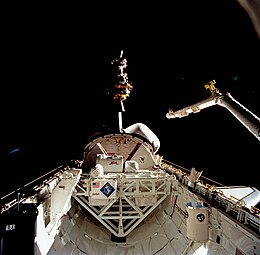
LAGEOS-2 being deployed from Columbia...
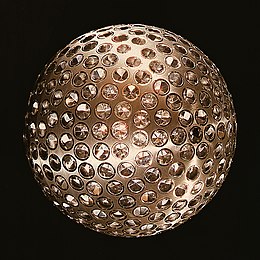
Image of its older, but structurally identical twin, LAGEOS-1...
Last edited:
here is the press kit:
https://historycollection.jsc.nasa....huttle_pk/pk/Flight_051_STS-052_Press_Kit.pdf
But before making new add on lets get the main program to work. I think it is close. If the contrail srb is good then update the scn and ini. Look at docs.
---------- Post added at 07:27 AM ---------- Previous post was at 07:10 AM ----------
Also a minor point. In the 2010 scn the shuttle type was written as "OV-101" Since the scn need we written should I change the dll to read "OV-" versus "OV 101" the difference is the dash
https://historycollection.jsc.nasa....huttle_pk/pk/Flight_051_STS-052_Press_Kit.pdf
But before making new add on lets get the main program to work. I think it is close. If the contrail srb is good then update the scn and ini. Look at docs.
---------- Post added at 07:27 AM ---------- Previous post was at 07:10 AM ----------
Also a minor point. In the 2010 scn the shuttle type was written as "OV-101" Since the scn need we written should I change the dll to read "OV-" versus "OV 101" the difference is the dash
Similar threads
- Replies
- 0
- Views
- 2K

- Sticky
- Replies
- 6
- Views
- 10K

- Replies
- 7
- Views
- 4K
