OHM SlaveMFD

OrbitHangar

Addon Comments
Joined
Apr 9, 2008
Messages
3,832
Reaction score
18
Points
0

Author: kamaz

SlaveMFD
========

This add-on allows you to display a MFD of another vessel in the current vessel.

INSTALLATION
- Unpack the archive, enable SlaveMFD.dll module.

HOW TO USE:
0. You must have more than one vessel in the scenario ;-)
1. Open SlaveMFD.
2. Select the desired spacecraft using SH+ and SH-. Spacecraft name is displayed
   in lower right corner of the MFD.
3. Select the desired MFD mode using MD+ and MD-.
4. Press GO.
5. At this point, the MFD operates normally, except that it is connected to the
   remote vessel.
6. To disconnect from the remote vessel, press PWR.

KNOWN BUGS:
- Attempting to use HSI MFD with MIR causes a crash.
- MNU button does not work on remote vessels.

SOURCE CODE:
- In the archive, look under Orbitersdk

LEGAL:
- The code is under MIT-style license


DOWNLOAD
 
That's really a cool concept, kamaz! Nice work :thumbup:.

However, just as with VNCMFD - and mentioned in the originating thread earlier here - I get really bad performance with it on my machine. I'm running the inline-client with approx. 60fps in the "Delta-glider/DG and DG-S" scenario. Switching to glass-cockpit shows the same.

Having one SlaveMFD active, my FPS drops to 44 and the simulation starts to stutter if I use repeated button presses on e.g. MapMFD for ISS to move the map up and down. Having a second one effectively grinds the simulation to a hold with 5-7 FPS.

In the VC, the situation is much better: one instance of SlaveMFD costs only about 3 fps here. I reckon this is simply due to the size of the surface that the bit-boundary block transfer needs to process on every call of Update(). Setting the MFD update rate up (e.g. to 0.2s) of course makes it even worse.

Would be interesting how it runs in a mission-control "vessel" with many MFDs active, perhaps with big resolutions.
 
Last edited:
Come on, what do you expect from a product of an all-night hacking binge? I am positively surprised that it works at all and is playable :lol: It's intended to be a proof-of-concept.

The performance is bad because I have used GDI BitBlt() to copy the screen. And I reverted to GDI because the most obvious trick -- oapiBlt() between surfaces -- didn't work, much to my surprise. But, the GDI-based version works, so I thought that I will publish it so you guys have something to play with :)

Regarding your complaint about the performance of VNCMFD, I have to ask (again) which version did you test -- because at one point VNCMFD got csander's DX7 screen ripper which improved it dramatically. So either you've talking about an old version, or I broke something in a later release :) I'm actually planning to reuse this code in SlaveMFD, if I can figure out how to render the obtained bitmap on screen effectively.
 
Last edited:
Come on, what do you expect from a product of an all-night hacking binge? I am positively surprised that it works at all and is playable :lol: It's intended to be a proof-of-concept.

Erm. I already wrote that it is a cool concept and that you did a nice work, did I not? You've even got a big thumb up ;) .

The performance is bad because I have used GDI BitBlt() to copy the screen. And I reverted to GDI because the most obvious trick -- oapiBlt() between surfaces -- didn't work, much to my surprise. But, the GDI-based version works, so I thought that I will publish it so you guys have something to play with :)

And that's fine for me and certainly a great outlook for the mission-control guys.

But why so defensive? Just because the FPS cut makes it unusable on my machine doesn't mean that it can't be improved. Perhaps it is something here with GDI support, I don't know. It just is what it is.

Regarding your complaint about the performance of VNCMFD, I have to ask (again) which version did you test -- because at one point VNCMFD got csander's DX7 screen ripper which improved it dramatically. So either you've talking about an old version, or I broke something in a later release :) I'm actually planning to reuse this code in SlaveMFD, if I can figure out how to render the obtained bitmap on screen effectively.

It is no complaint, it is a statement of fact. I'm not dependent on VNCMFD at all, and I don't have real interest in it besides the technical aspect, so I'm not complaining in the sense of urging you to get it to work. I honestly don't know what version I tried, so I can't comment on that.

What I tested though was effectively unplayable, and seeing a similar technique used here together with similar results regarding performance, I simply thought I let you know, just as hinted on in the originating thread. If the newest version of VNCMFD really improved on that, of course it would be a win for the concept to use the same approach.

You see, since it was me who encouraged you to implement this for the better of the mission-control community here, I thought it is only fair if I test it and give constructive feedback on the performance ASAP. Especially since that was the last thing we discussed for it.

Besides, my results are only one data-point. What about other members here? Anybody else got some performance data?
 
Lecture time :)

The main problem is that we must use ExternMFD, and ExternMFD can only draw to its own surface, not to an user-supplied surface. This forces us to copy image data from one surface to the other on display update.

The most basic way to do this is to acquire GDI contexts on both surfaces and call BitBlt(). BitBlt() is slow, but that's only half of the problem. The other half is that BitBlt() invokes some kind of a global mutex, and locks the renderer -- so running it in a separate thread will do no good. So if your call to BitBlt() takes, say 200ms, this means that the renderer is locked for 200ms, which results in a jerking animation once per second.

Strangely enough, speed of BitBlt() seems to depend on circumstances -- in SlaveMFD, a copy between two surfaces is much faster than a copy between a surface and a bitmap in VNCMFD. This is why I said that I am surprised that this add-on works -- in VNCMFD, one refresh would take on the order of 200ms. Of course having a renderer frozen for 200ms results in a visibly jerky animation (to put it mildly). Which is why early versions of VNCMFD were using progressive scan, i.e. copying 1/10th of MFD screen at a time. It appears that this is not needed here, for some reason.

At one point, csanders made this discovery that (in the inline client) SURFHANDLE is nothing else than a pointer to a DX7 surface objects. (In other words, SURFHANDLE is LPDIRECTDRAWSURFACE7). So you can actually use DX7 calls to manipulate SURFHANDLES. In particular, you can use DX7 blitting which is much faster than BitBlt. Hence WebMFD and VNCMFD got accelerated versions.

So, of course that this add-on can be improved -- I just have to figure out a way how to do fast blitting from LPDIRECTDRAWSURFACE7 to physical display. There's no sense in involving DX7 calls if I have to go through GDI at the end again :rofl: So far, I know that the most obvious thing -- oapiBlt() with MFD display as the target -- does NOT work (at least with 2D cockpit), which is, frankly, puzzling.

To make matters more interesting, BitBlt() under D3D9Client is blazingly fast, and does not require any special tricks.

So there's actually a good chance that you can make a playable "mission control" VC using SlaveMFD as it stands now, provided that you use D3D9Client.

---------- Post added at 06:49 PM ---------- Previous post was at 06:20 PM ----------

And this is why BitBlt() under D3D9Client is faster:

DX7 is still hardware accelerated. What isn't hardware accelerated is getting a GDI surface from DX7. DirectX/GDI interop isn't a common thing, and support for this was dropped from DX7 but continued in DX9.

I suspect an non-hardware accelerated GDI bitblt is the issue. I think it used to be accelerated on XP (at least if it didn't have to do a stretch (i.e. the source and destination resolutions were equal)), but no longer with Vista.

In any case, I discovered the inline client actually gives a pointer to DX7 surface with the "GetSurface" API call. From there one can do a DX7 bitblt, which is accelerated, but I digress.

 
Last edited:
That's nice! I already thought it won't be easy, but that sounds like making it actually usable for inline Orbiter should be possible for you. Looking forward to it... :cheers:
 
This is great. I just downloaded it and am checking it out. With D3D9client, I'm not seeing any reduction in frame rate on my system.

There have been several missions where I've had to jump between vessels just to see their MFD's. This add-on will really help with the immersion aspect.

This add-on should be part of Orbiter by default in my opinion!

To help improve this add-on (hopefully), here a couple of problems I am seeing:

Once you "GO" to an MFD, there's no obvious way to go back to SlaveMFD. I found that powering off the MFD and powering it back on will allow me to get back to the SlaveMFD options. (I can understand if it just has to be this way.) EDIT: Disregard. I realize this is what Point 6 is referring to in your original post. (Thanks Face.)

In MapMFD, when I press DSP, the button labels are not updated.

In MapMFD, when I am on the moon and I bring up MapMFD for the ISS (in orbit at Earth), I don't see the ISS or its orbital line on MapMFD.

That's all I've noticed so far. Great add-on! Very useful!
 
Last edited:
Once you "GO" to an MFD, there's no obvious way to go back to SlaveMFD. I found that powering off the MFD and powering it back on will allow me to get back to the SlaveMFD options. (I can understand if it just has to be this way.)

That's what kamaz outlined in point 6:
6. To disconnect from the remote vessel, press PWR.
 
For escaping remote MFD, pressing SEL will also work.

---------- Post added at 09:42 PM ---------- Previous post was at 09:29 PM ----------

Regarding the issue of coming back from remote MFD -- I thought about it and I came to the conclusion that using PWR/SEL is most natural. Otherwise, I'd either have to reserve an MFD button (thus running into a problem if MFD needs it) or use a keyboard shortcut, which is even worse because it requires you to memorize it and breaks immersion.

Also, after loading scenario the SlaveMFD state is restored, but you have to press GO again. This is intentional -- so the user sees that he is dealing with a remote'd MFD.

There have been several missions where I've had to jump between vessels just to see their MFD's.

Could you describe what kind of mission was that? I'm curious :)

In MapMFD, when I press DSP, the button labels are not updated.

In MapMFD, when I am on the moon and I bring up MapMFD for the ISS (in orbit at Earth), I don't see the ISS or its orbital line on MapMFD.

I'll have a look, but I'm under impression that there are some bugs in MapMFD which manifest in this usage scenario -- i.e. it takes data from the vessel in focus, not the vessel it's attached to.

I have also found a bug that SlaveMFD state gets reset when you switch cockpit views (F8). I will fix it in the next release. :)
 
Last edited:
Pressing SEL will also work.

Hmm... I tried that. If I press SEL and re-select SlaveMFD, it doesn't "reset" back to SlaveMFD options. (I still have the options from whatever MFD I "GO" to.) Here's a quick video showing what I see when I do that:


Another example would be when I did my Mars → Venus sling → Earth mission. In order to set up that mission, I had to bring up TransX on the vessel that I had sitting on Venus. So I had to shift vessel focus to the ship I had on Venus, and the only reason I had to do that was so that I could look at TransX MFD from there. (Otherwise, that ship on Venus had no purpose. It was only sitting there so I could see TransX with Venus as the MAJ body. On the other hand, if I could REF a different MAJ body from TransX, then that would also solve the problem. And would be a better solution actually.) But the point here is that with SlaveMFD, I could keep my ship focus on Mars, and just bring up TransX from the Venus vessel.

Though - having said all that, I just tested this idea, and unfortunately it doesn't work. If I bring up SlaveMFD and go to TransX, it still has the MAJ body as the body I am on, and not the MAJ body of the vessel I have selected.
 
Hmm... I tried that. If I press SEL and re-select SlaveMFD, it doesn't "reset" back to SlaveMFD options. (I still have the options from whatever MFD I "GO" to.) Here's a quick video showing what I see when I do that:

Um... yeah. I think this should be just documented as the behavior, i.e. PWR - reset state, SEL - switch back to local MFDs, but remote MFD remains attached.

Though - having said all that, I just tested this idea, and unfortunately it doesn't work. If I bring up SlaveMFD and go to TransX, it still has the MAJ body as the body I am on, and not the MAJ body of the vessel I have selected.

Which means that TransX uses vessel in focus, not the vessel it is attached to... I wonder if that can be fixed.
 
This is simply amazing! thanks Kamaz! I can finally build my idea of an MCC with MFDs driving remotely orbit vessels! I could even integrate the space network! GREAT!!! :hailprobe: :hotcool:
 
Great addon ! :thumbup:

I am in need of one additional thing. A way of typing in the name of the vessel. When I am in a scenario with alot of vessels (i think my ISSA-Z has over a hundred), it is very time consuming and confusing pressing SH+ til I get to the correct ship.
 
Heh. I actually had this implemented originally but changed it in favor of a more "user friendly" solution...

Please expect updated release next weekend. :)
 
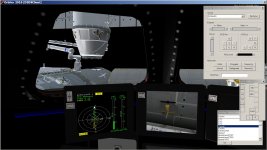
A view from the Cupole, with the remote dockingMFD of the Dragon. Makes it extremely easy and more immersive for berthing.
 

Attachments

  • slaveMFD.jpg
    slaveMFD.jpg
    224.5 KB · Views: 67
Interim bugfix release. Changes:

- Fix build paths
- Fix HSI crash
- Add typing in vessel name
- Remember state when switching cockpit views

Next version will be published on OH after integrating DX7 acceleration. Development was delayed because of goats.
 

Attachments

Last edited:
SlaveMFD not able to select AttitudeMFD. Will not include it in the selection list.
 
Back
Top