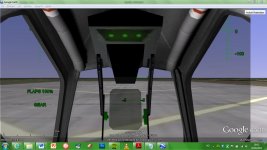
Gaming Delta-Glider Cockpit Overlay for Google Earth's Flight Simulator

Nice and looks good, but for those of us with a 1366x768 - 16:9 screen, it is a little bit wrong (watch the picture). The center of the cockpit is a little bit to the left, and it's some free space on the right side... Is it possible to fix this in notepad?
 

Attachments

  • Google Earth.jpg
    Google Earth.jpg
    87.9 KB · Views: 60
I fixed it. After a little bit of tweeking, I found the right numbers for a 1366x768-screen to be
Code:
      <screenXY x="1" y="-200" xunits="pixels" yunits="insetPixels"/>
      <size x="1366" y="1024" xunits="pixel" yunits="pixel"/>
in the end of the file. The cockpit gets a little bit stretched, but nothing serious.

 
I fixed it. After a little bit of tweeking, I found the right numbers for a 1366x768-screen to be
Code:
      <screenXY x="1" y="-200" xunits="pixels" yunits="insetPixels"/>
      <size x="1366" y="1024" xunits="pixel" yunits="pixel"/>
in the end of the file. The cockpit gets a little bit stretched, but nothing serious.

Just copy the overlay where you want and fix the path in the kml file.
 

Attachments

Back
Top