
Software DDS saving help with PhotoShop CS3E

_Designer_

New member
Joined
Oct 6, 2011
Messages
87
Reaction score
0
Points
0
Location
Playas de Tijuana
Hey all!

I am trying to save my .PSD of my skin as a .dds file

I have the NVIDIA plugin for PSCS3 but I get all these options on how to save it.


The only time I could open my dds file after saving, turned out to be purple/black and other times would not open.

anyone have any preferences on how to save it properly?
 
I've got Photoshop 7 and never had any success with the nvidia plug in.

It's no help, but I still export them from Photoshop as bmp's and then convert them to dds with the DxTex program included with Orbiter.
 
ah cool, I got it saved as a high jpg at the moment to make it less bulky with what I designed into it.

I can't seem to find the dxtex program....
 
Last edited:
The DxTex program is in the Orbiter/Utils directory. Remember to format your image to DXT-1 (1-bit alpha) with DxTex before saving it to .dds.
 
Ok, I did that one with the NVIDIA at first as 2d over cube and volume. only gave me purple where my stuff was.

---------- Post added at 03:20 AM ---------- Previous post was at 03:18 AM ----------

the system message reads when I load up the BMP says "source image width and height must be powers of 2" does that mean my height/width need to be even numbers all divisible by 2 my height is 4098 x 2085 need to drop it to 4098 x 2084?
 
the system message reads when I load up the BMP says "source image width and height must be powers of 2" does that mean my height/width need to be even numbers all divisible by 2 my height is 4098 x 2085 need to drop it to 4098 x 2084?
No. Powers of two aren't 2*n, but 2^n (where n is unsigned integer). They are numbers like: 1, 2, 4, 8, 16, 32, 64, 128, 256, 512, 1024, 2048, 4096, 8192, 16384.., but I don't recommend using anything more than 2048 if you want others being able to use such textures on relatively old graphics cards, or more than 4096 for people with relatively new graphics cards but Windows XP.

In your case you need to rescale it to 4096x2048. And if you release that texture, then either rescale it to 2048x2048 or 2048x1024.
 
The dimensions are the biggest thing that throws me off.

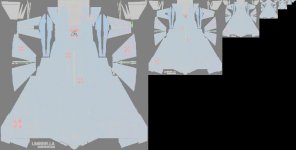
But the thing is, I am editing over another skin (I'm using it as a map) and when it opens im my photoshop the dimensions are 4094x2048 and has small samples of the same thing from largest to smallest. In case the .dds conversion made smaller samples of the same image (as the .dds looked like when I opened) I cropped the image from the large one. It's original size was 2034x2048.

I was able to save the .dds last time I edited a skin, I don't understand why it will not work now.

---------- Post added at 06:18 PM ---------- Previous post was at 05:54 PM ----------

Well, with NVIDIA I can save it now :D only problem is my colors are warped. looks like a gif image with 8 colors only.
with DxTX in the utils folder, it says my image must be divisible by 2 I don't think I can go any lower in height/width of the image because it may not blend right with the mesh
 
I am editing over another skin (I'm using it as a map) and when it opens im my photoshop the dimensions are 4094x2048 and has small samples of the same thing from largest to smallest. In case the .dds conversion made smaller samples of the same image (as the .dds looked like when I opened) I cropped the image from the large one.
Are you sure it wasn't 4096x2048? Those 2 pixels make huge difference. Those smaller samples are mipmaps. Each next in sequence has 2 times smaller dimensions than the previous (and partially that's the reason why your original texture needs to have power of 2 dimensions).

It's original size was 2034x2048.
You can make a 2048x2048 texture from it by resizing the canvas without resizing your image, or you can resample the image to be 2048x2048, if the whole texture needs to be filled with your image.

Well, with NVIDIA I can save it now :D only problem is my colors are warped. looks like a gif image with 8 colors only.
What encoding did you choose: DXT or some other? Had that texture power of 2 dimensions? Can you post a screenshot?

with DxTX in the utils folder, it says my image must be divisible by 2 I don't think I can go any lower in height/width of the image because it may not blend right with the mesh
Are you sure it didn't write "Source image width and height must be powers of 2." instead?

You don't need to go only down, you can go up too. The whole texture doesn't need to be filled with image. If a dimension of image is for example 120 pixels below 2048 pixels, the texture can be 2048 pixels with those 120 pixels unused (if it's a texture for your mesh, and not a skin for some mesh, where those pixels are indeed used).

Is it a skin for your mesh or for a ready mesh?

For a skin for ready mesh, like DG, where you can't change the UV map, you need to resize your texture to fit in the same field of the texture which (the whole texture) has power of 2 dimensions.
 
My texture is for the XR2 RavenStar

I managed to save my .psd as a .bmp so I got that clear thank god.

I use NVIDIA right now, because I now only have one problem (the size is divisible by 4 and I can mip map, I normally converted to smart object and re-sized I was done, no issues when I tried my luck editing over a XR2 ravenstar skin at first.)

My issue is when I save the .dds the image colors look awful. I'm saving it as basic as I can with a DXT1 or whatever it is under a 2d texture and I get this.

----- Post added -----

added the image, had to convert it to a jpg since a dds file format isn't supported.
 

Attachments

  • top_hull_colour_XR2_paint_dds_error.jpg
    top_hull_colour_XR2_paint_dds_error.jpg
    120 KB · Views: 8
I don't have Photoshop on my home computer, so I can't check, but maybe it's something with used color profile. :shrug:

Is the BMP an image saved in 24-bit sRGB colorspace (not some other, like CMYK or something)?

Is it the same when you try to convert it with DxTex instead of NVidia tools?
 
In DxTex it gives me that powers of 2 message. And ya the BMP was saved at 24-bit. I attempted the save at 32 to see if it does better

---------- Post added 10-10-11 at 12:33 AM ---------- Previous post was 10-09-11 at 11:32 PM ----------

same problem still, saved the .bmp as a 32-bit A8 R8 G8 B8 and saved the .dds as a 2d texture as a DXT1 ARGB 4bpp | 1 bit alpha. same color problem as what my attached image has.
 
Still the same mess, sucks that NVIDIA is the only plugin for PSCS3E.

Literally spent ALL DAY messing with getting this texture right :shrug:

---------- Post added at 05:48 AM ---------- Previous post was at 05:48 AM ----------

Still the same mess, sucks that NVIDIA is the only plugin for PSCS3E.

Literally spent ALL DAY messing with getting this texture right :shrug:
 
Can you attach in this thread a ZIP archive containing both the BMP and DDS files?
 
Orb, Pyro gave me a solution.

told me to download paint.net and the .dds file was saved easily, I could open it up in PS and had no problems, no color flaws, crashes. worked great :D

only prob I have is rewriting the scn to assign my skins properly.

I changed the skin in the scn file to my texture folder name (UCOD420XZ) and when I load my scn up. I get the default ravenstar skin? you think my .dds is too small or something because I could no mip map the image.
 
Orb, Pyro gave me a solution.

told me to download paint.net and the .dds file was saved easily, I could open it up in PS and had no problems, no color flaws, crashes. worked great :D
This is the same solution as using GIMP instead of Paint.NET or Photoshop. :shrug:
 
I've tried GIMP, paint.net I just opened up my .bmp, save as .dds click "ok" and done. the resolution didn't turn out as it looked in the previous attachment, it was perfect. I opened it in PS and no errors. only thing is no mip map but I can always do a copy/paste method and save as a .dds again no prob.

---------- Post added at 02:49 PM ---------- Previous post was at 02:33 PM ----------

NOW IT WORKS!!! IT'S ALIVE!!!

I forgot to paste the new .dds to the orbiter folder :p
 
Back
Top