
Have you mor than just a joystick?

HAL9001

super-ninja-orbinaut
Joined
Jun 4, 2010
Messages
1,107
Reaction score
11
Points
38
Location
Stuttgart, Germany
Inspirated from that: http://www.orbiter-forum.com/showpost.php?p=192099&postcount=37 I now ask, who has more than just a joystick. Have you got two joysticks? Or a reconstructed Cockpit?


Well, I have three Joysticks, but at the right the throttle stick is damaded and at the rleft one the x-axeis is smashed. I use the middle (my main-stick) to controll the ship normally, without fly-by-wire. The right i for translation (I used the x-Axis of the left for back forwad. That's crazy, but after a bit some training and a diagonal standing jostick it goes). The left sticks throttle-stick makes hover. The lower half of the x-axes of the left stick makes retro, so if I pull it back it's working a bitsome like a hand brake.
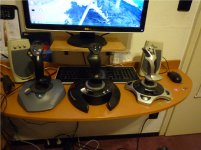
Joysticks.jpg
 
I just have one Joystick, but it's not enough for orbiter. I think to buy a X52 or similar, some pedals and then use my old one as translation control. Just rotate the base by 90° and use the yaw axis as forward/backwards thrusters.
That idea with an additional throttle for hover is a good idea! :thumbup:
 
One joystick with four buttons, two axes, a POV hat and a throttle. I spend something like 5% of my Orbiter time using it.

The far better controller for Orbiter has 101 input options, which are modifiable to give over 300 possibilities, and every computer has one attached.
 
I have a Saitek X52 (not pro), which I use in conjunction with a Cherry point-of-sale keyboard:
SPOS_QWERTY.jpg

So, I get those labelable extra buttons, and a touchpad for mousing around (mine doesn't have a credit card slot). Unfortunately, it won't register properly with the hardware programming, so I have to use the soft programming and add a small delay between key combinations.

For example, if I set it to do ctrl+H in hardware with no delay, it registers them simultaneously, so it will sometimes turn off the HUD or switch modes.

Not all of them have this problem, apparently. It depends on the model whether you get to change the hardware key press delay.

Also, I can't figure out how to not make it say "Key Combination" on the screen every time I use a key macro. A minor irritation. :dry:
 
12% thrust with a keyboard? Simple, CTRL + [NUMPAD +] to increment thrust until 12%.
 
I'm using Saitek AV8R-01 joystick with 5 axes and 12 keys and Saitek Throttle Quadrant with 3 axes (main/hoover/trimmer) and 6 keys. Almost eliminates the need of keyboard. Still have to stick with mouse, that's why I really miss a third hand:)
 
I have a joystick, and I've hardly ever used it. Part of why is the fact that it lacks a yaw control...

I used my 4 channel Futaba RC radio once...

Win. :thumbup:
 
I used my 4 channel Futaba RC radio once...

Was that with your RC DG project though?

---------- Post added at 09:50 AM ---------- Previous post was at 09:48 AM ----------

What's 12% yaw? Your RCS thrusters handle yaw with either 100% or 10% thrust.

Yes, but in atmosphere, you'd be using rudder (which is really the only place a joystick would matter anyway).
 
are we counting joystick totals or just the ones that are currently jacked in ?:lol:


i fly Saitek X52pro + Rudder Pedals + 3dx SpaceNavigator....

i have all that conveniently bolted onto the sides of my chair... which makes for something of a sim-pit, i guess

here:
picture.php


i've rigged up my FlightControls module so that the space navigagator directly controls translation RCS, as the stick and pedals do rotation simulataneously - so no more lin/rot switching for me :hmm:

but i'm not quite done in my cap'n kirk madness...
i still have a couple of older joysticks that i plan to take apart and hook up the circuitry to make a side console behind my throttle unit :blink:
i've dismantled it before, and all the wirings are beautifully modular, controlled by a single PCB which translates the analog inputs to the USB plug - so i guess it should be as simple as building the console unit and soldering the wires into the very awesome switches i have yet to acquire :rolleyes:
 
Nice rig! :thumbup:

I'd like to get an X45 (twistie-stickes (aka, X52) = teh evil!) for use with Orbiter and other space games like B5:IFH. Just can't afford it. :(

Also... not sure where I'd put it. lol Can't let it interfere with my ThrustMaster Cougar HOTAS. :D
 
I have a Logitech Attack 3 which I also use for Flight Simulator. I'd love a proper yoke with throttle, but they are so expensive.
 
Back
Top