I noticed that Windows performed a monster auto-update today. It took about half an hour to download and install, and since then my windows (xp-pro) has become unusable. Explorer windows freeze, and simple directory changes take minutes to display. Same for navigating any open/save file dialogs. My windows was pretty sluggish before, but now it's hopeless. Did anybody have a similar experience? I don't suppose there is a way to undo the update?

You are using an out of date browser. It may not display this or other websites correctly.
You should upgrade or use an alternative browser.
You should upgrade or use an alternative browser.
Windows woes
- Thread starter martins
- Start date
- Joined
- May 30, 2008
- Messages
- 5,580
- Reaction score
- 2
- Points
- 0
To uninstall an update on XP, open the Add or Remove Programs dialog, check the "show updates" box, and any installed updates will appear in the list. I would recommend going through the ones yesterday one at a time, to see if you can narrow it down.

jinglesassy
New member
they did release a new patch and thats why i have auto updates off to wait 2 weeks before getting any update to get any bugs out

- Joined
- Oct 16, 2007
- Messages
- 1,886
- Reaction score
- 11
- Points
- 0
- Location
- USA-WA
- Website
- www.orbiter-forum.com
Oh man I just got done downloading and installing it. Do you know which one it is? I just have to re-start my computer to complete the install.

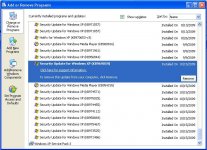
This is the updates I had today (the one shaded and below; dated 10/15/2009)
I guess its a 'pick your poison' type of thing
This is the updates I had today (the one shaded and below; dated 10/15/2009)
I guess its a 'pick your poison' type of thing
Attachments

Zeehond
New member
- Joined
- Mar 20, 2008
- Messages
- 64
- Reaction score
- 0
- Points
- 0
I don't think there is a big problem with the updates Microsoft provided, because I didn't see anything about it on the tech fora I visit.
I remember that updates to the .net framework sometimes launch a service that runs for a while to "optimize" things.
But to conclude: Windows XP should not be sluggish when run on a decent computer, so something is amiss with your install.
I remember that updates to the .net framework sometimes launch a service that runs for a while to "optimize" things.
But to conclude: Windows XP should not be sluggish when run on a decent computer, so something is amiss with your install.

how long has your installation been on? this sounds like a severe case of bit-rotting.

- Joined
- May 14, 2008
- Messages
- 10,547
- Reaction score
- 347
- Points
- 158
- Location
- East Sussex
- Website
- blog.gdwnet.com
- Preferred Pronouns
- He/Him
Sounds to me like a defrag is required, a clean up of apps launching at startup and possibly a few pagefile tweaks. All depends on the actual setup of the PC. Often a spring clean is enough to restore speed and stability to an ailiing system.
Yes, Microsoft did release a bumper patch update Tuesday evening (UK time), a grand total of 35 patches covering everything from Windows 2000 right up to Windows 7. However, Microsoft have gotten very good at this and I don't think a patch has been recalled in almost 2 years now.
Yes, Microsoft did release a bumper patch update Tuesday evening (UK time), a grand total of 35 patches covering everything from Windows 2000 right up to Windows 7. However, Microsoft have gotten very good at this and I don't think a patch has been recalled in almost 2 years now.
- Joined
- Oct 16, 2007
- Messages
- 1,886
- Reaction score
- 11
- Points
- 0
- Location
- USA-WA
- Website
- www.orbiter-forum.com
OK I just re-booted without even removing any of the updates and I really dont notice much of a difference. If there is any differences it would be only a few seconds--not much anyway.
On a side note, you could try a system restore, if you have that enabled.
On a side note, you could try a system restore, if you have that enabled.
kneejo
Astronut
- Joined
- Sep 20, 2009
- Messages
- 88
- Reaction score
- 0
- Points
- 0
- Location
- Groningen
- Website
- www.myspace.com
that's why I turned the auto-update off and rely on free, 3rd party software for security. XP was fine, out of the box. And furthermore, I don't like my pc eating cpu power when I don't tell it to (like during playing Orbiter, that tends to crash when my anti-virus does an update) oh, and I like to decide what get's installed and what not, so I don't run into surprises like this.. 
- Joined
- May 30, 2008
- Messages
- 5,580
- Reaction score
- 2
- Points
- 0
XP was fine out of the box?that's why I turned the auto-update off and rely on free, 3rd party software for security. XP was fine, out of the box. And furthermore, I don't like my pc eating cpu power when I don't tell it to (like during playing Orbiter, that tends to crash when my anti-virus does an update) oh, and I like to decide what get's installed and what not, so I don't run into surprises like this..
http://aroundcny.com/technofile/texts/tec082904.html
Moreover, by actually installing the Windows Update patches, you're entirely removing the possibility for malware to infect that particular part of your system, so you're making it that much easier on your antivirus.
If you don't want your "pc eating cpu power when you don't tell it to," then set updates to inform you that updates are available, and then you can choose when to install.
If your Windows machine is connected to the internet, not updating it regularly is asking for trouble.

I haven't had any problems with Windows, but that is mostly due to the fact that I have been using it for a long time  . I have noticed that the operating system destabilizes over time. I usually do a reformat every couple months or so.
As far as security is concerned, I think you would have to be exceptionally ignorant to get your system infected in 18 minutes...I do however go with the "if it's not broken don't fix it" analogy for this case. I keep auto-update turned off. It's not worth the pain in my opinion.
. I have noticed that the operating system destabilizes over time. I usually do a reformat every couple months or so. As far as security is concerned, I think you would have to be exceptionally ignorant to get your system infected in 18 minutes...I do however go with the "if it's not broken don't fix it" analogy for this case. I keep auto-update turned off. It's not worth the pain in my opinion.
- Joined
- May 14, 2008
- Messages
- 10,547
- Reaction score
- 347
- Points
- 158
- Location
- East Sussex
- Website
- blog.gdwnet.com
- Preferred Pronouns
- He/Him
I have noticed that the operating system destabilizes over time.
How? You mean the DLL's break down as they get old or something? :lol:
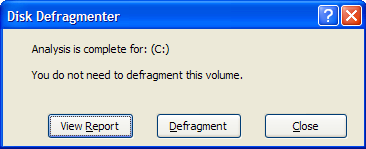
Seriously, that's a classic sign of fragmentation.
18 minutes is a long time. I've seen a Windows 2003 SP1 (at the time, about 18 months ago) server get infected in less than four minutes. We connected it to the internet via a natted router to download patches and boom. A WSUS server was quickly added to the build network.
I keep my windows partition properly defragmented. The sluggishness that happens over time is probably due to services such as Prefetch. I can't be sure though.

- Joined
- Oct 16, 2007
- Messages
- 6,586
- Reaction score
- 140
- Points
- 138
- Location
- Houston
- Website
- youtube.com
Hi Martin,
As others have suggested I would defrag the disk for sure, especially if you haven't done so in a while. I try and defrag my disk every week or two. Another thing you might try is a registry scan. I'm sure there are free options out there, but I found the software called RegDefense to be quite nice and it got good reviews from a lot of people. It's a very useful program which will scan for errors on your PC and fix them for you. Might be worth a try. :thumbup:
http://www.registrydefense.com/
As others have suggested I would defrag the disk for sure, especially if you haven't done so in a while. I try and defrag my disk every week or two. Another thing you might try is a registry scan. I'm sure there are free options out there, but I found the software called RegDefense to be quite nice and it got good reviews from a lot of people. It's a very useful program which will scan for errors on your PC and fix them for you. Might be worth a try. :thumbup:
http://www.registrydefense.com/
- Joined
- May 30, 2008
- Messages
- 5,580
- Reaction score
- 2
- Points
- 0
That's just it--it IS broken, and the updates ARE fixing it.I do however go with the "if it's not broken don't fix it" analogy for this case. I keep auto-update turned off. It's not worth the pain in my opinion.
Linguofreak
Well-known member
Moreover, by actually installing the Windows Update patches, you're entirely removing the possibility for malware to infect that particular part of your system, so you're making it that much easier on your antivirus.
I wouldn't say it entirely removes the possibility (it removes known exploits in that part of the system, but there could still be exploits that Microsoft doesn't know about, but that are used by malware of some form or other).
Still, it is a good idea to keep your system updated.
- Joined
- May 30, 2008
- Messages
- 5,580
- Reaction score
- 2
- Points
- 0
I meant that malware can no longer exploit that particular vulnerability.I wouldn't say it entirely removes the possibility (it removes known exploits in that part of the system, but there could still be exploits that Microsoft doesn't know about, but that are used by malware of some form or other).
Still, it is a good idea to keep your system updated.
That's just it--it IS broken, and the updates ARE fixing it.
Well it's not broken for me, I keep auto-update turned off and have yet to get a virus due to a fault of my own (brothers+sisters don't count
)...That's why I said it takes an exceptionally interesting person to get the machine infected in 18 minutes, or just sheer bad luck. Keep the updates on if you want, no one is really stopping you. I am just saying that I can manage without them
.kneejo
Astronut
- Joined
- Sep 20, 2009
- Messages
- 88
- Reaction score
- 0
- Points
- 0
- Location
- Groningen
- Website
- www.myspace.com
XP was fine out of the box?
Yes, security holes will always be found, it's the job of the anti-virus-writers to work on that, and they do it daily, windows just needs to be fast, it's already bloated enough. The only reason I don't use 98 anymore is due to incompatibility reasons, otherwise i'd still have that installed, unpatched.. well, maybe 98lite, to remove the explorer.
Linguofreak
Well-known member
I meant that malware can no longer exploit that particular vulnerability.
Fair enough.
---------- Post added at 03:18 AM ---------- Previous post was at 03:04 AM ----------
(brothers+sisters don't count
Tell me about it. My girlfriend has a young nephew and niece who are now not allowed on her computer after infecting it with every virus since Creeper. I *think* I managed to get it cleaned up before I left for Germany. (Then again, I'm not the greatest expert on malware removal, since we tend to be responsible enough browsers at my place that we don't acquire much. My brother is probably responsible for most of what we've gotten, and the number of viruses he's managed to infect our computer with is a few orders of magnitude less than my girlfriend had on her PC from that one incident. Plus, my Dad maintains a good enough antivirus and firewall policy that what does get onto our machines gets caught and killed fast, whereas her machine was infected for several months while I worked sporadically on cleaning it up, and may still have some remnants).
Similar threads

- Replies
- 1
- Views
- 9K


- Replies
- 0
- Views
- 5K

- Replies
- 2
- Views
- 4K

- Replies
- 50
- Views
- 23K
