VecMapper

OHM VecMapper 2.0

Mr Martian

Orbinaut/Addon dev/Donator
Addon Developer
Donator
Joined
Jun 6, 2012
Messages
382
Reaction score
254
Points
78
Location
Sydney, Australia, Earth, Sol
Website
www.orbithangar.com
Mr Martian submitted a new addon:

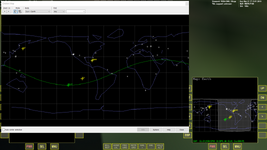
VecMapper - Create and edit .vec maps for the Map MFD

View attachment 38695

VecMapper 2.0 is a simple program which allows users to create and edit the .vec file maps used by the map MFD in Orbiter versions 2010 and up.

Basic Functionality
The program works by allowing users to draw a lines over an (optinally) imported image file. These lines, broken into closed segments, are then converted into a simple text document called a .vec file. It is this file which Orbiter's map MFD reads.

Some Features...

Read more about this addon...
 
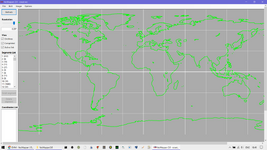
I've took a quick look and greatly resized (with a test purpose) the Earth map:

vec.png

The "Map" window uses the same map as the Map MFD. It's good.
Thanks for the manual. I'll read it.

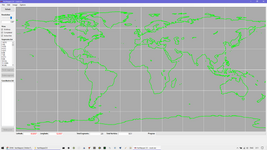
I can't zoom out the program window, so I can't see the bottom bar (I have to scroll down to see it). It looks like:

vec2.png

My screen resolution is 1920x1080.
 
The "Map" window uses the same map as the Map MFD. It's good.
Thanks for the manual. I'll read it.

I can't zoom out the program window, so I can't see the bottom bar (I have to scroll down to see it). It looks like:
My screen resolution is 1920x1080.
Hi misha.physics, thanks for the screenshots and feedback! I did mention in the manual there is no zoom functionality yet, but interesting your window appears very distorted and crammed. If your resolution is 1920x1080 what is your display zoom? Try setting it to 100%. I have two monitors both 1920x1080, one set to 100% and one to 125%, the 125% gives results more like the screenshot you posted.
 
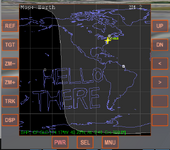
Yes, thank you, I had 125%. I changed it to 100% and it worked:

vec.png

(Although 100% is too small for me.)
 
Yes, thank you, I had 125%. I changed it to 100% and it worked:
(Although 100% is too small for me.)
That looks right! I know what you mean though, the scalability is probably the most significant drawback currently. I wrote this in C# and it was my first attempt using the language, so still got a lot to learn! If this is popular I’ll see what I can do about improving the window to scale in a more normal fashion.
 
By the way, one more thing. It seems to be pretty difficult to realize, but it would be nice to have the opportunity to select a segment by choosing it on the map (for example, draging a rectangle with a mouse on the map).

It could be very helpful for removing some segments on the map if we don't want to search for the segment in the segments list.
 
By the way, one more thing. It seems to be pretty difficult to realize, but it would be nice to have the opportunity to select a segment by choosing it on the map (for example, draging a rectangle with a mouse on the map).

It could be very helpful for removing some segments on the map if we don't want to search for the segment in the segments list.
That's a good idea. I did'nt really give much thought to removal of segments after they were drawn, but would definitely be useful for editing existing maps. I'll see what I can do in any future releases...
 
Back
Top