V8 Release Work Thread

Status
Not open for further replies.
To enhance the latest Virtual Cockpit update even further, a new type of rotational switch class has been implemented to allow lighting controls (and some others) to work more like the potentiometers they were and have finer control over them:


As you might be able to tell from the video, these switches are now operated by holding left click on the knob and pulling the mouse to the sides to rotate them. On the 2D panel the control has been made consistent to this changed VC behavior, although the finite number of bitmap states for the switches make this slightly awkward. I think the consistency of control between 2D and VC is more important though.

When updating to the latest NASSP Beta, the affected switches will sadly have the wrong switch positions in old scenarios, so be aware of that. The switches are:

-All flood, integral, numerics controls in the CSM and LM
-CSM high gain antenna and LM steerable S-band antenna pitch and yaw controls
-ORDEAL altitude selection in CSM and LM
-SPS gimbal trim thumbwheels (control hasn't changed for this, but saving/loading in scenarios at the 0.1° increments is fixed now, see https://github.com/orbiternassp/NASSP/issues/1209)
 
He has done it again!

Now available in NASSP is Comanche 67, the CMC software flown on Apollo 12. The software comes from the flight spare rope modules and was read by @thewonderidiot with his rope reader, as before for the Skylark modules and others.

There is only one major update from the Apollo 11 CMC software and a bunch of minor quality of life updates. The major update is Verb 79, a little program for automatic passive thermal control (PTC) and orbit rate pitch maneuvers. On previous missions these were accomplished with direct manipulation of DAP variables, which always seemed a bit scary to me. Comanche 67 puts these in an extended verb. Eventually, in Artemis (Apollo 15+), this feature got extended and incorporated into the universal pointing capabilities of P20.

The step from Apollo 12 to 13 is fairly small in terms of software changes, so it is probably possible for @thewonderidiot (and my usual 1% contribution for these things) to reconstruct the Apollo 13 CMC software from these newly found ropes. No promises though and it will definitely take several weeks, as the Comanche 67 source code will first have to be reconstructed. Until then our Apollo 13 scenario will keep using the Apollo 11 CMC software, to avoid changing this twice and potentially breaking/interrupting more missions that people are flying.

Thank you so much to Mike and the anonymous collector, who owns the rope modules, to preserve this software and make it possible to be used in NASSP!
 
Last edited:
As it turns out the Comanche 72 reconstruction might be a bit tricky. I also discovered that, due to the small number of differences between Comanche 67 and 72, old scenarios using Comanche 67 would not break when changing to Comanche 72 in the middle of a mission. You could just be in P00 and get a restart from the rope switch, but the lack of any relevant padload differences between the two ropes means you could continue as normal, without erasable memory edits in the scenario.

So considering these two facts, our Apollo 13 scenario(s) from now on uses Comanche 67! May it take a few days or months to get Comanche 72, as I said, it won't matter much for ongoing missions.

The switch from Comanche 55 (which our Apollo 13 scenarios were using until now) to 67 is not as painless though, so I cannot recommend doing that for an ongoing mission.
 
A reconstruction of Comanche 72 revision 3 is now available! So Apollo 13 in NASSP now uses the correct software for both CMC and LGC. Thanks again to @thewonderidiot for accomplishing this difficult feat. Going further than this is not really possible as Comanche 108 for Apollo 14 had too many changes, including changes that differ from Artemis for Apollo 15 and later. So this will be it for AGC updates in NASSP until more core rope modules are found.
 
Time for another update:

NASSP now supports IMU drift and accelerometer bias!

WARNING: DON'T UPDATE NASSP MID-MISSION FOR THIS UPDATE
Also, you guys can't skip P52s any more.


Brief Intro

The Apollo IMUs are comprised of a reference platform to which 3 IRIGs (Inertial Reference Integrating Gyroscope), and 3 PIPAs (Pulsed Integrating Pendulous Accelerometer) are mounted. The platform is supported by 3 servo-powered gimbals, which actuate to keep the platform in a fixed reference attitude. The image below shows an overview of the platform and the sensing elements on it.

1720476431320.png

The X, Y, and Z gyros (IRIGS) detect angular accelerations in their respective Input Axis (IA), by spinning a gyroscope along the Spin Reference Axis (SRA), and producing an output torque in the Output Axis (OA). The torquing of the output is sensed, and used by the AGC to determine, how much it needs to drive the IMU servos, such that the IMU platform remains fixed in space. The actual IMU position is determined by measuring the resolver phase angles. (There is a longer version of this description that we can get into when we properly impliment CDUs)

IMU Drift

Because nothing is perfect, the IMU sensing elements are subject to accumulating errors over time. The IMU will experience a drift (angular movement out of a perfect alignment) from the gyros, and the accelerometers will introduce error into the measured DV.

The sources of error in the IMU come in 6 types (each of these have an X, Y, and Z component, so it's really 18)
  • Null Bias Drift
    • This is the angular drift rate that the IMU experiences under no aceleration. It is a constant (but very slow) movement of the IMU about each of its principal axes.
  • Aceleration Drift, Spin Reference Axis
    • Angular drift about each principal axis, as a result of aceleration along the spin-refereence axis.
  • Aceleration Drift, Input Axis
    • Angular drift about each principal axis, as a result of aceleration along the input axis.
  • Aceleration Drift, Output Axis (not simulated, neglegable effect)
    • Angular drift about each principal axis, as a result of aceleration along the output axis. This is neglegablly small, and we don't simulate it, nor do we have good data for values for flown IMUs
  • PIPA Bias
    • Offset in where the "zero aceleration" reading is with respect to actual.
  • PIPA Scale Error
    • Linear error in measured aceleration. (Span error)
If you've ever wondered why the IMU has special density-matched fluids in it, this is why:
1720491641488.png


Drift-rates are measured in MERU (Milli Earth Rate Unit, equal to 7.29211586E-8 radians/second, or 1/1000 the rate at which earth rotates) or MERU/g.
PIPA biases are in cm/sec.
PIPA Scale errors are in ppm.

This is all now simulated. Our IMUs for Apollo 7-12 have the correct (mission specific) drift-rate and biases, and over time will lose alignment. PIPA bias will be observiable when in P47 or V16N21.

***​

While introducing errors into the simulation on its own is certianly fun, its still not the best part of this update. The CMC and LGC ropes actually have software that is ment to compensate for these drifts and biases. The figure below actually shows a 1800 ft/sec SPS burn between ~250 and ~325 seconds. In these plots, you can see both the aceleration sensitive drift, and the null bias drift, allong with the AGCs corrections to compensate.

1720490016650.png


If you are interested in how this works see: https://www.ibiblio.org/apollo/listings/Comanche055/IMU_COMPENSATION_PACKAGE.agc.html

The values below come from flown padloads:

Apollo 7Apollo 8Apollo 9Apollo 10Apollo 11Apollo 12
AddressOctalValueAddressOctalValueAddressOctalValueAddressOctalValueAddressOctalValueAddressOctalValue
CMPIPABIASX145232710.24145277766-0.00131452107550.64145274157-0.27145274267-0.261452775360
CMPIPASCALEX145373052-300145376575-76.57145375551-140145376270-10014530052040145374312-173
CMPIPABIASY145432710.241454131750.803145476462-0.1145477011-0.07145476133-0.13145477536-0.15
CMPIPASCALEY145574705-190145572466-329.14145572457-330145574166-230145576450-80145572207-243
CMPIPABIASZ145617540.141456106540.631145661230.441456772310.051456017540.14145677340-0.16
CMPIPASCALEZ145772333-340145774553-200.71145773322-280145776540-80145777403-30145771737-306
CMNBDX146077677-0.514604252.1814604612.41460630.4146077432-1.8146077762-0.9
CMNBDY14610014615152.62146100146177532-1.3146177663-0.61461777621.3
CMNBDZ146277663-0.614626323.2214624612.414622311.2146277746-0.21462000150.5
CMADIAX14632348.2146352417.88146313751463231146300435151463003676.7
CMADIAY146433411.6146477702-3.221464230814643671314640013751464000000.7
CMADIAZ146561320.81465103128.23146577251-181465321111465000231146577754-0.1
CMADSRAX14661123.9146677724-2.2414662057146627610146677615-6146677663-1.4
CMADSRAY146777767-0.41467401.6614672539146771-1.31467000713146777663-3.3
CMADSRAZ147077530-8.8147077702-3.22147077663-4147020571470001375147077615-3.5
LMPIPABIASX1452031310.31145273631-0.41145276612-0.12145277015-0.296
LMPIPASCALEX145360066-968145370750-430145374435-210145365137-649
LMPIPABIASY1454014540.191454016600.181454015730.17145400032-0.28
LMPIPASCALEY145560462-941145562171-840145574435-210145564147-681
LMPIPABIASZ1456000000145677542-0.031456005570.071456014550.54
LMPIPASCALEZ145762045-852145767241-530145760731-920145761325-885
LMNBDX1460011114.6146077150-3.21460002451.31460000150.6
LMNBDY14610117451461002771.5146177500-1.51461001460.8
LMNBDZ1462010754.5146277546-1.2146277415-1.91462005761.3
LMADIAX1463002025.414630003211463027125714630067210.6
LMADIAY146400000-0.314640101020146477627-4146477171-16
LMADIAZ14650101019.6146576617-241465010102014650052210.8
LMADSRAX146677745-0.514660020251466000642146677713-1.3
LMADSRAY14670064016.31467000642146701244261467001504.1
LMADSRAZ147077713-1.7147077745-1147077314-11147077713-0.3

Our Mission files now have these lines:
1720490830789.png


Implications for Users
Because the AGC compensates for drift, for the most part the misalignment will be almost unnoticable, apart from slightly higher N93 values. That being said, if you've ever skipped a P52 "because our IMU is perfect, and doesn't drift", you can no longer do that. :)

If you're really hard-core you could try adjusting one of the rates, and using the mission technique I've linked in References, to try to calculate it only from N93 values (I'm not by any means saying this is easy).

Extras
We also now simulate the IMU resolver voltage outputs, and phase errors. These are downlinked over telemetry, and could be used to determine the orientation of the spacecraft. The image below is from our TCP telemetry client.

1720491478555.png


Thanks
The very beginings of this project were in December of 2022 and started over dinner and a few beers with @rcflyinghokie @thewonderidiot, and @CaptainSwag101 at Paddy's in Newton MA. I did not know what I was getting myself into at the time, and @indy91 has been a huge help checking my left-handed rotation-matric math, testing, and making sure I don't merge typos or stray debugging code, by reviewing all 122 files I changed for this project. @rcflyinghokie, @ThatRedMelon, @Max-Q, and a few others from the SFS Discord have also tested this extensively. Thank you.

References

 

Just a small little update to improve launchpad behavior, we have implemented cryo dewars to continuously top off the SM cryo tanks while on the pad. This has two big benefits, your cryo quantity doesn't decrease on the pad and your pressures will stay stable even with the fans/heaters off on the pad.

One caveat however, if you update this mid mission you might have open valves that will cause pressure drops, in which case you have to manually edit your scenario to close the cryo inlet valves changing the leading "1" to a "0" as shown below.

<TANK> O2TANK1 133.938700 1 0 1 0 0 0.00010000 0.00001000 0.00100000 1.00000000
<TANK> O2TANK2 133.938700 1 0 1 0 0 0.00010000 0.00001000 0.00100000 1.00000000
<TANK> H2TANK1 191.138700 1 0 1 0 0 0.00100000 0.00010000 0.00100000 0.00100000
<TANK> H2TANK2 191.138700 1 0 1 0 0 0.00100000 0.00010000 0.00100000 0.00100000
 
I've made a minor quality-of-life change to make things easier for keyboard users.

For major maneuvers using the spacecraft engine, procedures call for you to enable the direct RCS coils (ROT CONTROL DIRECT in the CSM, ACA/4 JET in the LM). To oversimplify, the direct RCS coils bypass the logic in the RCS system and fire the jets regardless of other factors, such as the DAP or rotational rate limit. In the real spacecraft, the hand controllers had microswitches at the very end of the stick's travel, which was used to activate the direct RCS coils only when the appropriate cockpit switches were active AND the astronaut deflected their hand controller to its maximum angle. However, in NASSP, when you press a key on the keyboard, that's just an "on" or "off" signal, which was previously interpreted as a full deflection of the hand controller. This meant that, if you had the direct RCS system enabled via the cockpit switches, it would always fire any time you commanded rotation. This is frustrating because it wastes fuel and reduces your ability to maneuver in a controlled manner.

But, no more. Now, the default behavior for using keyboard attitude controls is that they command almost full deflection of the stick, just shy of triggering the direct RCS. If you want 100% stick deflection, simply hold the Alt key when commanding rotation.

Furthermore, you can now command "ACA out of detent" in the LM by holding Ctrl and Alt together and then commanding rotation. This moves the stick just a tiny bit (only 0.75 degrees from center) in order to zero the attitude deadband, and signal to the computer that the stick has moved without actually making the spacecraft fire its jets at all. This will be useful for LM activation procedures and RCS cold fire tests, as well as the "out of detent" step performed on Apollo 11 after touchdown.

Basically, you should now have better control over when (and how much) your RCS jets fire in both vehicles in certain situations when using the keyboard, and should otherwise not notice a significant difference.
 
Please read: If you are in the middle of flying a mission, do not update NASSP without performing the fix listed below:

This change: https://www.orbiter-forum.com/threads/v8-release-work-thread.36128/post-621001 intruduced IMU drift rates and PIPA bias/scale error. Recently we discovered a bug in the PIPA scale code, wherein we were applying the scale compensation rather than the scale-error itself. This fix ended up being a simple sign change in the code, thankfully.

For NASSP Users:
If you are in the middle of flying a mission you will need to either: 1) wait until you finish the mission to update NASSP 2) edit your scenerio to delete the following lines:

Any lines that start with: "PSCALE", e.g. PSCALE_X:

1737313293736.png


NOTE: there will be 6 lines total for scenarios with LMs and C(S)Ms. You need to get all of them.

Save the scenario, and when you reload, NASSP will load the correct values in from the mission file. If you have any questions, please reach out here or on the SFS discord. I'm happy to help edit scenerios for people
 
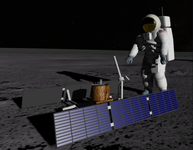
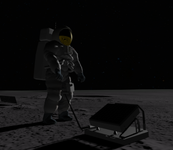
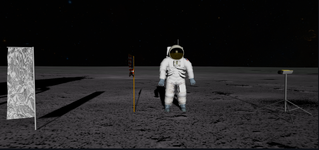
We now support the EASEP experiments and equipment for Apollo 11! This includes the TV camera, the Solar Wind Composition Experiment, the Passive Seismometer Experiment, and the Lunar Ranging Retro Reflector. Deployed with the "K" key. CDR does the camera, and LMP does the SWC, PSEP, and LRRR, in that order. ALSEP is coming soon.
 

Attachments

  • Capture3.PNG
    Capture3.PNG
    470 KB · Views: 603
  • Capture2.PNG
    Capture2.PNG
    303.5 KB · Views: 650
  • Capture.PNG
    Capture.PNG
    325.7 KB · Views: 676
Another major Virtual Cockpit update, mostly by @Jordan, is complete!

1739731420219.png


The major features are an improved system for floodlights, new digits for mission timers and new animated objects in the Command Module. These glareshades etc. were stowed on launch, but could be attached by the astronauts to various systems to improve visibility. Here are the 10 new animated CM VC elements:

-Panel 382 cover
-Waste disposal
-Altimeter cover
-Accelerometer cover
-Main DSKY glareshield
-EMS DV glareshield
-Mission timer glareshield
-Sextant eyepiece
-Telescope eyepiece
-Stowable ORDEAL

The click spots are usually right on top of the covers or on velcrospots. For the ORDEAL and the panel 382 cover a right mouseclick has to be used, as otherwise you might click one of the switches. The other new elements are used with left click.

Also various meter scalings have been corrected and probably many minor changes I am forgetting right now!
 
Pressure relief valves have now been added to the CSM cryo system. This means if you leave your heaters/fans on too long, over pressurizing your H2/O2, you will start venting O2/H2 into space!

Be weary of leaving those on now, you will of course get a CRYO PRESS light before the valve opens. One more thing to keep an eye on!
 
There has been a major visual upgrade of the RTCC MFD. Most MFD pages had originally been adjusted to look correct on the 2D panel, with the specific MFD size we use in NASSP (300 something pixels). As we are transitioning more and more to the Virtual Cockpit we are using the External MFD more. And depending on the MFD size my old system of position data on the MFD display could lead to quite major overlapping of text. Here an example:

1743090150082.png


Many MFD pages are trying to replicate real displays that were available to flight controllers in the MOCR. And I recently found out a bit more about the font sizes that were used for the displays. They had a few sizes available, the most commonly used one showing 28 x 56 characters. Here of course occurs a problem that has long bugged me. MFDs in Orbiter are usually in the aspect ratio 1:1 while the MOCR TV displays had the common TV aspect ratio of 4:3. This made it impossible to have the exact same display format as the real displays, at least in some cases.

So to fix the overlapping text issue once and for all and to properly show all the MOCR displays we have I have done a major overhaul, with changes to all pages of the RTCC MFD. It now has the proper format for all the MOCR displays (where we know them) and no matter the External MFD size, there is no text overlapping.

This does have some downsides though. Some MFD pages are now using a really small font size, especially the MOCR displays. It is barely readable on the 2D panel in some cases. But as we are mostly moving to the VC where the External MFD has to be used and because the NASSP 2D panel MFDs have always been smaller than the "glass cockpit" ones or in other vessels (e.g. DeltaGlider 2D panel) I think this is an acceptable limitation.

Here is how the same MFD page is looking now:

1743090790373.png


One additional idea I had was to create a modified version of the External MFD that is in the 4:3 aspect ratio. This would be really nice for the MOCR displays because it allows a larger font size. So attached to this post is a very WIP version of this, which I call "Wide External MFD":

1743090825226.png
 

Attachments

We have added a few small under the hood features that in no way will impact your day to day missions. Now the crew generates urine and urine dumps will actually dump this overboard. If you dont have stored urine on board, you wont see the yellow spray when opening the valve. Additionally, the particle streams for urine and water dumps has been improved.

Also in this update, the PAMFD has been reorganized slightly, moving the ECS glycol debugging display to its own subsection and adding a UCD (urine containment device) percentage showing you how much stored urine you have on board. Also, when on the lunar surface, you can "jettison" this with the new JET button at the time of equipment jettison.

Right now there is zero harm having "full" urine or not dumping as before, but this gives a more realistic urine dump instead of just generating the dump particle effect whe the valve is open.

1745677016797.png
 
We have merged a small update to improve O2 behavior today.

Back when we introduced realistic liquid substance densities that vary with pressure and temperature:
1750130671784.png


I chose some values for an updated liquid oxygen bulk modulus that were quite cold. The result of this was that the O2 could be quite stiff. And with full tanks, small changes in temperature would result in large changes in pressure. Well, no longer will this be the case. We now have improved bulk moduli for O2. This will eventually be added for other substances, but this was the most sensitive.

These are implemented as a 1000 element 1D lookup table plus a scaling factor, taken from NBS Technical Note 384
This is probably a significant performance bonus over my usual curve-fit 5th order polynomial approach.

1750130522580.png
 
Normally I don't make a writeup here for a mission/MCC/checklist update, but I will in the case of Apollo 7. Being one of our oldest scenarios, it's checklist and MCC have not received any love like other missions have over the years. It was made difficult by not having a lot of documentation, the correct software, correct panels etc. for the 7 flight. However now it has a brand new checklist per the actual flight as well as new MCC pads and procedures appropriate to Apollo 7.

Hopefully this will make 7 more streamlined and less confusing for those of you who have flown 7 in the past. Enjoy!
 
Following up on the Apollo 7 update, we have also released an update to Apollo 9's MCC and checklist that better supports the flown mission. Procedures, timelines etc have been updated with many corrections and improvements, adding improved (correct) LM procedures for the many powerup/powerdowns, CSM checklists for rendezvous, and you now can choose to do the EVA portion per the flight plan or as it actually was flown.

We hope this will make 9 more fun to fly and keep you on your toes!
 
Just a quick PSA, those updating NASSP please make sure you delete the old scenario files before updating. They all have been updated but since many were removed they must be manually deleted if installing from the zip.

Easy way to do it is simply deleting the Scenarios/Project Apollo - NASSP folder before updating with the latest release zip.

As always if there are any questions or issues let us know!
 
A little late to adding this, I apologize, but Apollo 8 now has an additional MCC state for a TLI+11 pad added per the actual flight. If you have a current Apollo 8 save between TLI and LOI-1 update pad, you will need to bump your mission state up by 1.

You can do this by editing your scenario file MCC_MissionState line and just incrementing the number by one.
 
Another slight update FYSA, the AOT reticle knob can now be pushed in at zero degrees to "lock" it in place to prevent turning while using it for X/Y P52s. The click spot is the reticle knob in 2d and coming soon to the virtual cockpit.

If you are trying to rotate the AOT and it wont move, its a feature not a bug and check the reticle knob!
 
We have made a few corrections to the CM flood circuitry. Not only is everything wired up and function (dim and flood switches) but there are a few quirks with the flood system added:

One significant one you will notice is floods don't engage until the knob is pushed passed half, that and your secondary floods have a much smaller dimmable range. Another feature not a bug is the lighting is dependent on bus voltage now, so increases and decreases in voltage will cause slight but noticeable dimming or brightening of the flood lights.
 
Status
Not open for further replies.
Back
Top