Can you print output that shows the values of empty_mass, max_front_weight, and max_rear_weight? I think they need to be explicitly passed to the function in C++, but I could be wrong.

ORBITER-FORUM will be temporarily closed at 2026-07-23 18:00 UTC while we complete some OF maintenance tasks. The amount of downtime is expected to take up to one hour, but probably less.

Give me a second.Can you print output that shows the values of empty_mass, max_front_weight, and max_rear_weight? I think they need to be explicitly passed to the function in C++, but I could be wrong.
**** /tmp/Orbiter.log
000000.000: Finished setting up render state
000000.000:
000000.000: **** Creating simulation session
000000.000: VSOP87(E) Sun: Precision 1.0e-06, Terms 554/6634
000000.000: VSOP87(B) Mercury: Precision 1.0e-05, Terms 167/7123
000000.000: VSOP87(B) Venus: Precision 1.0e-05, Terms 79/1710
000000.000: VSOP87(B) Earth: Precision 1.0e-08, Terms 2564/2564
000000.000: ELP82: Precision 1.0e-05, Terms 116/829
000000.000: VSOP87(B) Mars: Precision 1.0e-05, Terms 405/6400
000000.000: VSOP87(B) Jupiter: Precision 1.0e-06, Terms 1624/3625
000000.000: VSOP87(B) Saturn: Precision 1.0e-06, Terms 2904/6365
000000.000: SATSAT Mimas: Terms 113
000000.000: SATSAT Enceladus: Terms 33
000000.000: SATSAT Tethys: Terms 101
000000.000: SATSAT Dione: Terms 59
000000.000: SATSAT Rhea: Terms 68
000000.000: SATSAT Titan: Terms 100
000000.000: SATSAT Iapetus: Terms 605
000000.000: VSOP87(B) Uranus: Precision 1.0e-06, Terms 1827/5269
000000.000: VSOP87(B) Neptune: Precision 1.0e-06, Terms 391/2024
000000.000: Finished initialising world
000000.000: 3CV: FrontLeftWheelID: 8
000000.000: 3CV: FrontRightWheelID: 7
000000.000: 3CV: RearRightWheelID: 14
000000.000: 3CV: RearLeftWheelID: 13
000000.000: Finished initialising status
000000.000: Finished initialising camera
000000.000: Finished setting up render state
000000.000: empty_mass: 500.00
000000.000: max_weight_front: inf
000000.000: max_weight_rear: -inf
000000.000: Finished initialising panels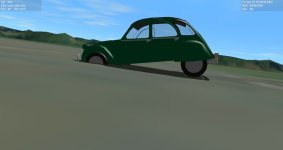
000000.000: empty_mass: 500.00000000.000: max_weight_front: 266.42000000.000: max_weight_rear: 5131.96
The empty mass is in kilograms, but the weight is in Newtons. 500 kg * g ~ 4905 N. The total maximum weight obtained inWell after initializing the variables in the constructor I no longer have infinite values (how did I forget?).
But now the car sinks, but at least it no longer does CTD or segfault.
This is the result of the Orbiter log:
000000.000: empty_mass: 500.00
000000.000: max_weight_front: 266.42
000000.000: max_weight_rear: 5131.96
Clearly there is an imbalance, what could it be?
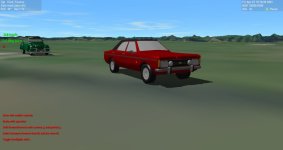
Now I corrected the values, they were indeed wrong.I just saw the picture of the setting of the car. The only thing that jumps out at me is that you may have set the front wheel contact points at the level of the front wheel axles. The rear wheels look like they are set appropriately.
I don't know if this is what is happening, but if your mesh is initially loaded such that contact points are well below the surface, when the touchdown points are set in ClbkPostCreation, that can cause an excessively large force on the touchdown point springs which can send the vessel into space instantly. You should try setting the altitude of the car in the scenario such that the tire contacts are pretty close to the surface. That might help.Well, I think I fixed it... temporarily. What I did was split the weight by 2 and spread it between the front and rear. It's not a great solution but it allows me to keep going until I have something better.
Thank you all for your help and ideas.
I tried that too without positive results.I don't know if this is what is happening, but if your mesh is initially loaded such that contact points are well below the surface, when the touchdown points are set in ClbkPostCreation, that can cause an excessively large force on the touchdown point springs which can send the vessel into space instantly. You should try setting the altitude of the car in the scenario such that the tire contacts are pretty close to the surface. That might help.
Looks good! You may be having steering problems due to the weight distribution on the tires. From your numbers most of the weight is on the rear wheels, and very little weight is on the front wheels used for steering. When you accelerate that will unload the front wheels even more. The front wheels will skid more easily in that situation, which is a correct behavior.
Thanks, though I haven't actually programmed the rotation keys yet.Looks good! You may be having steering problems due to the weight distribution on the tires. From your numbers most of the weight is on the rear wheels, and very little weight is on the front wheels used for steering. When you accelerate that will unload the front wheels even more. The front wheels will skid more easily in that situation, which is a correct behavior.
You may want to consider using ShiftMesh to relocate the CG about half-way between the front and rear wheels to put more weight on the front wheels.
000163.281: D3D9ERROR: D:\a\orbiter\orbiter\OVP\D3D9Client\Scene.cpp Line:1249 Error:-2005530516 pDevice->Clear(0, NULL, D3DCLEAR_TARGET | D3DCLEAR_ZBUFFER | D3DCLEAR_STENCIL, 0, 1.0f, 0L)void UCFO::clbkSetClassCaps(FILEHANDLE cfg){
//Get vessel parameters from configuration file,
//and set the physical vessel parameters.
if(!oapiReadItem_string(cfg, "Mesh", MeshName)){
TerminateAtError("Mesh", GetName(), "car");
}
SetMeshVisibilityMode (AddMesh (mhUCFO = oapiLoadMeshGlobal (MeshName)), MESHVIS_ALWAYS);
}...Do you also get this when you hit the throttle or any other key, or just the keypad 1/3 keys?Now I have another problem that causes segfaults.
It turns out that when I start to turn (by pressing 1 or 3 on the numeric keypad) Orbiter crashes. Both on Linux and Windows.
I used Cppcheck to fix all my code and initialize some variables that I had forgotten, I also used Valgrind to debug it but Valgrind tells me that it is a ZTreeMgr error (on Linux).
And on Windows the Orbiter log itself tells me that it is a D3D9 problem.
I suspect that it is something with the TouchdownPoints again and that is why I am going to study the GeneralVehicle code from fred18, to see if I can adapt it to mine and fix it. But I also have the doubt:
am I causing problems for D3D9 too?
This is from my Orbiter log:
000163.281: D3D9ERROR: D:\a\orbiter\orbiter\OVP\D3D9Client\Scene.cpp Line:1249 Error:-2005530516 pDevice->Clear(0, NULL, D3DCLEAR_TARGET | D3DCLEAR_ZBUFFER | D3DCLEAR_STENCIL, 0, 1.0f, 0L)
and I use this code to load the mesh:
C++:void UCFO::clbkSetClassCaps(FILEHANDLE cfg){ //Get vessel parameters from configuration file, //and set the physical vessel parameters. if(!oapiReadItem_string(cfg, "Mesh", MeshName)){ TerminateAtError("Mesh", GetName(), "car"); } SetMeshVisibilityMode (AddMesh (mhUCFO = oapiLoadMeshGlobal (MeshName)), MESHVIS_ALWAYS); }...
Am I doing something wrong?
Only when I press the 1/3 keys.Do you also get this when you hit the throttle or any other key, or just the keypad 1/3 keys?
You might want to temporarily disable the touchdown point definitions and see if you still get the segfault hitting those keys to isolate the problem. You really can't fix the problem until you know for certain where it resides.
==35813== 8 bytes in 1 blocks are still reachable in loss record 242 of 48,264
==35813==    at 0x4846613: operator new[](unsigned long) (vg_replace_malloc.c:729)
==35813==    by 0x3676A2: Vessel::AddAnimationComponent(unsigned int, double, double, MGROUP_TRANSFORM*, ANIMATIONCOMP*) (in /home/matias/orbiter_test/Orbiter/Orbiter)
==35813==    by 0x370060: VESSEL::AddAnimationComponent(unsigned int, double, double, MGROUP_TRANSFORM*, void*) const (in /home/matias/orbiter_test/Orbiter/Orbiter)
==35813==    by 0x1633BEDD: UCFO::DefineAnimations() (main.cpp:407)
==35813==    by 0x1633D5B7: UCFO::clbkSetClassCaps(void*) (main.cpp:711)
==35813==    by 0x346AC3: Vessel::SetClassCaps(std::basic_ifstream<char, std::char_traits<char> >&) (in /home/matias/orbiter_test/Orbiter/Orbiter)
==35813==    by 0x346377: Vessel::Vessel(PlanetarySystem const*, char const*, char const*, std::basic_ifstream<char, std::char_traits<char> >&) (in /home/matias/orbiter_test/Orbiter/Orbiter)
==35813==    by 0x2ED94B: PlanetarySystem::InitState(char const*) (in /home/matias/orbiter_test/Orbiter/Orbiter)
==35813==    by 0x2D8625: Orbiter::StartSession(Config*, char const*) (in /home/matias/orbiter_test/Orbiter/Orbiter)
==35813==    by 0x2D830B: Orbiter::Launch(char const*) (in /home/matias/orbiter_test/Orbiter/Orbiter)
==35813==    by 0x302B22: DlgLaunchpad::DrawScenarios() (in /home/matias/orbiter_test/Orbiter/Orbiter)
==35813== by 0x3028A4: DlgLaunchpad::Show() (in /home/matias/orbiter_test/Orbiter/Orbiter)ANIMATIONCOMPONENT_HANDLE flw_parent1 = AddAnimationComponent(anim_left_front_wheel_steer, 0, 1, &left_front_wheel_steer);
ANIMATIONCOMPONENT_HANDLE flw_parent2 = AddAnimationComponent(anim_left_front_wheel_travel, 0, 1,&left_front_wheel_travel, flw_parent1);
AddAnimationComponent(anim_left_front_wheel_rotation, 0, 1, &left_front_wheel_rotate, flw_parent2);