Discussion Trees for Orbiter

Your experiments have been very inspirational.
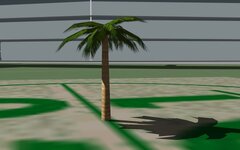
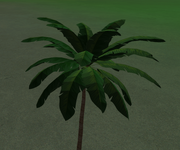
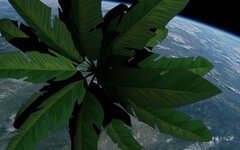
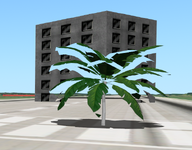
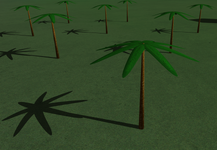
I decided to give a go at making a low poly palm tree, it has some imperfections but I think it's good enough to use with the viking project.
Mesh is 56kb, ~80 poly, 360 vert.
0569.jpg
0570.jpg
If anyone wants to plant a forest, .msh and tex attached.
 

Attachments

Looks great. You're on the right track! 🌴

So the next step, obviously, would be some kind of random tree/forest generator. It certainly can be done around surface bases, the generator would have to add individual trees as entries into the location .cfg file. Here are a few rules that the generators should be able to follow :

  • Give the user the option to input several meshes, and define a % to set a ratio between various meshes types.
  • Allow to randomize the size of the meshes, to add some variety (it would be ideal to be able to set custom parameters for each mesh type).
  • Set an option to enable a random rotation (ROT) for each generated mesh.
  • Have a 'minimum distance between trees' setting.
  • Do not plant trees on water.
  • Do not plant trees on runways or runway lights (that are defined as rectangles).
  • Do not plant trees inside buildings (maybe a 'minimum distance from non-tree objects' setting would work).
  • A 'density' setting (or total number of trees that have to be planted).
  • Maybe the possiblity to define 'sterile zones' (as rectangles, circles, which would be handy in places where urban areas/spaceports are next to a forest).

Now of course, a forest spot in the middle of nothing is going to look a bit weird... :unsure: At least it would work very well for small islands.
 
Last edited:
I'd add some randomization options to this list like tree height (in some range) and rotation.
 
Damn with textures the palm trees look amazing! Really wanna see what the other trees will look like. At this rate I'll be updating Quebec soon for this 👀
 
If someone wants to provide a pack of tree meshes, I can play around with randomly distributing them/scaling them/load on demand with a DLL plugin.
 
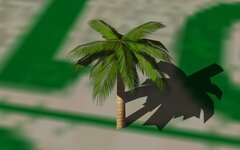
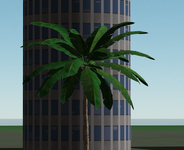
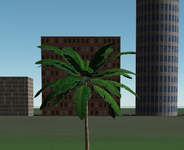
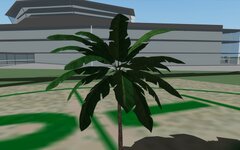
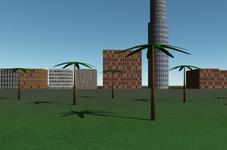
Sadly I still don't know how to hide a white halo around textures when an alpha channel is used. It's not noticeable on the 1st picture, but it's on the 2nd one:

t1.pngt2.png
 
Sadly I still don't know how to hide a white halo around textures when an alpha channel is used. It's not noticeable on the 1st picture, but it's on the 2nd one:
This looks pretty good!
If I may say I think you maybe a little too perfectionistic;)These are secondary objects and rarely in full view, and 100% quality needs high poly.
As mentioned before I think your texture alpha is blending to white and not black? also you may need to "crop" your texture 1 or 2 pixels to get rid of the "halo" in Orbiter.
 
Thanks. Yes, I agree. I just would like to hide this white halo if it's possible.
As mentioned before I think your texture alpha is blending to white and not black?
I don't know. And I don't know how to change it.
also you may need to "crop" your texture 1 or 2 pixels to get rid of the "halo" in Orbiter.
I cropped both the texture and its alpha channel in Photoshop, but I can't get rid of the white border. I attach the mesh and texture of that palm. You and anyone else could experiment with it.
 

Attachments

Can you post the .psd. Then I can repost so you can see the changes (if successful)
 
Last edited:
A few things I noticed:
I'm finding it difficult to replicate the "halo" (maybe this is more noticable in Orb24? I like to test in orbit; neutral lighting, different background shades (post a .scn?).
0601.jpg
The mesh has a lot of excess vertices (not sure where they're coming from?) and it breaks the smoothing. I applied cleanup-merge by distance, copied the second group, flipped normals, applied smoothing. I adjusted the sort order, but transparency problems in O16, with the new flag in O24 probably not (I partially solved this with the other tree by seperating and stacking the leaves).
The texture is very "clean" I've added noise (this can be done better)
The texture edges are very sharp, I softened the selection (1px in this case), inverted, deleted background, made new alpha.
0602.jpg
It now has a dark halo. Interested to know if you find this better?
Attached: changed files and .psd
 

Attachments

Actually, I have no PSD file, since I didn't create that texture (I downloaded a free mesh with textures), I just converted it from PNG to DDS. So, you can just open the texture with Photoshop and get the PSD file.

It looks like that white halo is related to the "FLAG 0x20". I removed the flag, and I see transparent planes in the same views I saw the white halo, namely it's not noticeable on the ground background:
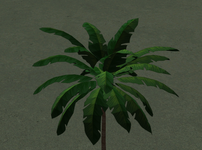
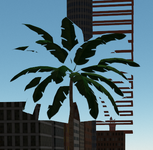
p1.pngp2.png

Actually, it's pretty noticeable especially from a great distance and when we have several trees:
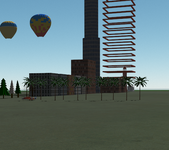
white.png

What's why I'm not very satisfied with this result. The "problem" seems to be in the use of the alpha channel.

I created my own texture with an alpha channel, and it has the white halo as well:
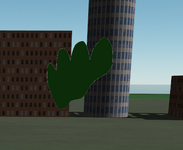
my.png

Below the alpha channel isn't used. The leaf contour is the mesh contour. No white halo (as expected):
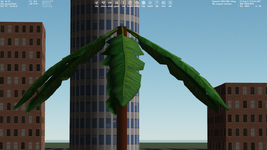
WithoutAlpha.png
I'm finding it difficult to replicate the "halo" (maybe this is more noticable in Orb24? I like to test in orbit; neutral lighting, different background shades (post a .scn?).
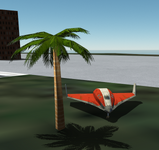
This is noticeable against the background of other objects, such as buildings, and when we look at the palm from the side, not from above (look at first two pictures in this message). I think the SCN isn't necessary.
not sure where they're coming from?
Here's the free palm model I downloaded (it contains different formats and texture maps).

Thanks, I'l take a look at your files.

 
Could it be related to the 'thickness' of the meshes ? AFAIK one limitation in Orbiter is that purely 2D-objects are not possible (except exhaust flames).
 
Could it be related to the 'thickness' of the meshes ? AFAIK one limitation in Orbiter is that purely 2D-objects are not possible (except exhaust flames).
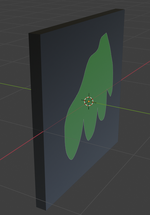
I think it might be. But I can't imagine how to use a texture with an alpha channel for a non 2D mesh. We just won't be able to see the border that has any thickness:

q.png
Attached: changed files and .psd
The halo remains, although the texture looks good:

test.png
 
I can't replicate the problem in Orbiter2016
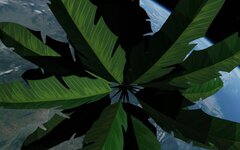
But you see something like this for leaves in Orbiter 2016, isn't it?:

2016.png

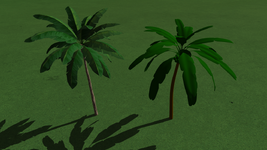
By the way, new custom test palm mesh without an alpha channel (I quickly drew this textures in Blender):

palms.pngpalms2.png
 
Back
Top