
Sword Edge - European outpost on the Moon

OHM Sword Edge - European outpost on the Moon 240613

LadyCroussette

Quebec City's Resident Base Builder
Addon Developer
Donator
Joined
Jan 26, 2013
Messages
346
Reaction score
1,155
Points
108
Location
Quebec City
Preferred Pronouns
She/Her
LordCroussette submitted a new addon:

Sword Edge - European outpost on the Moon - Fictional (obviously) manned outpost on the Moon.

Sword Edge is a European lunar outpost located right next to Rupes Recta, an escarpment known as the Straight Wall. In French, it is also called L'épée dans la Lune, which translate to "The Sword in the Moon". Hence the name of the base. "Sur le Bord de l'Épée", a.k.a. "On the Edge of the Sword". Or: Sword Edge.

IMPORTANT: The flattening of the runway is handled by the D3D9's flat (.flt)...

Read more about this addon...
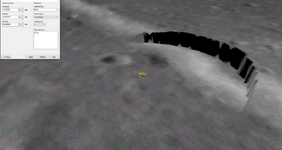
 
I just installed the high res .tree files for the Moon and yikes, the flattening I did at Sword Edge look awful. Expect a fix for that soon.
1718321859186.png
 
niiiiiice ! :) have you considered a pressurized van to dock to Orbiter and commute to a building entry?
 
The wheel tracks on the ground are meant to represent the tracks of a module on wheel which docks to the base. Something that would be used to transport cargo like some sort of space truck. So yes, I did consider it. But, I didn't want to model one, so there are none. :)
 
then, maybe an idea for me in a future addon... (after my work on Phebus' wheel station, maybe). Starting from an existing van, I think I could code an automated commuter when a glider has landed.........

BTW: wiki for Rupes Recta
 
Last edited:
Hi, your textures are only compatible with Orbiter_NG, D3D9. Textures appear "pure white" in orbiter.exe.

Is there a possible small fix to replace "pure white" textures with some backup textures? Or ideally to translate all textures in non-D3D9 compatible formats as well.
 
also, small bug with the shadows (graphic engine bug?) : the shadows of the flags don't extend on the domes ... not disturbing so much, before noticing it!
 
Suggestion : you could put your large textures, that are common to multiple stations in one single upper subfolder in <orbiter>/Textures (e.g. spaceblanket_gold 16MB) and call them from there in the .msh files... I'm trying this right now... and will keep you informed

edit: not worth doing (as the graphic engine will load only what is shown and no storage concern), and risky if names are the same for different components (e.g. module_15m_uv)...
 
Last edited:
Hi, your textures are only compatible with Orbiter_NG, D3D9. Textures appear "pure white" in orbiter.exe.

Is there a possible small fix to replace "pure white" textures with some backup textures? Or ideally to translate all textures in non-D3D9 compatible formats as well.
Yeah, I don't know why it does that. I assume that's due to the .dds format I use, but I don't know which format to use to make the texture works on both DX7 and D3D9. Since my bases always need to use D3D9's ground flattening system, thus requiring the D3D9 client anyway, I never really bothered to look for an answer.

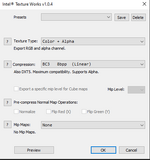
Still, if someone knows why, don't hesitate to tell me! I use Photoshop and the Intel DDS plugin. These are the settings I use for export to .dds.
1719065318855.png

Suggestion : you could put your large textures, that are common to multiple stations in one single upper subfolder in <orbiter>/Textures (e.g. spaceblanket_gold 16MB) and call them from there in the .msh files...
I did think to do this, but there aren't many textures used for the base, so I didn't think it was really worth it. Still, I did tell myself I would do it if I ever released all my moon base in a single pack. I'd need to make more than 4 bases for a pack to be worth it, though.
 
A simple solution that's worked for me is to use Dx Tex, in the Orbiter Utils folder. Just open the texture with it, and then save as, no other actions. As far as I've noticed, it changes nothing as far as D3D9 goes but they then work in default.
 
Yeah, I don't know why it does that. I assume that's due to the .dds format I use, but I don't know which format to use to make the texture works on both DX7 and D3D9. Since my bases always need to use D3D9's ground flattening system, thus requiring the D3D9 client anyway, I never really bothered to look for an answer.

Still, if someone knows why, don't hesitate to tell me! I use Photoshop and the Intel DDS plugin. These are the settings I use for export to .dds.
View attachment 39044


I did think to do this, but there aren't many textures used for the base, so I didn't think it was really worth it. Still, I did tell myself I would do it if I ever released all my moon base in a single pack. I'd need to make more than 4 bases for a pack to be worth it, though.
I usually use DXT5 for textures and enable mipmaps.

You can find information about textures in the Orbiter 3D Modeling Manual located at Orbitersdk/doc/3DModel.pdf

The texture list contains the names of texture files used by the various mesh groups. Texture
names should contain file extensions “.dds” but no directory paths. Textures must be located
in Orbiter’s Textures subdirectory.
Notes:
• Textures must be in DDS format (“Direct Draw Surface”). A DirectX SDK tool, dxtex,
which is included in the Orbiter SDK package, allows to convert BMP bitmaps into DDS.
• You should store the textures either in DXT1 compressed format (opaque textures or
textures with binary transparency), or in DXT5 compressed format (for textures with
continuous transparency).
• For maximum compatibility, avoid textures larger than 256x256 pixels, because of
limitations of some older graphics cards.
• If a texture is to be dynamically updated during the simulation (e.g. instrument panels in
virtual cockpits), the texture name should be followed by the flag ‘D’. Orbiter will
decompress these textures to allow more efficient dynamic updates.
ORBITER Developer Guide: 3D Models (c) 2001-2006 Martin Schweiger
 
Back
Top